EP1087609A2 - Method and system for repeating a scan operation - Google Patents
Method and system for repeating a scan operation Download PDFInfo
- Publication number
- EP1087609A2 EP1087609A2 EP00308162A EP00308162A EP1087609A2 EP 1087609 A2 EP1087609 A2 EP 1087609A2 EP 00308162 A EP00308162 A EP 00308162A EP 00308162 A EP00308162 A EP 00308162A EP 1087609 A2 EP1087609 A2 EP 1087609A2
- Authority
- EP
- European Patent Office
- Prior art keywords
- scan
- scan operation
- scanner
- server
- parameters
- Prior art date
- Legal status (The legal status is an assumption and is not a legal conclusion. Google has not performed a legal analysis and makes no representation as to the accuracy of the status listed.)
- Withdrawn
Links
Images


Classifications
-
- H—ELECTRICITY
- H04—ELECTRIC COMMUNICATION TECHNIQUE
- H04N—PICTORIAL COMMUNICATION, e.g. TELEVISION
- H04N1/00—Scanning, transmission or reproduction of documents or the like, e.g. facsimile transmission; Details thereof
- H04N1/00127—Connection or combination of a still picture apparatus with another apparatus, e.g. for storage, processing or transmission of still picture signals or of information associated with a still picture
- H04N1/00204—Connection or combination of a still picture apparatus with another apparatus, e.g. for storage, processing or transmission of still picture signals or of information associated with a still picture with a digital computer or a digital computer system, e.g. an internet server
- H04N1/00236—Connection or combination of a still picture apparatus with another apparatus, e.g. for storage, processing or transmission of still picture signals or of information associated with a still picture with a digital computer or a digital computer system, e.g. an internet server using an image reading or reproducing device, e.g. a facsimile reader or printer, as a local input to or local output from a computer
- H04N1/00241—Connection or combination of a still picture apparatus with another apparatus, e.g. for storage, processing or transmission of still picture signals or of information associated with a still picture with a digital computer or a digital computer system, e.g. an internet server using an image reading or reproducing device, e.g. a facsimile reader or printer, as a local input to or local output from a computer using an image reading device as a local input to a computer
-
- H—ELECTRICITY
- H04—ELECTRIC COMMUNICATION TECHNIQUE
- H04N—PICTORIAL COMMUNICATION, e.g. TELEVISION
- H04N1/00—Scanning, transmission or reproduction of documents or the like, e.g. facsimile transmission; Details thereof
- H04N1/00127—Connection or combination of a still picture apparatus with another apparatus, e.g. for storage, processing or transmission of still picture signals or of information associated with a still picture
- H04N1/00204—Connection or combination of a still picture apparatus with another apparatus, e.g. for storage, processing or transmission of still picture signals or of information associated with a still picture with a digital computer or a digital computer system, e.g. an internet server
- H04N1/00236—Connection or combination of a still picture apparatus with another apparatus, e.g. for storage, processing or transmission of still picture signals or of information associated with a still picture with a digital computer or a digital computer system, e.g. an internet server using an image reading or reproducing device, e.g. a facsimile reader or printer, as a local input to or local output from a computer
-
- H—ELECTRICITY
- H04—ELECTRIC COMMUNICATION TECHNIQUE
- H04N—PICTORIAL COMMUNICATION, e.g. TELEVISION
- H04N1/00—Scanning, transmission or reproduction of documents or the like, e.g. facsimile transmission; Details thereof
- H04N1/00962—Input arrangements for operating instructions or parameters, e.g. updating internal software
- H04N1/0097—Storage of instructions or parameters, e.g. customised instructions or different parameters for different user IDs
-
- H—ELECTRICITY
- H04—ELECTRIC COMMUNICATION TECHNIQUE
- H04N—PICTORIAL COMMUNICATION, e.g. TELEVISION
- H04N1/00—Scanning, transmission or reproduction of documents or the like, e.g. facsimile transmission; Details thereof
- H04N1/00962—Input arrangements for operating instructions or parameters, e.g. updating internal software
- H04N1/00973—Input arrangements for operating instructions or parameters, e.g. updating internal software from a remote device, e.g. receiving via the internet instructions input to a computer terminal
-
- H—ELECTRICITY
- H04—ELECTRIC COMMUNICATION TECHNIQUE
- H04N—PICTORIAL COMMUNICATION, e.g. TELEVISION
- H04N1/00—Scanning, transmission or reproduction of documents or the like, e.g. facsimile transmission; Details thereof
- H04N1/32—Circuits or arrangements for control or supervision between transmitter and receiver or between image input and image output device, e.g. between a still-image camera and its memory or between a still-image camera and a printer device
- H04N1/32502—Circuits or arrangements for control or supervision between transmitter and receiver or between image input and image output device, e.g. between a still-image camera and its memory or between a still-image camera and a printer device in systems having a plurality of input or output devices
- H04N1/32523—Circuits or arrangements for control or supervision between transmitter and receiver or between image input and image output device, e.g. between a still-image camera and its memory or between a still-image camera and a printer device in systems having a plurality of input or output devices a plurality of output devices
-
- H—ELECTRICITY
- H04—ELECTRIC COMMUNICATION TECHNIQUE
- H04N—PICTORIAL COMMUNICATION, e.g. TELEVISION
- H04N1/00—Scanning, transmission or reproduction of documents or the like, e.g. facsimile transmission; Details thereof
- H04N1/00127—Connection or combination of a still picture apparatus with another apparatus, e.g. for storage, processing or transmission of still picture signals or of information associated with a still picture
- H04N1/00204—Connection or combination of a still picture apparatus with another apparatus, e.g. for storage, processing or transmission of still picture signals or of information associated with a still picture with a digital computer or a digital computer system, e.g. an internet server
-
- H—ELECTRICITY
- H04—ELECTRIC COMMUNICATION TECHNIQUE
- H04N—PICTORIAL COMMUNICATION, e.g. TELEVISION
- H04N2201/00—Indexing scheme relating to scanning, transmission or reproduction of documents or the like, and to details thereof
- H04N2201/0077—Types of the still picture apparatus
- H04N2201/0081—Image reader
Definitions
- the present invention generally relates to a method and system for controlling the scan function of a scan peripheral, for example to software and firmware for repeating a scan operation of a peripheral connected to a network using previously used scan parameters.
- Scan peripherals are becoming a larger segment of the peripheral industry. Users find such peripherals useful as a means of input for text, graphics and images. Some peripherals combine scanning with other functions. These multifunction peripherals are popular, in part, because of their ability to combine multiple useful functions into a single device. Increasingly, the scan and or multifunction peripherals are implemented in a network so that their services are accessible to a more than one client. When connected to the network, the peripherals are operationally connected to the clients via a dedicated peripheral server, which includes software and firmware for allowing the clients to interact with the peripherals using a web browser. Such software and firmware are disclosed in commonly assigned U.S. Patent Application Serial No. 09/163,791 filed September 30, 1998 by Kumpf et al.
- the invention disclosed in the Kumpf et al. application provides an interactive networked client-server scan method launched and actively managed through a web browser interface on a client.
- a server responds to a universal resource locator (URL) address identifying the server with a general purpose format software program that creates an interface in the client web browser and enables the client to interact with the server in initiating, altering and monitoring scan jobs and related data.
- URL universal resource locator
- the scan parameters i.e., paper size, resolution, image type and image format, for example, in these peripherals for performing a scan operation are set to the manufacturer's default settings. As such, the scan parameters must be changed by the user (through the client) for every scan job when the desired scan parameters differ from the default scan parameters, which is inconvenient to the user.
- the present invention seeks to provide improved scanning.
- the preferred embodiment can enable a peripheral connected to a network to automatically repeat the previously performed scan operation without requiring the user to reset the scan parameters to those used in the previous scan operation.
- the scan parameters of a scan operation are automatically stored and used as the parameters for the next scan operation.
- the method determines whether a peripheral newly connected to a network peripheral server is the same type as the peripheral which performed the previous scan operation.
- the scan paramaters used in the previous scan operation are retained if the newly connected peripheral is determined to be of the same type as the previously connected peripheral, and are reset to the default scan parameters of the new peripheral if the newly connected peripheral is of a different type than the previously used peripheral.
- the described embodiment is directed to a method for automatically storing the scan parameters used in a previous scan operation and using these stored parameters in performing the next scan operation, thereby eliminating the inconvenience of having to manually reset the scan parameters to the values used in the previous scan job each time it is desired to repeat the previous scan operation.
- the described embodiment provides a method for repeating a previous scan operation in a network having a server connected to at least one scanner and at least one client.
- the method includes saving scan parameters of the previous scan operation received by the server from the client when a request to perform the previous scan operation is received from the client.
- the scan parameters of the previous scan operation are displayed when the client queries the server for scan parameters for a present scan operation, and then the present scan operation is initiated using the scan parameters of the previous scan operation.
- server for operating a scanner in a network having at least one client.
- the server is connected to the scanner via the network and is adapted to repeat a previous scan operation.
- the server includes a memory for storing scan parameters of the previous scan operation received from the client, when a request to perform the previous scan operation is received from the client.
- a program provides the scan parameters of the previous scan operation to the client when the client queries the server for scan parameters for a present scan operation.
- the client initiates the present scan operation using the scan parameters of the previous scan operation responsive to a request for the present scan operation from the user.
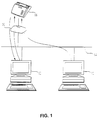
- a network peripheral server 10 such as a Hewlett-Packard JETDIRECT box.
- the JETDIRECT box is shown and described in a Hewlett-Packard user manual part no. 5967-2290 available from the applicant. It should be understood, however, that the functions of the server 10 can be performed, for example, as part of a card that connects via a bus interface to the peripheral, or as part of an internal central processing unit (CPU) of an attached network peripheral.
- the server 10 is connected to a plurality of devices 12, which are typically and preferably personal computers (PC), via a network 14.
- PC personal computers
- the server also operatively connects the clients to a scanner 16, which may be a stand alone scan peripheral or a multifunction peripheral (MFP) that performs various functions such as printing and scanning.
- the server 10 connects to a network port through a network interface unit (not shown) in a known manner and permits clients 12 to access the scanner 16.
- each of the scan parameters stored in the management information base (MIB) of the server is reset to a value of -1 (block 18).
- MIB management information base
- the four MIB values are all set to -1, which sets the scan parameters to the default settings of the scanner 16, as will be further described below. It should be noted that more or less than four scan parameters may be provided to suit the particular needs of the user and/or the peripheral.
- the client 12 queries the server 10 for the scan parameters stored in the server (block 22).
- the preferred protocol for querying the server 10 is Simple Network Management Protocol. However, other known protocols are contemplated.
- the scan job request is made through a suitable user interface (UI) provided in the client 12.
- UI user interface
- the client 12 determines whether all the scan parameters have been read from the server 10 (block 24). If not all the parameters have been read, it is determined whether the value of the next parameter is -1 (block 26). If it is -1, the user interface of the client 12 sets that parameter to the default value of the scanner 16 presently connected to the server 10 (block 28). If, however, the value of the next parameter is not -1, the user interface of the client 12 sets that parameter to the value stored in the server (block 30). In either case, the process goes back to block 22, where the client 12, queries the server 10 for the next scan parameter.
- the user interface of the client 12 displays the scan parameters to the user (block 32).
- the user than has the option to modify the displayed scan parameters to the desired settings through the user interface and initiate the scan operation (block 34).
- the user interface sends the scan parameters to the server 10, which stores the parameters, replacing the previously stored MIB values (block 36).
- the server 10 also identifies the type of the currently attached scanner 16 and stores the scanner type in the memory of the server (block 38). The scan operation is then completed (block 40).
- the server 10 determines whether this "new" scanner is in the same family as the scanner which performed the last scan operation.
- a scanner is said to be in the same family if it can accept all the same scan parameters and uses the same scan protocol as all the other scanners in that family. It is important to determine the family of the new scanner 16 because the scan parameters stored in the MIB of the server 10 may not be appropriate for the new scanner. Generally, the stored parameters can be used to repeat the last scan job even when the new scanner 16 is of a different type but still within the same family.
- the family type is determined whenever the server 10 detects what it considers to be a new scanner 16, as when the currently connected scanner is powered on or when the scanner is disconnected and reconnected to the server (block 42).
- the server 10 checks the device identification string of the new scanner 16 to determine its type (block 44), which is compared with the scanner type previously stored in the server (see block 38 above). If the new scanner 16 is the same type or in the same family as the scanner type stored in the server memory, the scan parameters of the last scan operation stored in the server 10 are unchanged (block 48), and the process is ended at this point (block 50).
- the scan parameters stored in the MIB of the server memory are reset to -1 (block 52), and the process is ended (block 50). Resetting the scan parameters values to -1 has the effect of changing the scan parameters to the manufacturers' default setting of the scanner 16, as described above in blocks 26, 28 and 32.
- an improved method for performing a scan operation has been shown and described which has many desirable attributes and advantages. It can enable the user to repeat a scan operation without having to change manually the scan parameters to me desired settings. It can also determine the type of the scanner each time the scanner is powered on or disconnected and reconnected, so that it can be determined whether the connected scanner is in the same family as the scanner that performed the last operation. The scan parameters stored in the server is then used in performing the repeat scan operation if the connected scanner is in the same family.
Landscapes
- Engineering & Computer Science (AREA)
- General Engineering & Computer Science (AREA)
- Multimedia (AREA)
- Signal Processing (AREA)
- Computing Systems (AREA)
- Facsimiles In General (AREA)
- Telephonic Communication Services (AREA)
Abstract
Description
Claims (10)
- A method of repeating a scan operation in a network (14) including a server (10) connected to at least one scanner (16) and at least one client device (12), the method comprising the steps of:saving scan parameters of a previous scan operation received by the server from the client device responsive to receipt of a request from the client device to perform the previous scan operation (20, 36);retrieving said scan parameters of the previous scan operation responsive to receipt of a client device query from the server for scan parameters for a present scan operation (22); andinitiating said present scan operation using said scan parameters of the previous scan operation (34).
- A method according to claim 1, wherein said scan parameters of the previous scan operation are saved in the server (36).
- A method according to claim 1 or 2, wherein the client device sends said scan parameters of the previous scan operation, said request to perform the previous scan operation (20) and said query to the server via a user interface of the client device (22).
- A method according to claim 1, 2 or 3, comprising the step of storing a scanner type of a scanner which performed the previous scan operation when said request to perform the previous scan operation is received from the client device (38).
- A method according to claim 5, including the steps of:determining whether a present scanner connected to the server is in a same family as said scanner which performed the previous scan operation, when said present scanner is one of powered on and connected and reconnected to said server (46);performing said step of retrieving said scan parameters of the previous scan operation (22) when said present scanner is in said same family as said scanner which performed the previous scan operation (48), and retrieving default scan parameters when said present scanner is not in said same family as said scanner which performed the previous scan operation (52); andperforming said step of initiating said present scan operation using said scan parameters of the previous scan operation when said present scanner is in the same family as said scanner which performed the previous scan operation (34), and initiating said present scan operation using said default scan parameters when said present scanner is not in the same family as said scanner which performed the previous scan operation (34).
- A method according to any preceding claim, wherein default scan parameters are retrieved at said retrieving step for any of said scan parameters of the previous scan operation when said any of said scan parameters are not available.
- A method according to claim 6, including the step of displaying one of said scan parameters of the previous scan operation and said default scan parameters to a user after said retrieving step (32).
- A method according to claim 7, wherein said scan parameters of the previous scan operation and said default scan parameters are displayed by a user interface of the client device (12).
- A method according to any preceding claim, wherein the scanner (16) is one of a scan peripheral and a multifunction peripheral.
- A server (10) for operating a scanner (16) in a network (14) including at least one client device (12), said server being connected to the scanner via the network and operable to repeat a previous scan operation, said server comprising:means for storing scan parameters of a previous scan operation received from a client device in response to receipt of a request from the client device to perform the previous scan operation (10);means for providing said scan parameters of the previous scan operation to the client device in response to a client query to said server for scan parameters for a present scan operation (10); andmeans for initiating said present scan operation using said scan parameters of the previous scan operation in response to a request for said present scan operation from the client device (10).
Applications Claiming Priority (2)
| Application Number | Priority Date | Filing Date | Title |
|---|---|---|---|
| US09/404,965 US6535914B1 (en) | 1999-09-24 | 1999-09-24 | Method for repeating a scan operation in a network |
| US404965 | 1999-09-24 |
Publications (2)
| Publication Number | Publication Date |
|---|---|
| EP1087609A2 true EP1087609A2 (en) | 2001-03-28 |
| EP1087609A3 EP1087609A3 (en) | 2002-02-13 |
Family
ID=23601754
Family Applications (1)
| Application Number | Title | Priority Date | Filing Date |
|---|---|---|---|
| EP00308162A Withdrawn EP1087609A3 (en) | 1999-09-24 | 2000-09-19 | Method and system for repeating a scan operation |
Country Status (3)
| Country | Link |
|---|---|
| US (1) | US6535914B1 (en) |
| EP (1) | EP1087609A3 (en) |
| JP (1) | JP2001136317A (en) |
Cited By (1)
| Publication number | Priority date | Publication date | Assignee | Title |
|---|---|---|---|---|
| WO2008030003A1 (en) * | 2006-09-07 | 2008-03-13 | Joong Cheol Jeon | Registering unit for scanned documents and its system |
Families Citing this family (12)
| Publication number | Priority date | Publication date | Assignee | Title |
|---|---|---|---|---|
| US7644119B1 (en) * | 2000-02-04 | 2010-01-05 | Canon Kabushiki Kaisha | Computer network scanning |
| US7019858B1 (en) * | 2001-06-06 | 2006-03-28 | Canon Kabushiki Kaisha | Electronic document delivery |
| KR100580173B1 (en) * | 2003-07-15 | 2006-05-15 | 삼성전자주식회사 | Network scanning method and apparatus and packet format for same |
| CN2733662Y (en) * | 2004-09-22 | 2005-10-12 | 上海益而益电器制造有限公司 | Power plug with leakage protection function |
| US20070271116A1 (en) * | 2006-05-22 | 2007-11-22 | Apple Computer, Inc. | Integrated media jukebox and physiologic data handling application |
| US7843586B2 (en) * | 2006-09-28 | 2010-11-30 | Sharp Laboratories Of America, Inc. | Systems and methods for facilitating direct scanning to network destinations by clients |
| US8432577B2 (en) * | 2008-05-15 | 2013-04-30 | Microsoft Corporation | Scanner parameter techniques |
| US8405840B2 (en) * | 2008-12-18 | 2013-03-26 | Sharp Laboratories Of America, Inc. | Systems and methods for minimizing re-imaging procedures for an imaging device |
| US8355170B2 (en) * | 2010-07-26 | 2013-01-15 | Ricoh Company, Ltd | Methods and systems to provide scan services to an image forming device |
| US8736929B2 (en) | 2012-06-19 | 2014-05-27 | Xerox Corporation | Recording and recalling of scan build job and scan batch job settings |
| US8730543B2 (en) | 2012-06-19 | 2014-05-20 | Xerox Corporation | Detecting common errors in repeated scan workflows by use of job profile metrics |
| CN118706023A (en) * | 2024-05-09 | 2024-09-27 | 先临三维科技股份有限公司 | Three-dimensional scanning method, device, electronic equipment and computer program product |
Family Cites Families (8)
| Publication number | Priority date | Publication date | Assignee | Title |
|---|---|---|---|---|
| US5081494A (en) | 1990-06-15 | 1992-01-14 | Xerox Corporation | Job supplement for electronic printing machines |
| US5872974A (en) * | 1995-04-19 | 1999-02-16 | Mezick; Daniel J. | Property setting manager for objects and controls of a graphical user interface software development system |
| US6188807B1 (en) * | 1995-10-04 | 2001-02-13 | Canon Kabushiki Kaisha | Scanner server apparatus and scanner server system |
| US6049673A (en) * | 1996-03-08 | 2000-04-11 | Organicnet, Inc. | Organicware applications for computer systems |
| US5944781A (en) * | 1996-05-30 | 1999-08-31 | Sun Microsystems, Inc. | Persistent executable object system and method |
| US5911044A (en) * | 1996-11-08 | 1999-06-08 | Ricoh Company, Ltd. | Network image scanning system which transmits image information from a scanner over a network to a client computer |
| JP3191919B2 (en) * | 1997-03-25 | 2001-07-23 | セイコーエプソン株式会社 | Print system, printer control device, printer, and printer control method |
| US6351751B1 (en) * | 1998-05-14 | 2002-02-26 | Sun Microsystems, Inc. | Persistent storage managers for configuring client/server environments |
-
1999
- 1999-09-24 US US09/404,965 patent/US6535914B1/en not_active Expired - Fee Related
-
2000
- 2000-09-19 EP EP00308162A patent/EP1087609A3/en not_active Withdrawn
- 2000-09-25 JP JP2000289676A patent/JP2001136317A/en active Pending
Cited By (1)
| Publication number | Priority date | Publication date | Assignee | Title |
|---|---|---|---|---|
| WO2008030003A1 (en) * | 2006-09-07 | 2008-03-13 | Joong Cheol Jeon | Registering unit for scanned documents and its system |
Also Published As
| Publication number | Publication date |
|---|---|
| EP1087609A3 (en) | 2002-02-13 |
| JP2001136317A (en) | 2001-05-18 |
| US6535914B1 (en) | 2003-03-18 |
Similar Documents
| Publication | Publication Date | Title |
|---|---|---|
| EP0991227B1 (en) | Network scan server support method using a web browser | |
| CN1550973B (en) | Printer management and printing control system used with printers | |
| US20060085516A1 (en) | Method and apparatus for providing a work flow web application that receives image data via a web browser and exports the image data to a document processing server | |
| US20010019953A1 (en) | Electric device capabel of being controlled based on data transmitted from cellular phone | |
| EP1197843A2 (en) | Printing images from a server | |
| US6535914B1 (en) | Method for repeating a scan operation in a network | |
| JP2001186294A (en) | Automatic scan processing | |
| EP2144198A1 (en) | Advertisement delivery system, and client of the system | |
| US20050248800A1 (en) | Method and apparatus to set print options | |
| JP4329825B2 (en) | Information processing apparatus, proxy processing execution method, and proxy processing execution program | |
| US20130088752A1 (en) | Image processing system and image processing apparatus and method | |
| US7457839B2 (en) | Selective rejection of access to parameters of an option application detachable from an embedded apparatus including web server function | |
| JP4333053B2 (en) | Image forming apparatus, printing method, program, and recording medium | |
| US7675640B2 (en) | Network printing system, printing terminal and printing method | |
| US9116640B2 (en) | Image processing apparatus, display method, and storage medium | |
| US20100011133A1 (en) | Information processing apparatus, method for controlling activation of class module, and computer program product for carrying out the method | |
| US7385728B2 (en) | Systems and methods for optimizing printing | |
| US7602511B2 (en) | Transmission device enabling external device to edit address data registered in the transmission device | |
| US20030093529A1 (en) | System and method for accessing network services | |
| JP3813851B2 (en) | Program, scan peripheral device, scan peripheral device, and scan control method | |
| JP3747898B2 (en) | Electronic device control method and program | |
| JP6248594B2 (en) | Image processing system, image processing apparatus, processing method, and control program | |
| JP4581515B2 (en) | Printing apparatus and printing system | |
| JP2003174537A (en) | Image reading system | |
| JP6248584B2 (en) | Image processing system, image processing apparatus, display method, and display program |
Legal Events
| Date | Code | Title | Description |
|---|---|---|---|
| PUAI | Public reference made under article 153(3) epc to a published international application that has entered the european phase |
Free format text: ORIGINAL CODE: 0009012 |
|
| AK | Designated contracting states |
Kind code of ref document: A2 Designated state(s): DE FR GB Kind code of ref document: A2 Designated state(s): AT BE CH CY DE DK ES FI FR GB GR IE IT LI LU MC NL PT SE |
|
| AX | Request for extension of the european patent |
Free format text: AL;LT;LV;MK;RO;SI |
|
| RAP1 | Party data changed (applicant data changed or rights of an application transferred) |
Owner name: HEWLETT-PACKARD COMPANY, A DELAWARE CORPORATION |
|
| PUAL | Search report despatched |
Free format text: ORIGINAL CODE: 0009013 |
|
| AK | Designated contracting states |
Kind code of ref document: A3 Designated state(s): AT BE CH CY DE DK ES FI FR GB GR IE IT LI LU MC NL PT SE |
|
| AX | Request for extension of the european patent |
Free format text: AL;LT;LV;MK;RO;SI |
|
| 17P | Request for examination filed |
Effective date: 20020813 |
|
| AKX | Designation fees paid |
Free format text: DE FR GB |
|
| STAA | Information on the status of an ep patent application or granted ep patent |
Free format text: STATUS: THE APPLICATION HAS BEEN WITHDRAWN |
|
| 18W | Application withdrawn |
Effective date: 20060201 |