EP1046977A2 - Modal security approach - Google Patents
Modal security approach Download PDFInfo
- Publication number
- EP1046977A2 EP1046977A2 EP00303401A EP00303401A EP1046977A2 EP 1046977 A2 EP1046977 A2 EP 1046977A2 EP 00303401 A EP00303401 A EP 00303401A EP 00303401 A EP00303401 A EP 00303401A EP 1046977 A2 EP1046977 A2 EP 1046977A2
- Authority
- EP
- European Patent Office
- Prior art keywords
- user interface
- user
- security
- computer
- mode
- Prior art date
- Legal status (The legal status is an assumption and is not a legal conclusion. Google has not performed a legal analysis and makes no representation as to the accuracy of the status listed.)
- Withdrawn
Links
Images









Classifications
-
- G—PHYSICS
- G06—COMPUTING OR CALCULATING; COUNTING
- G06F—ELECTRIC DIGITAL DATA PROCESSING
- G06F3/00—Input arrangements for transferring data to be processed into a form capable of being handled by the computer; Output arrangements for transferring data from processing unit to output unit, e.g. interface arrangements
- G06F3/01—Input arrangements or combined input and output arrangements for interaction between user and computer
- G06F3/048—Interaction techniques based on graphical user interfaces [GUI]
- G06F3/0481—Interaction techniques based on graphical user interfaces [GUI] based on specific properties of the displayed interaction object or a metaphor-based environment, e.g. interaction with desktop elements like windows or icons, or assisted by a cursor's changing behaviour or appearance
-
- G—PHYSICS
- G06—COMPUTING OR CALCULATING; COUNTING
- G06F—ELECTRIC DIGITAL DATA PROCESSING
- G06F21/00—Security arrangements for protecting computers, components thereof, programs or data against unauthorised activity
- G06F21/50—Monitoring users, programs or devices to maintain the integrity of platforms, e.g. of processors, firmware or operating systems
- G06F21/57—Certifying or maintaining trusted computer platforms, e.g. secure boots or power-downs, version controls, system software checks, secure updates or assessing vulnerabilities
-
- G—PHYSICS
- G06—COMPUTING OR CALCULATING; COUNTING
- G06F—ELECTRIC DIGITAL DATA PROCESSING
- G06F2221/00—Indexing scheme relating to security arrangements for protecting computers, components thereof, programs or data against unauthorised activity
- G06F2221/21—Indexing scheme relating to G06F21/00 and subgroups addressing additional information or applications relating to security arrangements for protecting computers, components thereof, programs or data against unauthorised activity
- G06F2221/2113—Multi-level security, e.g. mandatory access control
-
- G—PHYSICS
- G06—COMPUTING OR CALCULATING; COUNTING
- G06F—ELECTRIC DIGITAL DATA PROCESSING
- G06F2221/00—Indexing scheme relating to security arrangements for protecting computers, components thereof, programs or data against unauthorised activity
- G06F2221/21—Indexing scheme relating to G06F21/00 and subgroups addressing additional information or applications relating to security arrangements for protecting computers, components thereof, programs or data against unauthorised activity
- G06F2221/2119—Authenticating web pages, e.g. with suspicious links
-
- G—PHYSICS
- G06—COMPUTING OR CALCULATING; COUNTING
- G06F—ELECTRIC DIGITAL DATA PROCESSING
- G06F2221/00—Indexing scheme relating to security arrangements for protecting computers, components thereof, programs or data against unauthorised activity
- G06F2221/21—Indexing scheme relating to G06F21/00 and subgroups addressing additional information or applications relating to security arrangements for protecting computers, components thereof, programs or data against unauthorised activity
- G06F2221/2149—Restricted operating environment
Definitions
- the present invention relates to data security, and more specifically, to a modal security approach for selecting security preferences and handling security events in computer software.
- Some distributed computing systems use secure, proprietary connections to prevent, or at least reduce, unauthorized access to data exchanged between locations.
- secure proprietary connections are often expensive to install and maintain and do not guarantee data security.
- many distributed computing systems employ secure communication protocols with encryption algorithms to protect data exchanged between locations.
- Data security is an important issue for distributed computing on the global computing network known as the "Internet.”
- Data exchanged between locations via the Internet can travel through many different intermediate, and sometimes unknown, locations, making data transmitted over the Internet susceptible to unauthorized access.
- sensitive data transmitted over the Internet is often encrypted to prevent a third party from determining the contents of the data.
- SSL Secure Sockets Layer
- security preferences In computer software, data security characteristics or attributes, sometimes referred to as security preferences, are sometimes manually selected by a user using a user interface with pull-down menus and screens. Examples of security preferences include the specific encryption algorithm used and the bit length of an encryption key. Many Internet “browsers” have a security preferences option which, when selected, displays one or more pull-down menus for selecting security preferences. Generally, a "browser” is a utility program that allows a user to locate and retrieve information from networked information services. In the context of the Internet, a "browser” is a software tool that allows a user to view web pages. Examples of Internet browsers include Sun Microsystems' Net Dynamics Browser, Microsoft's Internet Explorer and Netscape's Communicator.
- security preferences are typically not organized by importance or user skill level.
- users are presented with a plethora of security preferences, many of which may not be well understood.
- users are often presented with a myriad of content-related security preferences and certificate-related security preferences that can cause several problems.
- a related problem with computer software, and in particularly browsers, is how security events are handled for users of different skill levels. For example, when a user attempts to connect to a web site and the user's browser does not recognize the certifying authority that issued a web site's certificate, the user is notified and presented with various options for responding to the notification. Typical options include aborting the connection attempt and proceeding to connect to the website, despite the security warning.
- security event notifications often include language and terms that are unfamiliar to inexperienced users. As a result, inexperienced users may be unsure about how to respond to security notifications and may inadvertently operate under insecure conditions.
- a modal security method for selecting security preferences and handling security events in computer software.
- a first user interface object is displayed via a user interface, wherein the first user interface object is associated with a first user interface mode in which a first set of one or more user interface objects is available for selecting the security preferences.
- a second user interface object is displayed via the user interface, wherein the second user interface object is associated with a second user interface mode in which a second set of one or more user interface objects is available for selecting the security preferences.
- a user interaction associated with the user interface is detected and a determination is made whether the user interaction is associated with either the first user interface object or the second user interface object. If the user interaction is associated with the first user interface object, then the first user interface mode is initiated. If the user interaction is associated with the second user interface object, then the second user interface mode is initiated.
- a computer system for selecting security preferences and handling security events in computer software.
- the computer system includes a user interface, a first user interface object displayed via the user interface and a second user interface object displayed via the user interface.
- the first user interface object is associated with a first user interface mode in which a first set of one or more user interface objects is available for selecting security preferences.
- the second user interface object is associated with a second user interface mode in which a second set of one or more user interface objects is available for selecting the security preferences.
- the computer system is configured to detect a user interaction associated with the user interface, determine whether the user interaction is associated with either the first user interface object or the second user interface object, if the user interaction is associated with the first user interface object, then initiate the first user interface mode, and if the user interaction is associated with the second user interface object, then initiate the second user interface mode.
- a modal approach for selecting security preferences and handling security events in computer software involves using two or more user interface modes to select security preferences and handle security events.
- computer software refers to any type of computer program or instructions which, when executed by a computer, cause the computer to perform a particular function.
- user interface mode refers to an operational mode that provides for the exchange of information between a computer and a user. This approach allows security preferences to be organized by importance and accommodates users having different skill levels and different levels of familiarity with security preferences and handle security events.
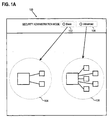
- FIG. 1A is a block diagram illustrating a modal approach for selecting security preferences and handling security events in computer software according to an embodiment of the invention.
- a user interface 100 provides a means of communication between a user and a computer (not illustrated).
- User interface 100 may include any mechanism for providing communication between a user and a computer and the invention is not limited to any particular type of user interface 100.
- user interface 100 may include a visual display such as a cathode ray tube (CRT) and a pointing device such as a mouse.
- CTR cathode ray tube
- pointing device such as a mouse
- user interface 100 may include speech synthesis and speech recognition mechanisms.
- a user interface object 102 is displayed via user interface 100.
- the term "user interface object” refers to any object displayed via user interface 100 that provides for the exchange of information between a user and a computer (not illustrated in FIG. 1) associated with user interface 100.
- a user interface object may convey information to a user, accept input from a user, or both convey information to a user and accept input from a user.
- Examples of user interface objects include, but are not limited to, text, menus, buttons, dialog boxes and other graphic-based symbols.
- user interface object 102 is provided for initiating a first user interface mode for selecting security preferences.
- the first user interface mode is defined by a first set of user interface operations and a set of user interface objects 104 with which a user may interact to select security preferences.
- the first user interface mode is specifically designed for users with a first user attribute.
- user attribute refers to any characteristic of a user. Examples of user attributes include user identities and user skill level such as beginner and advanced.
- the first user interface mode may be designed for "basic" or "beginner” users, or users that are relatively inexperienced with security preferences.
- a second user interface object 106 is also displayed via user interface 100.
- user interface object 106 is provided for initiating a second user interface mode for selecting security preferences.
- the second user interface mode is defined by a second set of user interface operations and a set of user interface objects 108 with which a user may interact to select the security preferences.
- the second user interface mode is specifically designed for users with a second user attribute.
- the second user interface mode may be designed for "advanced" users, or users that are relatively more experienced in understanding and/or selecting security preferences.
- FIG. 1B is a high level flow chart 150 illustrating an approach for selecting security preferences in computer software according to an embodiment of the invention.
- step 152 After starting in step 152, in step 154, user interface objects 102 and 106 corresponding to the first and second user interface modes, respectively, are displayed via user interface 100.
- the first and second user interface modes are implemented to accommodate users having different skill levels and different familiarity with security preferences.
- the first user interface mode may be a "basic" mode to accommodate users having a relatively lower skill level and/or familiarity with security preferences while the second user interface mode is an "advanced" mode to accommodate users having a relatively higher skill level and/or familiarity with security preferences.
- user interface objects 104 may be selected to use relatively basic terminology and provide relatively fewer security preference choices than user interface objects 108.
- values for security preferences that are not accessible to a user in the basic mode are automatically set to specified values.
- step 156 a user interaction with user interface 100 is detected.
- step 158 a determination is made whether the user interaction is associated with user interface object 102 associated with the first user interface mode. If so, then in step 160, the first user interface mode is initiated to allow a user to specify security preferences in the first user interface mode. The process is complete in step 162.
- step 158 a determination is made that the user interaction is not associated with user interface object 102 associated with the first user interface mode
- step 164 a determination is made whether the user interaction is associated with user interface object 106 associated with the second user interface mode. If so, then in step 166, the second user interface mode is initiated to allow a user to specify security preferences in the second user interface mode. The process is complete in step 162. If in step 164 a determination is made that the user interaction is not associated with user interface object 106 associated with the second user interface mode, then the process is complete in step 162.
- FIGS. 2-17 The modal approach for selecting security preferences in computer software is now described in more detail with reference to FIGS. 2-17.
- Embodiments of the invention are described hereinafter in the context of: (1) a basic security administration mode; and (2) an advanced security administration mode for selecting security preferences in computer software.
- the basic security administration mode provides relatively fewer security preferences than the advanced security administration mode. Fewer security preferences reduces the likelihood that a less experienced user will be confused. Fewer security preferences also reduces the likelihood that an inexperienced user will operate in an unsafe mode.
- the user interface and user interface objects illustrated in FIGS. 2-17 are provided to aid the reader in understanding the various features and aspects of the invention and do not necessarily include all features that might be displayed via a user interface.
- the user interface illustrated in FIGS. 2-17 might include additional "buttons" and user interface features for performing various interface functions that are not illustrated or described so as to not obscure the features and aspects of the invention.
- the basic security administration mode is designed to accommodate users having a relatively lower skill level and/or familiarity with security preferences.
- the user interface objects used in the basic security administration mode have relatively fewer selections and use less technical supporting text than those in the advanced security administration mode described hereinafter.
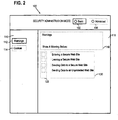
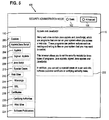
- FIGS. 2 and 3 are block diagrams illustrating the basic security administration mode for selecting user preferences associated with user interface object 102.
- User interface 100 includes a region 110, referred to herein as a "sidebar", for displaying categories of security preferences that can be selected by a user in the first user interface mode.
- sidebar 110 includes a user interface object 112 associated with security preferences categorized as "Warnings.”
- Sidebar 110 also includes a user interface object 114 associated with security preferences categorized as "Cookies.”
- User interface 100 also includes a region 116 referenced to herein as "dialog area" 116 that displays information and user interface objects associated with a "selected” object from sidebar 110.
- User interface objects may be "selected” and “deselected” by a user in a variety of ways, for example by manipulating a user interface pointing device such as a mouse, trackball or scratchpad, by manipulating a keyboard, or by otherwise interacting with user interface 100.
- user interface object 112 associated with "Warnings" security preferences, has been selected, as indicated by the solid line surrounding user interface object 112.
- dialog area 116 includes text information 118, text information 120 and selectable objects 122, associated with user interface object 112.
- Text information 118 provides information about the "Warnings" security preferences associated with user interface object 112.
- Text information 120 includes a list of "Warnings" security preferences that may be individually selected or deselected by manipulating a corresponding interface object from selectable objects 122.
- Dialog area 116 includes text information 124, text information 126 and selectable objects 128, associated with user interface object 114.
- Text information 124 provides information about the "Cookies" security preferences associated with user interface object 114.
- Text information 126 includes a list of "Cookies" security preferences that may be individually selected or deselected by manipulating a corresponding interface object from selectable objects 128.
- the advanced security administration mode is designed to accommodate users having a relatively higher skill level and/or familiarity with security preferences.
- the advanced security administration mode includes more security preferences and may use more technical supporting text than the basic security administration mode.
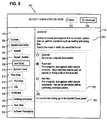
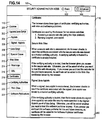
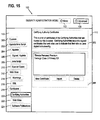
- FIGS. 4-17 are block diagrams illustrating the advanced security administration mode for selecting user preferences associated with user interface object 106.
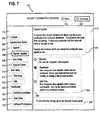
- Sidebar 110 includes a user interface object 200 associated with "Cookies” security preferences and a user interface object 202 associated with “Applets/JavaScript” security preferences.
- Four types of "Applets/JavaScript” security preferences are provided and are associated with user interface object 204 "Applets”, user interface object 206 "Signed Applets”, user interface object 208 "JavaScript” and user interface object 210 "Special Cases.”
- Sidebar 110 also includes a user interface object 212 associated with "Web Sites” security preferences. Two types of "Web Sites” security preferences are provided and are associated with user interface object 214 "Warnings" and user interface object 216 "SSL.”
- Sidebar 110 also includes a user interface object 218 associated with "Certificates” security preferences.
- Three types of “Certificate” security preferences are provided and are associated with user interface object 220 "Certifying Authorities”, user interface object 222 "Web Sites” and user interface object 224 "Software Publishers.”
- dialog area 116 includes text information 226, text information 228 and selectable objects 230, associated with user interface object 200.
- Text information 226 provides information about the "Cookies" security preferences associated with user interface object 200.
- Text information 228 includes a list of "Cookies" security preferences that may be individually selected or deselected by manipulating a correspond interface object from selectable objects 230.
- Dialog area 116 includes text information 232 that provides information about the "Applets/JavaScript" security preferences associated with user interface object 202.
- Dialog area 116 includes text information 234, text information 236, text information 238 and selectable objects 240, associated with user interface object 204.
- Text information 234 provides information about the "Applets” security preferences associated with user interface object 204.
- Text information 236 specifies a list of "Applets” security preferences that may be individually selected or deselected by manipulating a corresponding interface object from selectable objects 240.
- Text information 238 specifies additional information about selecting "Applets" security preferences using selectable objects 240.
- Dialog area 116 includes text information 242, text information 244, text information 246 and selectable objects 248, associated with user interface object 206.
- Text information 242 provides information about the "Signed Applets" security preferences associated with user interface object 206.
- Text information 244 specifies a list of "Signed Applet” security preferences that may be individually selected or deselected by manipulating a corresponding interface object from selectable objects 248.
- Text information 246 specifies additional information about selecting "Applets” security preferences using selectable objects 248.
- Dialog area 116 includes text information 250, text information 252, text information 254 and selectable objects 256, associated with user interface object 208.
- Text information 250 provides information about the "JavaScript" security preferences associated with user interface object 208.
- Text information 252 specifies a list of "JavaScript” security preferences that may be individually selected or deselected by manipulating a corresponding interface object from selectable objects 256.
- Text information 254 specifies additional information about selecting "JavaScript" security preferences using selectable objects 256.
- Dialog area 116 includes text information 258, a user interface object 260 and user interface objects 262.
- Text information 258 provides information about the "Special Case" security preferences associated with user interface object 210.
- User interface object 260 is typically referred to as a scrolling window for viewing web site identifiers, software publisher certificates and certifying authorities for which the security mode may be individually selected.
- User interface objects 262 are in the form of action "buttons" for adding new items or editing or deleting existing items in user interface object 260.
- FIG. 10 is a block diagram that illustrates an example set of user interface objects 264 that may be used adding a new item or editing an existing item in user interface object 260 of FIG. 9.
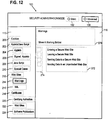
- Dialog area 116 includes text information 266 that provides information about the "Web Site” security preferences associated with user interface object 212.
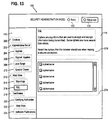
- Dialog area 116 includes text information 270, text information 272 and selectable objects 274, associated with user interface object 214.
- Text information 270 provides information about the "Warnings" security preferences associated with user interface object 214.
- Text information 272 includes a list of "Warnings" security preferences that may be individually selected or deselected by manipulating the correspond interface object from selectable objects 274.
- Dialog area 116 includes text information 276 and user interface objects 278.
- Text information 276 provides information about the "SSL" security preferences associated with user interface object 216.
- User interface objects 278 allow a user to select particular ciphers to be used by the browser.
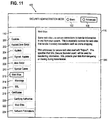
- Dialog area 116 includes text information 280 that explains the purpose and use of certificates for the browser.
- Dialog area 116 includes text information 282 and user interface objects 284.
- Text information 282 provides information about the "Certifying Authorities” security preferences associated with user interface object 220.
- User interface objects 284 allow a user to add (import) new certifying authority certificates or to view or delete existing certifying authority certificates.
- Dialog area 116 includes text information 286 and user interface objects 288.
- Text information 286 provides information about the "Web Site Certificate” security preferences associated with user interface object 222.
- User interface objects 288 allow a user to view and delete certificates from secure web sites that have been visited.
- Dialog area 116 includes text information 290 and user interface objects 292.
- Text information 290 provides information about the "Software Publisher Certificate” security preferences associated with user interface object 224.
- User interface objects 292 allow a user to view and delete software publisher certificates from signed Java applets that have been accessed.
- security event refers to any type of event related to security and the invention is not limited to any particular type of security event.
- An example of a security event is a condition that threatens the safety or security of data.
- Another example of a security event is when a user attempts to initiate a financial transaction while connected to an insecure web site.
- two or more user interface modes are used to handle security events.
- the specific user interface objects displayed on user interface 100 in response to a security event depend upon the particular user interface mode that is in use at the time the security event occurs.
- the user interface objects displayed on a user interface in response to a security event may use simple language and offer relatively few choices for responding to the security event.
- the user interface objects may use more sophisticated language and offer a relatively larger number of choices for responding to the security event.
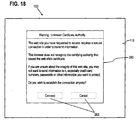
- FIG. 18 illustrates a modal approach for handling security events using a first user interface mode according to an embodiment of the invention.
- the first user interface mode is generally associated with beginner or basic users. In the present example, it is presumed that a user has attempted to access a site that requires a secure connection and the certifying authority that issued the web site's certificate is not recognized.
- Dialog box 290 warns the user that the certificate authority is unknown. In addition, the user is given the opportunity to either connect to the web site or cancel the connection attempt using selectable objects 292.
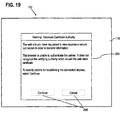
- FIGS. 19-21 illustrate a modal approach for handling security events using a second user interface mode according to an embodiment of the invention.
- the second user interface mode generally corresponds to an advanced user mode.
- a dialog box 294 is displayed in dialog area 116. Dialog box 294 warns the user that the certificate authority is unknown. In addition, the user is given the opportunity to either continue and specify options for establishing the connection or cancel the connection attempts using selectable objects 296.
- Selecting continue to specify options for establishing the connection causes the user interface interaction illustrated in FIG. 20.
- a dialog box 298 informs the user about certificates and allows a user to view the certificate by selecting user interface object 300.
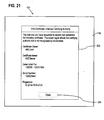
- Selecting user interface object 300 causes certificate information to be viewed as illustrated in FIG. 21.
- certificate details are presented in a dialog box 302.
- a user may return to the display of FIG. 20 by selecting a user interface object 304 in FIG. 21.
- a dialog box 306 provides several user options including accepting the certificate for this session only, accepting the certificate for this and future sessions and showing a warning before sending information to the web site. Finally, a user may accept the selections or abort viewing the certificate by selecting user interface object 308.
- the modal approach described herein is applicable to both security preferences selected by a user, as well as user interface activity generated in response to security events.
- a given security event such as attempting to connect to a web site that requires a secure connection
- a user may be presented with different user interface objects, e.g., dialog boxes, and different options, depending upon the particular user interface mode. This allows users of different skill levels and experience to successfully respond to a given security event.
- any number of user interface modes may be used and the invention is not limited to a particular number of user interface modes.
- three user interface modes corresponding to basic, intermediate and advanced security administration modes may be used.
- the modal approach for selecting security preferences in computer software as described herein may be integrated into one or more computer software programs as part of the "front end," or may be implemented as a stand-alone process that interacts with other software processes.
- the approach may be implemented using any number of sequences of instructions executing on a general purpose computer to provide the necessary functionality on a computer user interface.
- the invention is not limited to pure software implementations.
- the approach may be implemented in hardware circuitry, in computer software, or a combination of hardware circuitry and computer software.
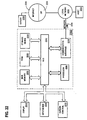
- FIG 22 is a block diagram that illustrates a computer system 2200 upon which an embodiment of the invention may be implemented.
- Computer system 2200 includes a bus 2202 or other communication mechanism for communicating information, and a processor 2204 coupled with bus 2202 for processing information.
- Computer system 2200 also includes a main memory 2206, such as a random access memory (RAM) or other dynamic storage device, coupled to bus 2202 for storing information and instructions to be executed by processor 2204.
- Main memory 2206 also may be used for storing temporary variables or other intermediate information during execution of instructions to be executed by processor 2204.
- Computer system 2200 further includes a read only memory (ROM) 2208 or other static storage device coupled to bus 2202 for storing static information and instructions for processor 2204.
- ROM read only memory
- a storage device 2210 such as a magnetic disk or optical disk, is provided and coupled to bus 2202 for storing information and instructions.
- Computer system 2200 may be coupled via bus 2202 to a display 2212, such as a cathode ray tube (CRT), for displaying information to a computer user.
- a display 2212 such as a cathode ray tube (CRT)
- An input device 2214 is coupled to bus 2202 for communicating information and command selections to processor 2204.
- cursor control 2216 is Another type of user input device
- cursor control 2216 such as a mouse, a trackball, or cursor direction keys for communicating direction information and command selections to processor 2204 and for controlling cursor movement on display 2212.
- This input device typically has two degrees of freedom in two axes, a first axis (e.g., x) and a second axis (e.g., y), that allows the device to specify positions in a plane.
- the invention is related to the use of computer system 2200 for selecting security preferences in a computer program.
- selecting security preferences in a computer program is provided by computer system 2200 in response to processor 2204 executing one or more sequences of one or more instructions contained in main memory 2206.
- Such instructions may be read into main memory 2206 from another computer-readable medium, such as storage device 2210.
- Execution of the sequences of instructions contained in main memory 2206 causes processor 2204 to perform the process steps described herein.
- processors in a multi-processing arrangement may also be employed to execute the sequences of instructions contained in main memory 2206.
- hard-wired circuitry may be used in place of or in combination with software instructions to implement the invention.
- embodiments of the invention are not limited to any specific combination of hardware circuitry and software.
- Non-volatile media includes, for example, optical or magnetic disks, such as storage device 2210.
- Volatile media includes dynamic memory, such as main memory 2206.
- Transmission media includes coaxial cables, copper wire and fiber optics, including the wires that comprise bus 2202. Transmission media can also take the form of acoustic or light waves, such as those generated during radio wave and infrared data communications.
- Computer-readable media include, for example, a floppy disk, a flexible disk, hard disk, magnetic tape, or any other magnetic medium, a CD-ROM, any other optical medium, punch cards, paper tape, any other physical medium with patterns of holes, a RAM, a PROM, and EPROM, a FLASH-EPROM, any other memory chip or cartridge, a carrier wave as described hereinafter, or any other medium from which a computer can read.
- Various forms of computer readable media may be involved in carrying one or more sequences of one or more instructions to processor 2204 for execution.
- the instructions may initially be carried on a magnetic disk of a remote computer.
- the remote computer can load the instructions into its dynamic memory and send the instructions over a telephone line using a modem.
- a modem local to computer system 2200 can receive the data on the telephone line and use an infrared transmitter to convert the data to an infrared signal.
- An infrared detector coupled to bus 2202 can receive the data carried in the infrared signal and place the data on bus 2202.
- Bus 2202 carries the data to main memory 2206, from which processor 2204 retrieves and executes the instructions.
- the instructions received by main memory 2206 may optionally be stored on storage device 2210 either before or after execution by processor 2204.
- Computer system 2200 also includes a communication interface 2218 coupled to bus 2202.
- Communication interface 2218 provides a two-way data communication coupling to a network link 2220 that is connected to a local network 2222.
- communication interface 2218 may be an integrated services digital network (ISDN) card or a modem to provide a data communication connection to a corresponding type of telephone line.
- ISDN integrated services digital network
- communication interface 2218 may be a local area network (LAN) card to provide a data communication connection to a compatible LAN.
- LAN local area network
- Wireless links may also be implemented.
- communication interface 2218 sends and receives electrical, electromagnetic or optical signals that carry digital data streams representing various types of information.
- Network link 2220 typically provides data communication through one or more networks to other data devices.
- network link 2220 may provide a connection through local network 2222 to a host computer 2224 or to data equipment operated by an Internet Service Provider (ISP) 2226.
- ISP 2226 in turn provides data communication services through the world wide packet data communication network now commonly referred to as the "Internet" 2228.
- Internet 2228 uses electrical, electromagnetic or optical signals that carry digital data streams.
- the signals through the various networks and the signals on network link 2220 and through communication interface 2218, which carry the digital data to and from computer system 2200, are exemplary forms of carrier waves transporting the information.
- Computer system 2200 can send messages and receive data, including program code, through the network(s), network link 2220 and communication interface 2218.
- a server 2230 might transmit a requested code for an application program through Internet 2228, ISP 2226, local network 2222 and communication interface 2218.
- one such downloaded application provides for selecting security preferences in a computer program as described herein.
- the received code may be executed by processor 2204 as it is received, and/or stored in storage device 2210, or other non-volatile storage for later execution. In this manner, computer system 2200 may obtain application code in the form of a carrier wave.
- the approach described herein for selecting security preferences provides several advantages over prior approaches.
- the modal approach allows two or more user interface modes to be tailored to attributes of users. This can greatly reduce the number of security attributes presented to less experienced users, making selecting security attributes less complex and less confusing.
- the modal approach also allows security preferences to be prioritized based upon which security preferences are presented to a user.
- the modal approach provides a higher level of security by automatically selecting certain security attributes on behalf of less experienced users to provide a relatively high level of user protection and by limiting the security preferences that a user can select.
Landscapes
- Engineering & Computer Science (AREA)
- General Engineering & Computer Science (AREA)
- Theoretical Computer Science (AREA)
- Physics & Mathematics (AREA)
- General Physics & Mathematics (AREA)
- Computer Hardware Design (AREA)
- Computer Security & Cryptography (AREA)
- Software Systems (AREA)
- Human Computer Interaction (AREA)
- Digital Computer Display Output (AREA)
- User Interface Of Digital Computer (AREA)
Abstract
Description
Claims (21)
- A method for selecting security preferences in computer software, the method comprising the computer-implemented steps of:displaying a first user interface object via a user interface, wherein the first user interface object is associated with a first user interface mode in which a first set of one or more user interface objects is available for selecting the security preferences;displaying a second user interface object via the user interface, wherein the second user interface object is associated with a second user interface mode in which a second set of one or more user interface objects is available for selecting the security preferences;detecting a user interaction associated with the user interface;determining whether the user interaction is associated with either the first user interface object or the second user interface object;if the user interaction is associated with the first user interface object, then initiating the first user interface mode; andif the user interaction is associated with the second user interface object, then initiating the second user interface mode.
- The method as recited in Claim 1, wherein:the first user interface mode corresponds to a first value of a particular user attribute, andthe second user interface mode corresponds to a second value of the particular user attribute.
- The method as recited in Claim 2, wherein:the first value of the particular user attribute corresponds to a first user experience level, andthe second value of the particular user attribute corresponds to a second user experience level.
- The method as recited in Claim 1, wherein the step of initiating the first user interface mode includes displaying the first set of one or more user interface objects via the user interface and the step of initiating the second user interface mode includes displaying the second set of one or more user interface objects via the user interface.
- The method as recited in Claim 1, wherein the computer software is an Internet browser.
- The method as recited in Claim 1, wherein the step of initiating the first user interface mode includes displaying the first set of one or more user interface objects via the user interface in response to a security event and the step of initiating the second user interface mode includes displaying the second set of one or more user interface objects via the user interface in response to the security event.
- A computer-readable medium carrying one or more sequences of one or more instructions for selecting security preferences in computer software, the one or more sequences of one or more instructions including instructions which, when executed by one or more processors, cause the one or more processors to perform the steps of:displaying a first user interface object via a user interface, wherein the first user interface object is associated with a first user interface mode in which a first set of one or more user interface objects is available for selecting the security preferences;displaying a second user interface object via the user interface, wherein the second user interface object is associated with a second user interface mode in which a second set of one or more user interface objects is available for selecting the security preferences;detecting a user interaction associated with the user interface;determining whether the user interaction is associated with either the first user interface object or the second user interface object;if the user interaction is associated with the first user interface object, then initiating the first user interface mode; andif the user interaction is associated with the second user interface object, then initiating the second user interface mode.
- The computer-readable medium as recited in Claim 7, wherein:the first user interface mode corresponds to a first value of a particular user attribute, andthe second user interface mode corresponds to a second value of a particular user attribute.
- The computer-readable medium as recited in Claim 6, wherein:the first value of the particular user attribute corresponds to a first user experience level, andthe second value of the particular user attribute corresponds to a second user experience level.
- The computer-readable medium as recited in Claim 7, wherein the step of initiating the first user interface mode includes displaying the first set of one or more user interface objects via the user interface and the step of initiating the second user interface mode includes displaying the second set of one or more user interface objects via the user interface.
- The computer-readable medium as recited in Claim 7, wherein the computer software is an Internet browser.
- The computer-readable medium as recited in Claim 7, wherein the computer-readable medium is a carrier wave.
- The computer-readable medium as recited in claim 7, wherein the step of initiating the first user interface mode includes displaying the first set of one or more user interface objects via the user interface in response to a security event and the step of initiating the second user interface mode includes displaying the second set of one or more user interface objects via the user interface in response to the security event.
- A computer system comprising:a user interface;a first user interface object displayed via the user interface, wherein the first user interface object is associated with a first user interface mode in which a first set of one or more user interface objects is available for selecting security preferences; anda second user interface object displayed via the user interface, wherein the second user interface object is associated with a second user interface mode in which a second set of one or more user interface objects is available for selecting the security preferences,
wherein the computer system is configured todetect a user interaction associated with the user interface,determine whether the user interaction is associated with either the first user interface object or the second user interface object,if the user interaction is associated with the first user interface object, then initiate the first user interface mode, andif the user interaction is associated with the second user interface object, then initiate the second user interface mode. - The computer system as recited in Claim 14, wherein:the first user interface mode corresponds to a first value of a particular user attribute, andthe second user interface mode corresponds to a second value of a particular user attribute.
- The computer system as recited in Claim 15, wherein:the first value of the particular user attribute corresponds to a first user experience level, andthe second value of the particular user attribute corresponds to a second user experience level.
- The computer system as recited in Claim 13, wherein the step of initiating the first user interface mode includes displaying the first set of one or more user interface objects via the user interface and the step of initiating the second user interface mode includes displaying the second set of one or more user interface objects via the user interface.
- The computer system as recited in Claim 13, wherein the computer software is an Internet browser.
- The computer system as recited in claim 13, wherein the step of initiating the first user interface mode includes displaying the first set of one or more user interface objects via the user interface in response to a security event and the step of initiating the second user interface mode includes displaying the second set of one or more user interface objects via the user interface in response to the security event.
- A method for handling a security event in computer software, the method comprising the computer-implemented steps of:detecting a security event;determining whether a first user interface mode or a second user interface mode has been selected;if the first user interface mode has been selected, then displaying one or more user interface objects associated with the first user interface mode to notify a user that the security event has occurred and to provide one or more options for responding to the security event; andif the second user interface mode has been selected, then displaying one or more user interface objects associated with the second user interface mode to notify the user that the security event has occurred and to provide one or more options for responding to the security event,wherein the first and second user interface modes correspond generally to different user experience levels.
- A computer program comprising computer code to perform the method according to any one of claims 1 to 6 or 20 when run on a computer.
Applications Claiming Priority (2)
| Application Number | Priority Date | Filing Date | Title |
|---|---|---|---|
| US29603799A | 1999-04-21 | 1999-04-21 | |
| US296037 | 1999-04-21 |
Publications (2)
| Publication Number | Publication Date |
|---|---|
| EP1046977A2 true EP1046977A2 (en) | 2000-10-25 |
| EP1046977A3 EP1046977A3 (en) | 2001-10-24 |
Family
ID=23140337
Family Applications (1)
| Application Number | Title | Priority Date | Filing Date |
|---|---|---|---|
| EP00303401A Withdrawn EP1046977A3 (en) | 1999-04-21 | 2000-04-20 | Modal security approach |
Country Status (1)
| Country | Link |
|---|---|
| EP (1) | EP1046977A3 (en) |
Cited By (2)
| Publication number | Priority date | Publication date | Assignee | Title |
|---|---|---|---|---|
| EP1065871A3 (en) * | 1999-06-30 | 2001-10-31 | Lucent Technologies Inc. | Method for determining the security status of transmissions in a telecomunications network |
| WO2017055317A1 (en) * | 2015-09-30 | 2017-04-06 | Koninklijke Philips N.V. | Assistance system for cognitively impaired persons |
Family Cites Families (5)
| Publication number | Priority date | Publication date | Assignee | Title |
|---|---|---|---|---|
| JPH07271501A (en) * | 1994-03-31 | 1995-10-20 | Wacom Co Ltd | Display method of display object on display screen |
| EP0713168A1 (en) * | 1994-11-15 | 1996-05-22 | Compaq Computer Corporation | Computer resource regulation |
| US5726688A (en) * | 1995-09-29 | 1998-03-10 | Ncr Corporation | Predictive, adaptive computer interface |
| US5958051A (en) * | 1996-11-27 | 1999-09-28 | Sun Microsystems, Inc. | Implementing digital signatures for data streams and data archives |
| US6061512A (en) * | 1997-04-29 | 2000-05-09 | Global Adsi Solutions | Methods and apparatus for creating automated servers for display telephones |
-
2000
- 2000-04-20 EP EP00303401A patent/EP1046977A3/en not_active Withdrawn
Cited By (3)
| Publication number | Priority date | Publication date | Assignee | Title |
|---|---|---|---|---|
| EP1065871A3 (en) * | 1999-06-30 | 2001-10-31 | Lucent Technologies Inc. | Method for determining the security status of transmissions in a telecomunications network |
| US6959184B1 (en) | 1999-06-30 | 2005-10-25 | Lucent Technologies Inc. | Method for determining the security status of transmissions in a telecommunications network |
| WO2017055317A1 (en) * | 2015-09-30 | 2017-04-06 | Koninklijke Philips N.V. | Assistance system for cognitively impaired persons |
Also Published As
| Publication number | Publication date |
|---|---|
| EP1046977A3 (en) | 2001-10-24 |
Similar Documents
| Publication | Publication Date | Title |
|---|---|---|
| US7092915B2 (en) | PDA password management tool | |
| US7024626B2 (en) | System and method of producing user interface information messages | |
| JP3816540B2 (en) | How to generate user panels dynamically | |
| US6442607B1 (en) | Controlling data transmissions from a computer | |
| US9298591B1 (en) | System and method for remotely debugging application programs | |
| US7293115B2 (en) | Internet-aware agent for automatically updating applications without executing the application | |
| US7143364B1 (en) | System for and method of selecting and presenting user customizable preferences | |
| US10963584B2 (en) | Method and system for collaborative editing of a remotely stored document | |
| CN1286011C (en) | Remote support method and system for computer and other electronic device | |
| US7779363B2 (en) | Enabling user control over selectable functions of a running existing application | |
| US20120317467A1 (en) | Identifying url target hostnames | |
| US20070255957A1 (en) | Method and system for secure alert messaging | |
| US20030081003A1 (en) | System and method to facilitate analysis and removal of errors from an application | |
| JP2005501325A (en) | A method for remotely inquiring configuration information of a networked computer device, measuring it safely and communicating it safely | |
| US20050278540A1 (en) | System, method, and computer program product for validating an identity claimed by a subject | |
| US7065785B1 (en) | Apparatus and method for TOL client boundary protection | |
| WO2002069171A1 (en) | Method and apparatus for multi-modal document retrieval in the computer network | |
| CA2236962C (en) | Method and system for facilitating navigation among software applications and improved screen viewing | |
| US6973580B1 (en) | System and method for alerting computer users of digital security intrusions | |
| US20030139932A1 (en) | Control apparatus | |
| US20050097197A1 (en) | Web browser control for customer support | |
| US7987433B2 (en) | Methods, systems and computer program products for multidimensional movement in a display window | |
| US20050108654A1 (en) | Method, system and program product for processing requests in a web application | |
| US20050289539A1 (en) | Central installation, deployment, and configuration of remote systems | |
| US6603492B1 (en) | Method and apparatus for generating and displaying a conceal window |
Legal Events
| Date | Code | Title | Description |
|---|---|---|---|
| PUAI | Public reference made under article 153(3) epc to a published international application that has entered the european phase |
Free format text: ORIGINAL CODE: 0009012 |
|
| AK | Designated contracting states |
Kind code of ref document: A2 Designated state(s): AT BE CH CY DE DK ES FI FR GB GR IE IT LI LU MC NL PT SE Kind code of ref document: A2 Designated state(s): DE FR GB |
|
| AX | Request for extension of the european patent |
Free format text: AL;LT;LV;MK;RO;SI |
|
| PUAL | Search report despatched |
Free format text: ORIGINAL CODE: 0009013 |
|
| AK | Designated contracting states |
Kind code of ref document: A3 Designated state(s): AT BE CH CY DE DK ES FI FR GB GR IE IT LI LU MC NL PT SE |
|
| AX | Request for extension of the european patent |
Free format text: AL;LT;LV;MK;RO;SI |
|
| RIC1 | Information provided on ipc code assigned before grant |
Free format text: 7G 06F 1/00 A, 7G 06F 3/033 B |
|
| 17P | Request for examination filed |
Effective date: 20020403 |
|
| AKX | Designation fees paid |
Free format text: DE FR GB |
|
| 17Q | First examination report despatched |
Effective date: 20040217 |
|
| STAA | Information on the status of an ep patent application or granted ep patent |
Free format text: STATUS: THE APPLICATION IS DEEMED TO BE WITHDRAWN |
|
| 18D | Application deemed to be withdrawn |
Effective date: 20040828 |