EP1039727A2 - Method for managing the user's information in a mobile phone - Google Patents
Method for managing the user's information in a mobile phone Download PDFInfo
- Publication number
- EP1039727A2 EP1039727A2 EP00105853A EP00105853A EP1039727A2 EP 1039727 A2 EP1039727 A2 EP 1039727A2 EP 00105853 A EP00105853 A EP 00105853A EP 00105853 A EP00105853 A EP 00105853A EP 1039727 A2 EP1039727 A2 EP 1039727A2
- Authority
- EP
- European Patent Office
- Prior art keywords
- information
- user
- displaying
- icon
- control command
- Prior art date
- Legal status (The legal status is an assumption and is not a legal conclusion. Google has not performed a legal analysis and makes no representation as to the accuracy of the status listed.)
- Withdrawn
Links
Images


Classifications
-
- H—ELECTRICITY
- H04—ELECTRIC COMMUNICATION TECHNIQUE
- H04M—TELEPHONIC COMMUNICATION
- H04M1/00—Substation equipment, e.g. for use by subscribers
- H04M1/26—Devices for calling a subscriber
- H04M1/27—Devices whereby a plurality of signals may be stored simultaneously
- H04M1/274—Devices whereby a plurality of signals may be stored simultaneously with provision for storing more than one subscriber number at a time, e.g. using toothed disc
- H04M1/2745—Devices whereby a plurality of signals may be stored simultaneously with provision for storing more than one subscriber number at a time, e.g. using toothed disc using static electronic memories, e.g. chips
- H04M1/27467—Methods of retrieving data
- H04M1/27475—Methods of retrieving data using interactive graphical means or pictorial representations
-
- H—ELECTRICITY
- H04—ELECTRIC COMMUNICATION TECHNIQUE
- H04B—TRANSMISSION
- H04B7/00—Radio transmission systems, i.e. using radiation field
- H04B7/24—Radio transmission systems, i.e. using radiation field for communication between two or more posts
- H04B7/26—Radio transmission systems, i.e. using radiation field for communication between two or more posts at least one of which is mobile
-
- H—ELECTRICITY
- H04—ELECTRIC COMMUNICATION TECHNIQUE
- H04M—TELEPHONIC COMMUNICATION
- H04M1/00—Substation equipment, e.g. for use by subscribers
- H04M1/72—Mobile telephones; Cordless telephones, i.e. devices for establishing wireless links to base stations without route selection
- H04M1/724—User interfaces specially adapted for cordless or mobile telephones
-
- H—ELECTRICITY
- H04—ELECTRIC COMMUNICATION TECHNIQUE
- H04M—TELEPHONIC COMMUNICATION
- H04M1/00—Substation equipment, e.g. for use by subscribers
- H04M1/72—Mobile telephones; Cordless telephones, i.e. devices for establishing wireless links to base stations without route selection
- H04M1/724—User interfaces specially adapted for cordless or mobile telephones
- H04M1/72403—User interfaces specially adapted for cordless or mobile telephones with means for local support of applications that increase the functionality
- H04M1/7243—User interfaces specially adapted for cordless or mobile telephones with means for local support of applications that increase the functionality with interactive means for internal management of messages
- H04M1/72436—User interfaces specially adapted for cordless or mobile telephones with means for local support of applications that increase the functionality with interactive means for internal management of messages for text messaging, e.g. short messaging services [SMS] or e-mails
Definitions
- the present invention relates to a method for managing the user's information stored in a digital mobile phone.
- the digital mobile phone has been developed to be more convenient to the user with various additional functions. Namely, in addition to the original voice communication function, it has evolved to serve as a data processing terminal for processing data such as storing, revising, and transmitting data.
- one of such additional functions is the digital phone book for storing a list of phone numbers into a storage device provided in the mobile phone to retrieve as needed.
- Such storage device may be used for storing varieties of information.
- the mobile phone has been developed to include additional software and hardware.
- a method for managing the user's information stored in a storage device provided in a mobile phone comprises the steps of separately displaying on the display screen a user information display window for displaying the state of the user's information selectively under processing by the user such as inputting, revising, retrieving, and deleting, and a control command input window for displaying the user's control commands such as editing, deleting, and storing; and selectively editing, storing, retrieving, revising, or deleting the user's information according to a control command inputted through the control command input window.
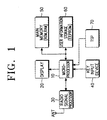
- a microprocessor 10 controls the entire function of a digital mobile phone including displaying, searching, retrieving, inputting, storing, and transmitting the user's information.
- a display 20 consists of an LCD to display the information relating to the operational state of the mobile phone with numbers, characters, symbols, etc.
- the microprocessor 10 controls the display 20 to separately display a user information display window for displaying the state of the user's information selectively under processing by the user such as inputting, revising, retrieving, and deleting, and a control command input window for displaying the user's control commands such as editing, deleting, and storing.
- the display 20 includes a buffer to help displaying of the information.
- a radio signal processor 30 processes the radio signals transmitted between the mobile phone and base stations. By this the radio signals received are converted into the intermediate frequency, then into base band, and finally into corresponding digital signals. When transmitting, the digital signals are oppositely convened.
- a key input device 40 consists of a plurality of numeric and functional keys to generate particular key data necessary for inputting the user's information as well as setting various functional states.
- the functional keys may also serve to delete, store, retrieve, and transmit of the user's information.
- a touch screen panel (TSP) 70 by which the user may selectively input the information displayed on the screen of the display 20 by touching the screen.
- TSP touch screen panel
- the control command input window located in the TSP 70 displays the icons of various control commands selectively touched to execute the selected command.
- the TSP 70 converts the points pressed into touch screen panel data consisting of data of X and Y coordinates representing the their positions and state data determining whether X and Y coordinate data are continuously generated.
- touch screen panel data consisting of data of X and Y coordinates representing the their positions and state data determining whether X and Y coordinate data are continuously generated.
- Such screen panel data are recognized and processed by the microprocessor.
- a main memory 50 consists of a ROM for storing a control program to control the entire operation of the mobile phone including managing, searching, retrieving, transmitting, etc. of the user's information stored, and a RAM for temporarily storing data generated during execution of the control program.
- the ROM generally consists of a flash memory and EEPROM.
- a user information storage 60 consists of an EEPROM for storing various data inputted by the user or received from an external information instrument.
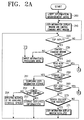
- user information management mode is firstly entered in step 200 as shown in Fig. 2A.
- the user information is stored in the user information storage 60, including alphabet or graphic or voice memo, electronic phone book, schedule, etc.
- the graphic memo inputted through the TSP 70 is used as a typical example for describing the process.
- the screen of the display 20 separately displays the user information display window and control command input window.
- the user information display window is a particular region for displaying the graphic memo stored by the user while the control command input window is a particular region for displaying the control command icons to control the information displayed in the user information display window.
- the control command icons include retrieving icon for retrieving the user information displayed, storing icon for storing it, edit icon for editing it, and delete icon for deleting it. These icons are used to execute the respective commands by touching the corresponding regions of the TSP 70.
- step 230 it is determined in step 230 whether the touched input represents a particular command icon in the control command input window. If so, it is determined to be the retrieving (read) icon in step 240, the storing icon in step 250, edit icon in step 260, or the delete icon in step 270, so that the corresponding operation is performed. Namely, if it represents the retrieving icon in step 240, the process of Fig. 2B is performed, if the storing icon in step 250, the operation of step 251 performed, if the edit icon in step 260, the process of Fig. 2C performed, and if the delete icon in step 270, the operation of step 271 performed.
- step 230 the process goes to step 231 to process the information inputted by the user since it is regarded as the touch input through the user information display window. Namely, it represents the information entered by the user through the TSP 70.
- the control command input window is displayed changed in step 241.
- the control command input window displays the search icon to search the information, transmit icon to transmit the information displayed, and delete icon to delete the information displayed from the user storage.
- icon commands may be performed through the key input device in addition to the key input device. Determining in step 242 whether the TSP 70 is inputted, it is determined to be a particular icon in the control command input window in step 243. If not so, the process goes to step 231. However, if so, it is determined to represent the search icon in step 244, transmit icon in step 245, or delete icon in step 246, so that the respective operations are executed.
- step 244 proceeds to step 244-1 to search the user information.
- the search may be sequentially performed through sub-steps represented by sub-icons respectively representing the previous search and subsequent search.
- step 245 proceeds to step 245-1 to input receiver's/sender's phone number, then to step 245-2 to transmit the displayed information.
- step 246 proceeds to step 246-1 to delete the displayed information from the user information storage 60.
- the process of Fig. 2B is to manage the user information such as searching, transmitting, deleting, etc. of the user information.
- the user information storage 60 is firstly searched in step 251 to determine whether it has available storage space. Namely, the addresses of the storage are sequentially searched to detect in step 252 available addresses to additionally store information. If there is available storage space in step 252, the information displayed is stored into it. However, if there is no available storage space, the message of no available storage space is displayed in step 254, returning to step 220. Of course, the process returns to step 220 after completing step 253.
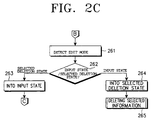
- step 262 it is determined in step 262 to be the input state or selected deletion.
- the input state represents to input the additional information made by the user for revising the information currently displayed while the selected deletion represents to delete the part selected by the user of the information currently displayed.
- step 262 represents the selected deletions
- the mobile phone is changed into the input information processing mode in step 263.
- step 262 represents the input state
- the mobile phone is changed into the selected deletion state in step 264 to delete the part selected by the user of the information currently displayed in step 265.
- the present edit state is the selected deletion state and the edit icon is touched, the selected deletion state is exchanged into the input state.
- the present edit state is the input state and the edit icon is touched, the input state is exchanged into the selected deletion state.
- the user information display window is initialized canceling the information currently displayed.
- the screen deletion is to make the information currently displayed simply disappear from the screen without deleting the information from the user information storage 60. Namely, the screen deletion is to delete the displayed information from the display buffer. Then, the process returns to step 220.
- Fig. 3 illustrates the display screen displaying the user information managed by the user.
- the screen represented by reference numeral 300 separately displays the user information display window and the control command input window. This is produced by executing step 210.
- the screen represented by reference numeral 300-1 The screen shows the retrieving icon, delete icon, and transmit icon.
- the screen represented by reference numeral 300-2 displays selection of the storing icon produced by executing step 250 in the state of reference numeral 300, resulting from the process of Fig. 2C. This represents the completion of storing the displayed information.
- the screen represented by reference numeral 300-3 displays selection of the edit icon produced by executing step 260 in the state of reference numeral 300, resulting from the process of Fig. 2D). This represents the editing state of the displayed information.
- the screen represented by reference numeral 300-4 displays selection of the delete icon produced by executing step 270 in the state of reference numeral 300, resulting from the process of Fig. 2A. This represents the state of the displayed information canceled from the screen.
Landscapes
- Engineering & Computer Science (AREA)
- Signal Processing (AREA)
- Computer Networks & Wireless Communication (AREA)
- Human Computer Interaction (AREA)
- Mobile Radio Communication Systems (AREA)
- User Interface Of Digital Computer (AREA)
Abstract
Description
Claims (11)
- A method for managing the user's information stored in a storage device provided in a mobile phone, comprising the steps of:separately displaying on the display screen a user information display window for displaying the state of the user's information selectively under processing by the user such as inputting, revising, retrieving, and deleting, and a control command input window for displaying the user's control commands such as editing, deleting, and storing; andselectively editing, storing, retrieving, revising, or deleting the user's information according to a control command inputted through said control command input window.
- A method as defined in Claim 1, wherein said control command input window is positioned in one side of said user information display window.
- A method as defined in Claim 1, wherein said control command input window is designed to show a retrieving icon entered for retrieving the stored information.
- A method as defined in Claim 1, wherein said control command input window is designed to show a storing icon entered for storing the information displayed.
- A method as defined in Claim 1, wherein said control command input window is designed to show an edit icon entered for editing the information displayed.
- A method as defined in Claim 1, wherein said control command input window is designed to show a delete icon entered for canceling the information displayed.
- A method as defined in Claim 1, wherein said control command input window is designed to show the process of searching, transmitting, and deleting the information displayed.
- A method for managing the user's information stored in a storage device provided in a mobile phone, comprising the steps of:displaying a user information display window for displaying the state of the user's information selectively under processing by the user such as inputting, revising, retrieving, and deleting;displaying a retrieving icon entered for retrieving the stored information;displaying a storing icon entered for storing the information displayed;displaying an edit icon entered for editing the information displayed;displaying a delete icon entered for canceling the information displayed; andprocessing the information inputted by entering one of the icons described above.
- A method as defined in Claim 8, wherein, upon entering said retrieving icon, the step of processing the information further includes the steps of displaying a search icon entered for searching the stored information, and displaying a transmit icon entered for transmitting the information displayed.
- A method as defined in Claim 8, wherein, upon entering said storing icon, the step of processing the information further includes the steps of searching the remaining storage space of said storage device, and additionally storing the information displayed into the remaining storage space.
- A method as defined in Claim 8, wherein, upon entering said edit icon, the step of processing the information further includes the steps of deleting a selected part of the information displayed, and displaying the user's information additionally entered.
Applications Claiming Priority (2)
| Application Number | Priority Date | Filing Date | Title |
|---|---|---|---|
| KR1019990009417A KR20000060798A (en) | 1999-03-19 | 1999-03-19 | Method for managing user data in digital portablr terminal equipment |
| KR9909417 | 1999-03-19 |
Publications (2)
| Publication Number | Publication Date |
|---|---|
| EP1039727A2 true EP1039727A2 (en) | 2000-09-27 |
| EP1039727A3 EP1039727A3 (en) | 2003-10-29 |
Family
ID=19577089
Family Applications (1)
| Application Number | Title | Priority Date | Filing Date |
|---|---|---|---|
| EP00105853A Withdrawn EP1039727A3 (en) | 1999-03-19 | 2000-03-20 | Method for managing the user's information in a mobile phone |
Country Status (3)
| Country | Link |
|---|---|
| EP (1) | EP1039727A3 (en) |
| KR (1) | KR20000060798A (en) |
| CN (1) | CN1268010A (en) |
Cited By (1)
| Publication number | Priority date | Publication date | Assignee | Title |
|---|---|---|---|---|
| WO2009092296A1 (en) * | 2008-01-21 | 2009-07-30 | Xu, Hang | Visible terminal and method for playing media information |
Families Citing this family (4)
| Publication number | Priority date | Publication date | Assignee | Title |
|---|---|---|---|---|
| KR100447591B1 (en) * | 2002-02-20 | 2004-09-07 | 엘지전자 주식회사 | Method of storing a phone number in mobile phone |
| CN1980226B (en) * | 2005-12-08 | 2010-08-11 | 腾讯科技(深圳)有限公司 | A security protection method and system for user information in instant messaging |
| KR101667577B1 (en) * | 2009-09-09 | 2016-10-28 | 엘지전자 주식회사 | Mobile terminal and method for controlling displaying thereof |
| CN106101357B (en) * | 2016-06-28 | 2019-11-26 | 上海青橙实业有限公司 | Information processing method and mobile terminal |
Family Cites Families (3)
| Publication number | Priority date | Publication date | Assignee | Title |
|---|---|---|---|---|
| JP2602001B2 (en) * | 1993-11-01 | 1997-04-23 | インターナショナル・ビジネス・マシーンズ・コーポレイション | Personal communicator with shrinkable keyboard |
| US5825353A (en) * | 1995-04-18 | 1998-10-20 | Will; Craig Alexander | Control of miniature personal digital assistant using menu and thumbwheel |
| US5848356A (en) * | 1995-10-02 | 1998-12-08 | Motorola, Inc. | Method for implementing icons in a radio communication device |
-
1999
- 1999-03-19 KR KR1019990009417A patent/KR20000060798A/en not_active Ceased
-
2000
- 2000-03-18 CN CN00104154A patent/CN1268010A/en active Pending
- 2000-03-20 EP EP00105853A patent/EP1039727A3/en not_active Withdrawn
Cited By (1)
| Publication number | Priority date | Publication date | Assignee | Title |
|---|---|---|---|---|
| WO2009092296A1 (en) * | 2008-01-21 | 2009-07-30 | Xu, Hang | Visible terminal and method for playing media information |
Also Published As
| Publication number | Publication date |
|---|---|
| KR20000060798A (en) | 2000-10-16 |
| EP1039727A3 (en) | 2003-10-29 |
| CN1268010A (en) | 2000-09-27 |
Similar Documents
| Publication | Publication Date | Title |
|---|---|---|
| JP4382654B2 (en) | Message processing apparatus and method using avatar in portable terminal | |
| US20140104215A1 (en) | Apparatus and method for inputting character using touch screen in portable terminal | |
| US20100169367A1 (en) | Method and device for selecting a word to be defined in mobile communication terminal having an electronic dictionary | |
| EP1883210A2 (en) | Method and device for performing integration search in mobile communication terminal | |
| KR20070088029A (en) | Apparatus and method for providing a user interface in a mobile terminal | |
| KR20110039095A (en) | Message transmitting and receiving device and method of mobile communication terminal with touch screen | |
| EP1039727A2 (en) | Method for managing the user's information in a mobile phone | |
| KR101506162B1 (en) | A mobile terminal using a QWERTY key and its symbol setting and input method | |
| US8554763B2 (en) | Apparatus and method for selecting and performing at least one data function | |
| JPH1023117A (en) | Mobile phone equipment | |
| KR20120082121A (en) | Method and apparatus for sroring telephone number in portable terminal | |
| US20080064388A1 (en) | Softkey access to network connections | |
| KR100584136B1 (en) | Shortcut Setting Device of Mobile Communication Terminal | |
| US20030087630A1 (en) | Method of searching for electronic mail in portable cellular phone and electronic mail searching program for portable cellular phone | |
| KR100686067B1 (en) | Mobile terminal having menu icon and message checking method using same | |
| JP3556237B2 (en) | Mobile phone | |
| KR100889964B1 (en) | How to manage address book and send message in mobile terminal | |
| JP2003298719A (en) | Communication terminal device | |
| JP2002158749A (en) | Communication device | |
| KR100603441B1 (en) | Option menu control method using soft key in wireless communication terminal | |
| JPH10247988A (en) | Information processing device with communication function | |
| KR101397149B1 (en) | mobile communication device and controlling method thereof | |
| CN100515110C (en) | Search shortening method in mobile communication terminal and its mobile communication terminal | |
| JP3699034B2 (en) | Menu search method and menu search program for mobile communication device | |
| JP3487816B2 (en) | Wireless portable terminal and telephone number display method thereof |
Legal Events
| Date | Code | Title | Description |
|---|---|---|---|
| PUAI | Public reference made under article 153(3) epc to a published international application that has entered the european phase |
Free format text: ORIGINAL CODE: 0009012 |
|
| 17P | Request for examination filed |
Effective date: 20000320 |
|
| AK | Designated contracting states |
Kind code of ref document: A2 Designated state(s): AT BE CH CY DE DK ES FI FR GB GR IE IT LI LU MC NL PT SE |
|
| AX | Request for extension of the european patent |
Free format text: AL;LT;LV;MK;RO;SI |
|
| RIN1 | Information on inventor provided before grant (corrected) |
Inventor name: PARK, JOUNG-KYOU Inventor name: SENG-WOOK, SIM C/O SAMSUNG ELECTRONICS CO., LTD. |
|
| PUAL | Search report despatched |
Free format text: ORIGINAL CODE: 0009013 |
|
| AK | Designated contracting states |
Kind code of ref document: A3 Designated state(s): AT BE CH CY DE DK ES FI FR GB GR IE IT LI LU MC NL PT SE |
|
| AX | Request for extension of the european patent |
Extension state: AL LT LV MK RO SI |
|
| 17Q | First examination report despatched |
Effective date: 20040216 |
|
| AKX | Designation fees paid |
Designated state(s): DE FR GB |
|
| STAA | Information on the status of an ep patent application or granted ep patent |
Free format text: STATUS: THE APPLICATION IS DEEMED TO BE WITHDRAWN |
|
| 18D | Application deemed to be withdrawn |
Effective date: 20040629 |