EP1037162A2 - System and method for dynamically switching ocr packages - Google Patents
System and method for dynamically switching ocr packages Download PDFInfo
- Publication number
- EP1037162A2 EP1037162A2 EP00301277A EP00301277A EP1037162A2 EP 1037162 A2 EP1037162 A2 EP 1037162A2 EP 00301277 A EP00301277 A EP 00301277A EP 00301277 A EP00301277 A EP 00301277A EP 1037162 A2 EP1037162 A2 EP 1037162A2
- Authority
- EP
- European Patent Office
- Prior art keywords
- ocr
- scanning
- package
- parameter values
- user
- Prior art date
- Legal status (The legal status is an assumption and is not a legal conclusion. Google has not performed a legal analysis and makes no representation as to the accuracy of the status listed.)
- Withdrawn
Links
Images


Classifications
-
- G—PHYSICS
- G06—COMPUTING OR CALCULATING; COUNTING
- G06V—IMAGE OR VIDEO RECOGNITION OR UNDERSTANDING
- G06V30/00—Character recognition; Recognising digital ink; Document-oriented image-based pattern recognition
- G06V30/10—Character recognition
- G06V30/24—Character recognition characterised by the processing or recognition method
- G06V30/242—Division of the character sequences into groups prior to recognition; Selection of dictionaries
- G06V30/244—Division of the character sequences into groups prior to recognition; Selection of dictionaries using graphical properties, e.g. alphabet type or font
- G06V30/2445—Alphabet recognition, e.g. Latin, Kanji or Katakana
Definitions
- the present invention generally relates to computer systems and, in particular, to a system and method for dynamically changing which optical character recognition (OCR) package is used to analyze an image captured by an optical scanner.
- OCR optical character recognition
- OCR scanning systems create electronic or software copies of textual documents.
- each OCR scanning system includes a scanning device that captures an image of a document.
- Software referred to as an "OCR package” associated with the scanning system is then executed to analyze the captured image in order to interpret the text of the scanned document.
- OCR package Software, referred to as an "OCR package,” associated with the scanning system is then executed to analyze the captured image in order to interpret the text of the scanned document.
- OCR package Software, referred to as an "OCR package”
- OCR package software copy of the text is created which can be stored and manipulated according to conventional processing techniques.
- U.S. Patent No. 5,212,739 entitled, "Noise Tolerant Optical Character Recognition System,” which is incorporated herein by reference describes an OCR system capable of analyzing a scanned image to create a software copy of the text included within the scanned image.
- the OCR package In order to improve performance of the scanning system, it is desirable for the OCR package to be specifically tailored to the language of the scanned document. For example, the characters and words used by different languages (e.g., English, French, Spanish, etc. ) are often different. Therefore, to achieve the best results, one OCR package specifically tailored for English should be used to interpret the image of an English document, and another OCR specifically tailored for French should be used to interpret the image of a French document.
- languages e.g., English, French, Spanish, etc.
- OCR scanning systems do not provide the capability of dynamically switching which OCR packages are used to analyze and interpret the documents scanned by the OCR scanning system.
- most conventional OCR scanning systems are initialized to use a particular OCR package.
- Some systems allow the user to select a particular OCR package at initialization while other systems are automatically initialized to use a default OCR package.
- the system utilizes the OCR package selected during initialization to analyze and interpret each document scanned by the system. If the user wishes to utilize a different OCR package after initialization, the user is usually required to reinstall the scanning application along with the different OCR package so that the system may be initialized to use the different OCR package.
- the present invention overcomes the inadequacies and deficiencies of the prior art as discussed hereinbefore.
- the present invention provides a system and method for dynamically switching OCR packages used to analyze and interpret the text of scanned documents.
- the present invention utilizes a memory device, a registry, a scanning application, a processor, and a scanning device.
- the scanning device is configured to capture an image of a document in response to a scan command from the scanning application.
- the scanning application locally stores a set of current parameter values indicating the location in the memory device of the OCR package that should be used to currently analyze and interpret images produced by the scanning device. If the scanning application receives a message to update the current parameter values, the scanning application retrieves new parameter values from the registry and stores these values in the memory device as the current parameter values. If the scanning application receives a message to initiate a document scan, the scanning application transmits the scan command to the scanning device and retrieves the current parameter values from the memory device. The processor uses these retrieved parameter values to locate code defining an OCR package. Once the OCR package is located, the processor executes the OCR package to analyze and interpret the image produced by the scanning device.
- an OCR utility is configured to interface with a user to determine when the user would like to select a new OCR package. When the user would like to select a new OCR package, the OCR utility updates the registry then transmits an update notification to the scanning application.
- the present invention can also be viewed as providing an OCR method for electronically scanning text of documents into memory.
- the method can be broadly conceptualized by the following steps: providing a scanning device; providing a plurality of OCR packages to analyze images captured by the scanning device; capturing an image of a document via the scanning device; enabling a user to dynamically select one of the OCR packages to analyze the image captured by the scanning device; indicating which of a plurality of OCR packages is selected by the user to analyze the image; and analyzing the image with the OCR package that is indicated as being selected by the user in the indicating step.
- the present invention has many advantages, a few of which are delineated hereafter, as mere examples.
- An advantage of the present invention is that the OCR packages used to analyze and interpret the text of a scanned image may be quickly and easily switched.
- Another advantage of the present invention is that the efficiency of an OCR scanning system can be increased.
- Another advantage of the present invention is that documents written in different languages can be scanned by the same OCR scanning system.
- FIG. 1 depicts an optical character recognition (OCR) scanning system 20 in accordance with the present invention.
- the system 20 includes a scanning application 24, a scanning device 25, an OCR utility 27, a registry 28, and a plurality of OCR packages 29.
- the scanning device 25 is designed to capture an image of a document, and the OCR packages 29 are configured to analyze and interpret the text of the captured image.
- the registry 28 indicates which of the OCR packages 29 should be used to currently analyze and interpret the images of scanned documents.
- the scanning application 24 is configured to control the process of scanning and interpreting the text of a document
- the OCR utility 27 is configured to control the process of switching which OCR package 29 is utilized to interpret the scanned documents.
- the scanning application 24, the OCR utility 27, and the OCR packages 29 can be implemented in software, hardware, or a combination thereof.
- the scanning application 24, the OCR utility 27 and the OCR packages 29 of the present invention along with their associated methodology are implemented in software and stored in computer memory 31 of a computer system 30.
- the scanning application 24, the OCR utility 27, and the OCR packages 29, when implemented in software, can be stored and transported on any computer-readable medium for use by or in connection with an instruction execution system, apparatus, or device, such as a computer-based system, processor-containing system, or other system that can fetch the instructions from the instruction execution system, apparatus, or device and execute the instructions.
- a "computer-readable medium" can be any means that can contain, store, communicate, propagate, or transport the program for use by or in connection with the instruction execution system, apparatus, or device.
- the computer readable medium can be, for example but not limited to, an electronic, magnetic, optical, electromagnetic, infrared, or semiconductor system, apparatus, device, or propagation medium.
- the computer-readable medium would include the following: an electrical connection (electronic) having one or more wires, a portable computer diskette (magnetic), a random access memory (RAM) (magnetic), a read-only memory (ROM) (magnetic), an erasable programmable read-only memory (EPROM or Flash memory) (magnetic), an optical fiber (optical), and a portable compact disc read-only memory (CDROM) (optical).
- an electrical connection electronic having one or more wires
- a portable computer diskette magnetic
- RAM random access memory
- ROM read-only memory
- EPROM or Flash memory erasable programmable read-only memory
- CDROM portable compact disc read-only memory
- the computer-readable medium could even be paper or another suitable medium upon which the program is printed, as the program can be electronically captured, via for instance optical scanning of the paper or other medium, then compiled, interpreted or otherwise processed in a suitable manner if necessary, and then stored in a computer memory.
- the scanning application 24, the OCR utility 27, and the OCR packages 29 may be magnetically stored and transported on a conventional portable computer diskette(s).
- the preferred embodiment of the computer system 30 of FIG. 2 comprises one or more conventional processing elements 32, such as a digital signal processor (DSP), that communicate to and drive the other elements within the system 30 via a local interface 33, which can include one or more buses.
- DSP digital signal processor
- an input device 34 for example, a keyboard or a mouse, can be used to input data from a user of the system 30, and screen display 35 or a printer 36 can be used to output data to the user.
- a disk storage mechanism 37 can be connected to the local interface 33 to transfer data to and from a nonvolatile disk(s) (e.g., magnetic, optical, etc. ).
- the local interface 33 can be connected to a registry 28 that, as known in the art, includes information regarding operation of the computer system 30.
- the system 30 can be connected to a network interface 41 that allows the system 30 to exchange data with a network 43.
- system 30 can be connected to scanning device 25, which is a well known device configured to capture an electronic image of a document.
- FIG. 3 depicts the architecture and functionality of the scanning application 24.
- the scanning application 24 is configured to retrieve OCR parameter values from registry 28 during initialization of the scanning application 24.
- the retrieved OCR parameter values indicate the location in memory of a particular OCR package 29.
- each OCR package 29 is configured to analyze an image captured by the scanning device 25 in order to interpret the text included in the image.
- each OCR package 29 is usually tailored to a particular language, such as English, Spanish or French, for example, and therefore is configured differently than other OCR packages 29.
- the registry 28 is designed to indicate which set of OCR parameter values is current via utilization of a pointer or some other suitable structure and/or technique. The selection of the current OCR parameter values will be discussed in further detail hereinafter.
- the scanning application 24 retrieves OCR parameter values from the registry 28, the scanning application 24 is configured to determine which set of OCR parameter values is indicated as current by the registry 28 and to retrieve the current OCR parameter values.
- the scanning application 24 After retrieving the current OCR parameter values from registry 28, the scanning application 24 is designed to store the current OCR parameter values in memory 31, as shown by block 65 of FIG. 3. Then, the scanning application 24 is designed to wait for a notification to either initiate a document scan or to update the OCR package 29 used to scan documents, as shown by blocks 71 and 73 of FIG. 3.
- the scanning application 24 is designed to update the current OCR parameter values stored in memory 31 by repeating blocks 61 and 65, as shown by FIG. 3. Therefore, the scanning application 24 is designed to retrieve new OCR parameter values and to store these new OCR parameter values in memory 31 in response to the notification to update the OCR parameter values.
- the new OCR parameter values correspond to the OCR parameter values indicated as current by the registry 28 when the scanning application 24 retrieves the new OCR parameter values.
- the scanning application 24 is designed to instruct the scanning device 25 to capture an image, as shown by block 74.
- the scanning application 24, as shown by block 76 is designed to retrieve the OCR parameter values that were most recently stored in memory 31 in block 65 (i.e., the current OCR parameter values).
- the OCR package 29 at the location in memory 31 defined by the current OCR parameter values retrieved in block 76 is then executed to interpret and define the text included in the captured image, as depicted by block 79. Thereafter, the data produced by the execution of the OCR package 29 (i.e., the data defining the text of the captured image) can be stored and manipulated as desired according to techniques well known in the art.
- the architecture and functionality of the OCR utility 27 is shown by FIG. 4. As shown by blocks 83 and 85, the OCR utility 27, through techniques known in the art, is designed to utilize user interfaces (e.g., input device 34 and display 35) to determine whether a user wishes to select a new OCR package 29.
- user interfaces e.g., input device 34 and display 35
- the OCR utility 27 determines that the user wishes to select a new OCR package 29, then the OCR utility 27 is first designed to update the registry 28, as shown by block 88.
- the OCR utility 27 is designed to change which set of OCR parameter values are indicated as current by the registry 28 so that the OCR parameter values corresponding with the OCR package 29 ( i.e., defining the location in memory of the OCR package 29) currently selected by the user are indicated by the registry 28 as current.
- the OCR utility 27 is configured to transmit a notification to the scanning application 24 to notify the scanning application 24 of the selection of the new OCR package 29.
- the scanning application 24 updates the current OCR parameter values stored in memory 31, as described hereinabove.
- scanning device 25, scanning application 24, and OCR utility 27 are initially installed on the computer system 30, as shown by block 101. Furthermore, at least one OCR package 29 is installed in block 101, although it is possible to install the OCR package(s) 29 at other times.
- OCR utility 27, and OCR package 29 code defining the scanning application 24, OCR utility 27, and OCR package 29 is stored in memory 31. In this regard, the code can be read from a disk(s) located in the disk storage device 37, through techniques known in the art.
- the scanning application 24 and registry 28 are initialized, as shown by block 103.
- the registry 28 includes information pertaining to the operation of the system 30. This information includes the OCR parameter values (i.e., values indicating the location in memory 31 of an OCR package 29) associated with each OCR package 29 installed on the system 30.
- the registry 28 is initialized by indicating which set of OCR parameter values is current, as depicted by block 104 (FIG. 6). For example, a pointer can be defined that points to the OCR parameter values that are selected as current.
- the current OCR parameter values can be selected during initialization based on default standards or on inputs received from the user.
- the OCR parameter values indicated by the registry 28 as current can be changed, as desired.
- the scanning application 24 is initialized by reading the current OCR parameter values from the registry 28 and storing these values in memory 31, as shown by block 105 and 107 (FIG. 6).
- a user may specify via input device 34 to initiate a document scan.
- the current OCR parameter values selected during initialization define the location of an English OCR package 29 and that the user wishes to scan an English document. Since the current OCR parameter values correspond to an English OCR package 29, the current OCR parameter values do not need to be updated before the user requests a document scan. Therefore, the user enters a request via input device 34 to scan the document, and the input device 34 transmits a scan message to the scanning application 24 indicating that a document is ready to be scanned.
- the scanning application 24 instructs the scanning device 25 to capture an image of the document, as shown by blocks 73 and 74. Then, in block 76, the scanning application 24 retrieves the current OCR parameter values stored in memory 31. These values indicate the location in memory 31 of the currently selected OCR package 29 (i.e., the English OCR package 29 in this example) and are used in block 79 by the processing element 32 (FIG. 2) to execute the code defined by the data located at this location.
- the OCR package 29 interprets the text of the scanned document by analyzing an image of the document through techniques known in the art. Once the text is interpreted and defined in data, the text can be manipulated, stored and/or printed through techniques known in the art.
- the user desires to scan a document written in French. Since the currently selected OCR package 29 (i.e., the English OCR package 29 in this example) does not correspond with the language of the document to be scanned, the selected OCR package 29 should be changed. In this regard, the user via input device 34 indicates that the selected OCR package 29 should be a French OCR package 29.
- the OCR utility 27 updates the registry 28 such that the registry 28 now indicates that another set of OCR parameter values is labeled as current, as shown by blocks 71 and 88. In particular, the registry 29 is updated such that a set of OCR parameter values defining the location of a French OCR package 29 are indicated as current.
- the OCR utility 27 transmits an update message to the scanning application 24 in block 91 to update the current OCR parameter values (i.e., to change the OCR package 29 used to analyze and interpret images).
- the scanning application 24 in blocks 61 and 65 retrieves the OCR parameter values indicated by the registry 28 as current and stores these values in memory 31 as the current OCR parameter values.
- these OCR parameter values indicate the location in memory 31 of the French OCR package 29.
- the scanning application 24 instructs the scanning device 25 to capture an image of the document, as depicted by block 74.
- the scanning application 24 in block 76 retrieves the current OCR parameter values stored in memory 31 (i.e., the OCR parameter values defining the location in memory 31 of the French OCR package 29 in the example described hereinbefore), and the code located at the location in memory 31 defined by these OCR parameter values is executed, as shown by block 79.
- the execution of this code results in an analysis and interpretation of the text of the scanned document. Once the text is interpreted, it can be defined in data and manipulated, stored, and/or printed through conventional techniques.
- OCR packages 29 can be utilized to scan and interpret documents without rebooting the system 30 or reinstalling the scanning application 24 along with a new OCR package 29.
- a user can dynamically change which OCR package 29 is used to scan a document, thereby increasing the efficiency of the system 30.
- the user it is not necessary for the user to request a change to the current OCR package 29 used by the system 20. In this regard, it is possible for a user to merely specify that a document is ready to be scanned and the language of the document.
- the OCR utility 27 can then determine whether the currently selected OCR package 29 is suitable for analyzing the document. If the currently selected OCR package 29 is suitable, then the scanning application 24 may begin the aforementioned scanning operation. However, if the currently selected OCR package is not suitable, then the selection of the current OCR package 29 is changed according to the techniques described hereinabove.
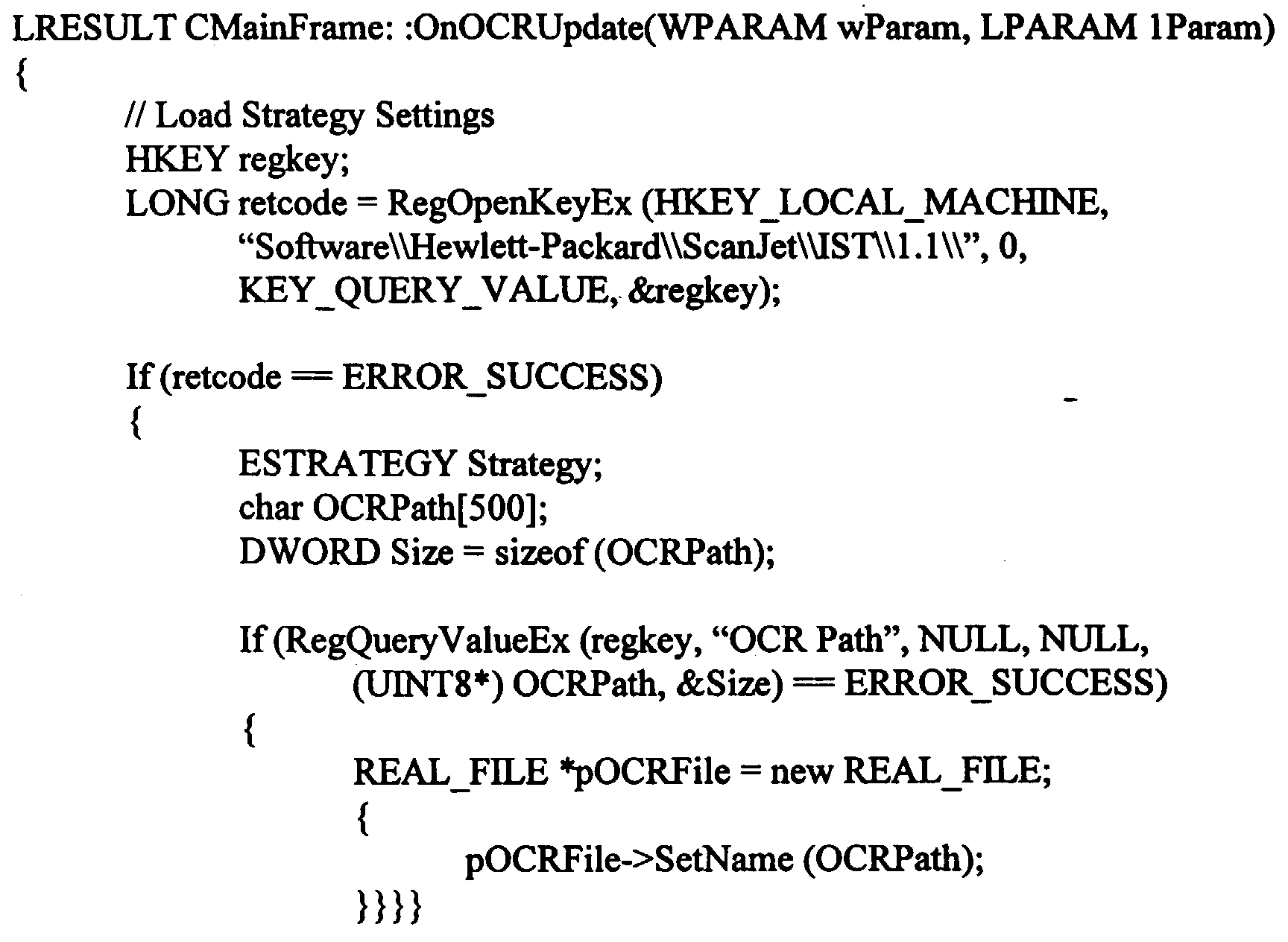
- the following is an example of code that may be used to implement a portion of the functionality of the scanning application 24.
- the following code gives the scanning application 24 the capability of detecting a notification to update which OCR package 2 is currently selected and of updating the current OCR parameter values stored in memory 31 in response to the notification.
Landscapes
- Engineering & Computer Science (AREA)
- Computer Vision & Pattern Recognition (AREA)
- Physics & Mathematics (AREA)
- General Physics & Mathematics (AREA)
- Multimedia (AREA)
- Theoretical Computer Science (AREA)
- Character Discrimination (AREA)
- Character Input (AREA)
Abstract
Description
Claims (9)
- An optical character recognition (OCR) system (20) for electronically scanning text of documents into memory, comprising:a memory device (31);a registry (28) configured to store parameter values that indicate locations in said memory device (31) where OCR packages are stored, said registry (28) configured to indicate which of said parameter values correspond with a currently selected OCR package (29);a scanning application (24) having a set of parameter values defining a location in said memory device (31) and configured to receive a scan message and an update message, said scanning application (24) configured to retrieve said set of parameter values in response to a scan message if said scan message is received before said update message, said scanning application (24) further configured to retrieve a new set of parameter values from said registry (28) in response to said update message and to store said new set of parameter values in said memory device (31), said scanning application (24) further configured to retrieve said new set of parameter values from said memory device (31) in response to said scan message if said scan message is received after said update message, said scanning application (24) further configured to transmit a scan command in response to said scan message;a processor (32) configured to execute code located at a memory address defined by said set of parameter values that is retrieved by said scanning application (24) in response to said scan message; anda scanning device (25) configured to capture an image of a document in response to said scan command.
- The system (20) of claim 1, further comprising:an input device (34) configured to receive a request from a user to scan a document and to transmit said scan message in response to said request.
- The system (20) of claim 2, further comprising an OCR utility (27) configured to receive a request from said user to select a new OCR package (29), said OCR utility (27) further configured to change which of said values are indicated by said registry (28) as corresponding with said currently selected OCR package (29) in response to said request and to transmit said update message to said scanning application (24) after changing which of said values are indicated by said registry (28) as corresponding with said currently selected OCR package (29).
- The system (20) of claim 2, further comprising an OCR utility (27) configured to determine whether said currently selected OCR package (29) corresponds with said document and to change which of said values are indicated by said registry (28) as corresponding with said currently selected OCR package (29) in response to a determination that said document fails to correspond with said currently selected OCR package (29), said OCR utility (27) further configured to transmit said update message to said scanning application (24) after changing which of said values are indicated by said registry (28) as corresponding with said currently selected OCR package (29), whereby changing which of said values that correspond with said currently selected OCR package (29) changes which of said OCR packages (29) is currently selected.
- An optical character recognition (OCR) system (20) for capturing and analyzing an electronic image of a document, comprising:an application (24, 27) configured to enable a user to dynamically select one of a plurality of OCR packages (29) to analyze said image;a registry (28) configured to indicate which of said OCR packages (29) is selected by said user; anda processor (32) configured to execute said OCR package (29) selected by said user.
- The system (20) of claim 5, said application (24, 27) further configured to enable said user to dynamically change which of said OCR packages (29) is selected by said user.
- An optical character recognition (OCR) method for electronically scanning text of documents into memory (31), comprising the steps of:providing a scanning device (25);providing a plurality of OCR packages (29) to analyze images captured by said scanning device (25);capturing an image of a document via said scanning device (25);enabling a user to dynamically select one of said OCR packages (29) to analyze said image captured by said scanning device (25);indicating which of a plurality of OCR packages (29) is selected by said user to analyze said image; andanalyzing said image with said OCR package (29) that is indicated as being selected by said user in said indicating step.
- The method of claim 7, further comprising the steps of:receiving a request from said user to change which of said OCR packages (29) is selected; andchanging which of said OCR packages (29) is indicated as being selected by said user in response to said request.
- The method of claim 7, further comprising the step of:enabling said user to dynamically change which of said OCR packages (29) is selected by said user.
Applications Claiming Priority (2)
| Application Number | Priority Date | Filing Date | Title |
|---|---|---|---|
| US26319099A | 1999-03-05 | 1999-03-05 | |
| US263190 | 1999-03-05 |
Publications (2)
| Publication Number | Publication Date |
|---|---|
| EP1037162A2 true EP1037162A2 (en) | 2000-09-20 |
| EP1037162A3 EP1037162A3 (en) | 2002-05-22 |
Family
ID=23000768
Family Applications (1)
| Application Number | Title | Priority Date | Filing Date |
|---|---|---|---|
| EP00301277A Withdrawn EP1037162A3 (en) | 1999-03-05 | 2000-02-18 | System and method for dynamically switching ocr packages |
Country Status (2)
| Country | Link |
|---|---|
| US (2) | US6567547B1 (en) |
| EP (1) | EP1037162A3 (en) |
Cited By (1)
| Publication number | Priority date | Publication date | Assignee | Title |
|---|---|---|---|---|
| EP1508098A4 (en) * | 2002-05-28 | 2007-05-30 | Toshiba Corp | System and method for generating and transferring image data |
Families Citing this family (14)
| Publication number | Priority date | Publication date | Assignee | Title |
|---|---|---|---|---|
| GB0406451D0 (en) * | 2004-03-23 | 2004-04-28 | Patel Sanjay | Keyboards |
| JP4574313B2 (en) * | 2004-10-04 | 2010-11-04 | キヤノン株式会社 | Image processing apparatus and method |
| GB0505941D0 (en) * | 2005-03-23 | 2005-04-27 | Patel Sanjay | Human-to-mobile interfaces |
| GB0505942D0 (en) * | 2005-03-23 | 2005-04-27 | Patel Sanjay | Human to mobile interfaces |
| JP4016996B2 (en) * | 2005-04-19 | 2007-12-05 | コニカミノルタビジネステクノロジーズ株式会社 | Image processing system, image processing apparatus, and image processing program |
| US9141607B1 (en) * | 2007-05-30 | 2015-09-22 | Google Inc. | Determining optical character recognition parameters |
| CN104704510B (en) | 2012-10-10 | 2018-08-31 | 摩托罗拉解决方案公司 | Identify the method and apparatus that the language used in a document and the language based on identification execute OCR identifications |
| US8983190B2 (en) | 2013-08-13 | 2015-03-17 | Bank Of America Corporation | Dynamic service configuration during OCR capture |
| JP2015056078A (en) * | 2013-09-12 | 2015-03-23 | 株式会社リコー | Information processing system, information processing method, and program |
| US9514377B2 (en) * | 2014-04-29 | 2016-12-06 | Google Inc. | Techniques for distributed optical character recognition and distributed machine language translation |
| US9514376B2 (en) * | 2014-04-29 | 2016-12-06 | Google Inc. | Techniques for distributed optical character recognition and distributed machine language translation |
| JP6655331B2 (en) * | 2015-09-24 | 2020-02-26 | Dynabook株式会社 | Electronic equipment and methods |
| US10192127B1 (en) | 2017-07-24 | 2019-01-29 | Bank Of America Corporation | System for dynamic optical character recognition tuning |
| US10346702B2 (en) | 2017-07-24 | 2019-07-09 | Bank Of America Corporation | Image data capture and conversion |
Family Cites Families (7)
| Publication number | Priority date | Publication date | Assignee | Title |
|---|---|---|---|---|
| JPH0664631B2 (en) | 1987-09-09 | 1994-08-22 | インターナショナル・ビジネス・マシーンズ・コーポレーション | Character recognition device |
| US5016173A (en) * | 1989-04-13 | 1991-05-14 | Vanguard Imaging Ltd. | Apparatus and method for monitoring visually accessible surfaces of the body |
| US5101436A (en) * | 1990-05-11 | 1992-03-31 | Optigraphics Corporation | Hybrid image editor |
| US5212739A (en) | 1990-10-17 | 1993-05-18 | Hewlett-Packard Company | Noise tolerant optical character recognition system |
| US5237627A (en) | 1991-06-27 | 1993-08-17 | Hewlett-Packard Company | Noise tolerant optical character recognition system |
| US5901255A (en) | 1992-02-07 | 1999-05-04 | Canon Kabushiki Kaisha | Pattern recognition method and apparatus capable of selecting another one of plural pattern recognition modes in response to a number of rejects of recognition-processed pattern segments |
| JP3213197B2 (en) * | 1994-04-20 | 2001-10-02 | キヤノン株式会社 | Image processing apparatus and control method thereof |
-
1999
- 1999-03-05 US US09/263,190 patent/US6567547B1/en not_active Expired - Fee Related
-
2000
- 2000-02-18 EP EP00301277A patent/EP1037162A3/en not_active Withdrawn
-
2002
- 2002-03-14 US US10/099,605 patent/US20020186883A1/en not_active Abandoned
Cited By (1)
| Publication number | Priority date | Publication date | Assignee | Title |
|---|---|---|---|---|
| EP1508098A4 (en) * | 2002-05-28 | 2007-05-30 | Toshiba Corp | System and method for generating and transferring image data |
Also Published As
| Publication number | Publication date |
|---|---|
| EP1037162A3 (en) | 2002-05-22 |
| US20020186883A1 (en) | 2002-12-12 |
| US6567547B1 (en) | 2003-05-20 |
Similar Documents
| Publication | Publication Date | Title |
|---|---|---|
| EP1037162A2 (en) | System and method for dynamically switching ocr packages | |
| US6947162B2 (en) | Systems and methods for converting the format of information | |
| US6662186B1 (en) | System and method for a data propagation file format | |
| US6279154B1 (en) | Apparatus and method for an install system for third party applications | |
| US6490634B2 (en) | Adaptive digital data transfer apparatus and method | |
| US6880122B1 (en) | Segmenting a document into regions associated with a data type, and assigning pipelines to process such regions | |
| JP5335497B2 (en) | Image processing apparatus and method for controlling image processing apparatus | |
| JP2000113180A5 (en) | ||
| US8259326B2 (en) | Image readout system, server apparatus, image readout apparatus, and terminal apparatus | |
| US6943907B1 (en) | Printer, image printing system to which the printer is applied, and method for printing confidential document | |
| US6539117B2 (en) | System and method for rendering image based data | |
| US7145674B2 (en) | Method and apparatus for determining a location of data in an open specification environment | |
| US20070070443A1 (en) | Host device having extraction function of text and extraction method thereof | |
| US20030043397A1 (en) | Systems and methods for converting image data | |
| US7420701B2 (en) | Systems and methods for providing automatic language switching | |
| US7369704B2 (en) | Image processing apparatus, image processing system, and image processing method | |
| CN101097518B (en) | Systems and methods for recognizing optical characters | |
| US5339409A (en) | Image storage/search apparatus for merging image and related key codes when match found between key code and specific character code of image | |
| JP4006068B2 (en) | Information processing apparatus, information processing method, and storage medium storing computer-readable program | |
| JP4174547B2 (en) | Information processing apparatus, information processing method, and storage medium | |
| JP2002091957A (en) | Editing device and editing program storage medium | |
| US20080049243A1 (en) | Method and apparatus for automatic language switching for an imaging device | |
| CN107797776A (en) | For handling the method and system of linearisation and non-linearization pdf document | |
| JP2001282482A (en) | Data processing device and data processing method | |
| JPH07334611A (en) | How to display unrecognized characters |
Legal Events
| Date | Code | Title | Description |
|---|---|---|---|
| PUAI | Public reference made under article 153(3) epc to a published international application that has entered the european phase |
Free format text: ORIGINAL CODE: 0009012 |
|
| AK | Designated contracting states |
Kind code of ref document: A2 Designated state(s): AT BE CH CY DE DK ES FI FR GB GR IE IT LI LU MC NL PT SE |
|
| AX | Request for extension of the european patent |
Free format text: AL;LT;LV;MK;RO;SI |
|
| RAP1 | Party data changed (applicant data changed or rights of an application transferred) |
Owner name: HEWLETT-PACKARD COMPANY, A DELAWARE CORPORATION |
|
| PUAL | Search report despatched |
Free format text: ORIGINAL CODE: 0009013 |
|
| AX | Request for extension of the european patent |
Free format text: AL;LT;LV;MK;RO;SI |
|
| 17P | Request for examination filed |
Effective date: 20020624 |
|
| AKX | Designation fees paid |
Designated state(s): DE FR GB |
|
| 17Q | First examination report despatched |
Effective date: 20071106 |
|
| STAA | Information on the status of an ep patent application or granted ep patent |
Free format text: STATUS: THE APPLICATION IS DEEMED TO BE WITHDRAWN |
|
| 18D | Application deemed to be withdrawn |
Effective date: 20090317 |