EP0965979B1 - Position manipulation in speech recognition - Google Patents
Position manipulation in speech recognition Download PDFInfo
- Publication number
- EP0965979B1 EP0965979B1 EP99304637A EP99304637A EP0965979B1 EP 0965979 B1 EP0965979 B1 EP 0965979B1 EP 99304637 A EP99304637 A EP 99304637A EP 99304637 A EP99304637 A EP 99304637A EP 0965979 B1 EP0965979 B1 EP 0965979B1
- Authority
- EP
- European Patent Office
- Prior art keywords
- command
- word
- previously
- user
- text
- Prior art date
- Legal status (The legal status is an assumption and is not a legal conclusion. Google has not performed a legal analysis and makes no representation as to the accuracy of the status listed.)
- Expired - Lifetime
Links
Images


Classifications
-
- G—PHYSICS
- G06—COMPUTING OR CALCULATING; COUNTING
- G06F—ELECTRIC DIGITAL DATA PROCESSING
- G06F3/00—Input arrangements for transferring data to be processed into a form capable of being handled by the computer; Output arrangements for transferring data from processing unit to output unit, e.g. interface arrangements
- G06F3/16—Sound input; Sound output
-
- G—PHYSICS
- G10—MUSICAL INSTRUMENTS; ACOUSTICS
- G10L—SPEECH ANALYSIS TECHNIQUES OR SPEECH SYNTHESIS; SPEECH RECOGNITION; SPEECH OR VOICE PROCESSING TECHNIQUES; SPEECH OR AUDIO CODING OR DECODING
- G10L15/00—Speech recognition
- G10L15/06—Creation of reference templates; Training of speech recognition systems, e.g. adaptation to the characteristics of the speaker's voice
- G10L15/063—Training
-
- G—PHYSICS
- G10—MUSICAL INSTRUMENTS; ACOUSTICS
- G10L—SPEECH ANALYSIS TECHNIQUES OR SPEECH SYNTHESIS; SPEECH RECOGNITION; SPEECH OR VOICE PROCESSING TECHNIQUES; SPEECH OR AUDIO CODING OR DECODING
- G10L15/00—Speech recognition
- G10L15/22—Procedures used during a speech recognition process, e.g. man-machine dialogue
-
- G—PHYSICS
- G10—MUSICAL INSTRUMENTS; ACOUSTICS
- G10L—SPEECH ANALYSIS TECHNIQUES OR SPEECH SYNTHESIS; SPEECH RECOGNITION; SPEECH OR VOICE PROCESSING TECHNIQUES; SPEECH OR AUDIO CODING OR DECODING
- G10L15/00—Speech recognition
- G10L15/22—Procedures used during a speech recognition process, e.g. man-machine dialogue
- G10L2015/223—Execution procedure of a spoken command
-
- G—PHYSICS
- G10—MUSICAL INSTRUMENTS; ACOUSTICS
- G10L—SPEECH ANALYSIS TECHNIQUES OR SPEECH SYNTHESIS; SPEECH RECOGNITION; SPEECH OR VOICE PROCESSING TECHNIQUES; SPEECH OR AUDIO CODING OR DECODING
- G10L15/00—Speech recognition
- G10L15/22—Procedures used during a speech recognition process, e.g. man-machine dialogue
- G10L2015/226—Procedures used during a speech recognition process, e.g. man-machine dialogue using non-speech characteristics
- G10L2015/228—Procedures used during a speech recognition process, e.g. man-machine dialogue using non-speech characteristics of application context
Definitions
- a speech recognition system analyzes a user's speech to determine what the user said. Most speech recognition systems are frame-based. In a frame-based system, a processor divides a signal descriptive of the speech to be recognized into a series of digital frames, each of which corresponds to a small time increment of the speech.
- a continuous speech recognition system can recognize spoken words or phrases regardless of whether the user pauses between them.
- a discrete speech recognition system recognizes discrete words or phrases and requires the user to pause briefly after each discrete word or phrase.
- Continuous speech recognition systems typically have a higher incidence of recognition errors in comparison to discrete recognition systems due to complexities of recognizing continuous speech.
- the processor of a continuous speech recognition system analyzes "utterances" of speech.
- An utterance includes a variable number of frames and may correspond to a period of speech followed by a pause of at least a predetermined duration.
- the processor determines what the user said by finding acoustic models that best match the digital frames of an utterance, and identifying text that corresponds to those acoustic models.
- An acoustic model may correspond to a word, phrase or command from a vocabulary.
- An acoustic model also may represent a sound, or phoneme, that corresponds to a portion of a word. Collectively, the constituent phonemes for a word represent the phonetic spelling of the word. Acoustic models also may represent silence and various types of environmental noise.
- the words of phrases corresponding to the best matching acoustic models are referred to as recognition candidates.
- the processor may produce a single recognition candidate (i.e., a single sequence of words or phrases) for an utterance, or may produce a list of recognition candidates.
- Correction mechanisms for previous discrete speech recognition systems displayed a list of choices for each recognized word and permitted a user to correct a misrecognition by selecting a word from the list or typing the correct word.
- DragonDictate® for Windows® available from Dragon Systems, Inc. of Newton, Massachusetts, displayed a list of numbered recognition candidates ("a choice list") for each word spoken by the user, and inserted the best-scoring recognition candidate into the text being dictated by the user. If the best-scoring recognition candidate was incorrect, the user could select a recognition candidate from the choice list by saying "choose-N", where "N" was the number associated with the correct candidate.
- the user could refine the list, either by typing in the first few letters of the correct word, or by speaking words (e.g. "alpha", "bravo") associated with the first few letters.
- the user also could discard the incorrect recognition result by saying "scratch that”.
- US-5,231,670 discloses a system and method for generating text from a voice input that defines the processing of each speech event into a dictation event and a text event.
- EP-A-0,785,540 discloses a method for use in recognising continuous speech, wherein signals are accepted corresponding to interspersed speech elements including text elements corresponding to text to be recognised and command elements corresponding to commands to be executed.
- an action position in computer-implemented speech recognition is manipulated in response to received data representing a spoken command.
- the command includes a command identifier and a designation of at least one previously-spoken word. Speech recognition is performed on the data to identify the command identifier and the designation. Thereafter, an action position is established relative to the previously-spoken word based on the command identifier.
- Implementations may include one or more of the following features.
- the designation may include a previously-spoken word or words.
- the command identifier may indicate that the action position is to be before (e.g., "insert before”) or after (e.g., "insert after”) the previously-spoken word, words, or utterance.
- the action position may be established immediately prior to, or immediately following, the previously-spoken word, words, or utterance.
- the designation may include one or more previously-spoken words and one or more new words.
- any words following the previously-spoken words included in the command may be replaced by the new words included in the command.
- the action position then is established after the new words.
- This command may be implemented, for example, as a "resume with” command in which the words "resume with” are followed by one or more previously-recognized words and one or more new words.
- the "resume with” command does not rely on the presentation of information on the display. For that reason, the command is particularly useful when the user records speech using a portable recording device, such as an analog or digital recorder, and subsequently transfers the recorded speech to the speech recognition system for processing.
- the "Resume With” command provides the user with a simple and efficient way of redirecting the dictation and eliminating erroneously-spoken words.
- the data representing the command may be generated by recording the command using a recording device physically separate from a computer implementing the speech recognition.
- the recording device is a digital recording device
- the data may be in the form of a file generated by the digital recording device.
- the data also may be in the form of signals generated by playing back the spoken command using the recording device, such as when an analog recording device is used.
- a block of text is selected in computer-implemented speech recognition in response to data representing a spoken selection command.
- the command includes a command identifier and a text block identifier identifying a block of previously-recognized text. At least one word included in the block of text is not included in the text block identifier.
- Speech recognition is performed on the data to identify the command identifier and the text block identifier. Thereafter, the block of text corresponding to the text block identifier is selected.
- the text block identifier may include at least a first previously-recognized word of the block of text and at least a last previously-recognized word of the block of text.
- the command identifier may be "select” and the text block identifier may include the first previously-recognized word of the block of text, "through", and the last previously-recognized word of the block of text (i.e., "select X through Y").
- Speech recognition may be performed using a constraint grammar.
- the constraint grammar may permit the block of text to start with any word in a set of previously-recognized words and to end with any word in the set of previously-recognized words.
- the set of previously-recognized words may include previously-recognized words displayed on a display device when the selection command is spoken.
- Performing speech recognition may include generating multiple candidates for the text block identifier, and eliminating candidates for which the block of text starts with a previously-recognized word spoken after a previously-recognized word with which the block of text ends.
- a computer-based technique for use in working with text includes receiving a command including an utterance designating a portion of the text, performing speech recognition on the utterance to identify the portion of the text, and establishing an action position in the text at a location relative to the identified portion of the text the location being determined by the command.
- Fig. 1 is a block diagram of a speech recognition system.
- Fig. 2 is a block diagram of speech recognition software of the system of Fig. 1.
- Figs. 4A-4N are screen displays of a user interface of the speech recognition system of Fig. 1.
- Figs. 5A, 5B, and 6 are flow charts of procedures implemented by a control/interface module of the software of Fig. 2.
- a speech recognition system 100 includes input/output (I/O) devices (e.g., microphone 105, mouse 110, keyboard 115, and display 120) and a general purpose computer 125 having a processor 130, an I/O unit 135 and a sound card 140.
- I/O input/output
- a memory 145 stores data and programs such as an operating system 150, an application program 155 (e.g., a word processing program), and speech recognition software 160.
- the microphone 105 receives the user's speech and conveys the speech, in the form of an analog signal, to the sound card 140, which in turn passes the signal through an analog-to-digital (A/D) converter to transform the analog signal into a set of digital samples.
- A/D analog-to-digital
- the processor 130 identifies utterances in the user's continuous speech. Utterances are separated from one another by a pause having a sufficiently-large, predetermined duration (e.g., 160-250 milliseconds). Each utterance may include one or more words of the user's speech.
- the system also may include an analog recorder port 165 and/or a digital recorder port 170.
- the analog recorder port 165 is connected to the sound card 140 and is used to transmit speech recorded using a handheld recorder to the sound card.
- the analog recorder port may be implemented as a microphone positioned so as to be next to the speaker of the handheld recorder when the recorder is inserted into the port 165, and also may be implemented using the microphone 105.
- the analog recorder port 165 may be implemented as a tape player that receives a tape recorded using a handheld recorder and transmits information recorded on the tape to the sound card 140.
- the digital recorder port 170 may be implemented to transfer a digital file generated using a handheld digital recorder. This file may be transferred directly into memory 145.
- the digital recorder port 170 may be implemented as a storage device (e.g., a floppy drive) of the computer 125.
- Fig. 2 illustrates components of the speech recognition software 160.
- the following description indicates that the components carry out operations to achieve specified results. However, it should be understood that each component actually causes the processor 130 to operate in the specified manner.
- a front end processing module 200 converts the digital samples 205 from the sound card 140 (or from the digital recorder port 170) into frames of parameters 210 that represent the frequency content of an utterance.
- Each frame includes 24 parameters and represents a short portion (e.g., 10 milliseconds) of the utterance.
- Recognizer 215 receives and processes the frames of an utterance to identify text corresponding to the utterance.
- the recognizer entertains several hypotheses about the text and associates a score with each hypothesis.
- the score reflects the probability that a hypothesis corresponds to the user's speech.
- scores are maintained as negative logarithmic values. Accordingly, a lower score indicates a better match (a high probability) while a higher score indicates a less likely match (a lower probability), with the likelihood of the match decreasing as the score increases.
- the recognizer provides the best-scoring hypotheses to the control/interface module 220 as a list of recognition candidates, where each recognition candidate corresponds to a hypothesis and has an associated score.
- Some recognition candidates may correspond to text while other recognition candidates correspond to commands. Commands may include words, phrases, or sentences.
- the recognizer 215 processes the frames 210 of an utterance in view of one or more constraint grammars 225.
- a constraint grammar also referred to as a template or restriction rule, may be a limitation on the words that may correspond to an utterance, a limitation on the order or grammatical form of the words, or both.
- a constraint grammar for menu-manipulation commands may include only entries from the menu (e.g., "file”, "edit”) or command words for navigating through the menu (e.g., "up”, “down”, "top”, “bottom”). Different constraint grammars may be active at different times.
- a constraint grammar may be associated with a particular application program 155 and may be activated when the user opens the application program and deactivated when the user closes the application program.
- the recognizer 215 discards any hypothesis that does not comply with an active constraint grammar.
- the recognizer 215 may adjust the score of a hypothesis associated with a particular constraint grammar based on characteristics of the constraint grammar.
- Fig. 3A illustrates an example of a constraint grammar for a "select" command used to select previously recognized text.
- a constraint grammar may be illustrated as a state diagram 400.
- the "select" command includes the word “select” followed by one more previously-recognized words, with the words being in the order in which they were previously recognized.
- the first state 405 of the constraint grammar indicates that the first word of the select command must be "select”. After the word "select", the constraint grammar permits a transition along a path 410 to a second state 415 that requires the next word in the command to be a previously-recognized word.
- a path 420 which returns to the second state 415, indicates that the command may include additional previously-recognized words.
- Fig. 3B illustrates the state diagram 450 of the constraint grammar for the select command when a previously-recognized utterance is "four score and seven". This state diagram could be expanded to include words from additional utterances.
- the constraint grammar also may be expressed in Backus-Naur Form (BNF) or Extended BNF (EBNF).
- BNF Backus-Naur Form
- EBNF Extended BNF
- the grammar for the "Select" command is: where As illustrated in Figs. 3A and 3B, this notation indicates that "select” may be followed by any ordered sequence of previously-recognized words. This grammar does not permit optional or alternate words. In some instances, the grammar may be modified to permit optional words (e.g., an optional "and” to permit "four score and seven" or "four score seven") or alternate words or phrases (e.g., "four score and seven" or "eighty seven").
- a constraint grammar 225 that may be used by the speech recognition software 160 is a large vocabulary dictation grammar.
- the large vocabulary dictation grammar identifies words included in the active vocabulary 230, which is the vocabulary of words known to the software.
- the large vocabulary dictation grammar also indicates the frequency with which words occur.
- a language model associated with the large vocabulary dictation grammar may be a unigram model that indicates the frequency with which a word occurs independently of context, or a bigram model that indicates the frequency with which a word occurs in the context of a preceding word. For example, a bigram model may indicate that a noun or adjective is more likely to follow the word "the" than is a verb or preposition.
- Other constraint grammars 225 include an in-line dictation macros grammar for dictation commands, such as "CAP” or “Capitalize” to capitalize a word and "New-Paragraph” to start a new paragraph; the select X Y Z grammar discussed above and used in selecting text; an error correction commands grammar; a dictation editing grammar; an application command and control grammar that may be used to control a particular application program 155; a global command and control grammar that may be used to control the operating system 150 and the speech recognition software 160; a menu and dialog tracking grammar that may be used to manipulate menus; and a keyboard control grammar that permits the use of speech in place of input devices, such as the keyboard 115 or the mouse 110.
- an in-line dictation macros grammar for dictation commands, such as "CAP” or “Capitalize” to capitalize a word and "New-Paragraph” to start a new paragraph
- the select X Y Z grammar discussed above and used in selecting text
- an error correction commands grammar such as "CAP” or "Cap
- the active vocabulary 230 uses a pronunciation model in which each word is represented by a series of phonemes that comprise the phonetic spelling of the word.
- Each phoneme may be represented as a triphone that includes three nodes.
- a triphone is a context-dependent phoneme. For example, the triphone “ abc " represents the phoneme “b” in the context of the phonemes “a” and “ c “, with the phoneme “b” being preceded by the phoneme “a” and followed by the phoneme " c ".
- One or more vocabulary files may be associated with each user.
- the vocabulary files contain all of the words, pronunciations and language model information for the user. Dictation and command grammars may be split between vocabulary files to optimize language model information and memory use, and to keep each single vocabulary file under 64,000 words. There also is a set of system vocabularies.
- Separate acoustic models 235 are provided for each user of the system. Initially speaker-independent acoustic models of male or female speech are adapted to a particular user's speech using an enrollment program. The acoustic models may be further adapted as the system is used. The acoustic models are maintained in a file separate from the active vocabulary 230.
- the acoustic models 235 represent phonemes.
- the acoustic models 235 represent each triphone node as a mixture of Gaussian probability density functions ("PDFs").
- PDFs Gaussian probability density functions
- node "i" of a triphone "abc” may be represented as ab i c: where each w k is a mixture weight, ⁇ k is a mean vector for the probability density function (“PDF") N k , and c k is the covariance matrix for the PDF N k .
- PDF probability density function
- the vectors ⁇ k each include twenty four parameters.
- the matrices c k are twenty four by twenty four matrices.
- Each triphone node may be represented as a mixture of up to, for example, sixteen different PDFs.
- a large vocabulary dictation grammar may include multiple dictation topics (e.g., "medical” or "legal”), each having its own vocabulary file and its own language model.
- a dictation topic includes a set of words which represents the active vocabulary 230. In a typical example, a topic may include approximately 30,000 words that are considered for normal recognition.
- a complete dictation vocabulary consists of the active vocabulary 230 plus a backup vocabulary 245.
- the backup vocabulary may include files that contain user-specific backup vocabulary words and system-wide backup vocabulary words.
- User-specific backup vocabulary words include words which a user has created while using the speech recognition software. These words are stored in vocabulary files for the user and for the dictation topic, and are available as part of the backup dictionary for the dictation topic regardless of user, and to the user regardless of which dictation topic is being used. For example, if a user is using a medical topic and adds the word "ganglion" to the dictation vocabulary, any other user of the medical topic will have immediate access to the word "ganglion”. In addition, the word will be written into the user-specific backup vocabulary. Then, if the user says “ganglion” while using a legal topic, the word "ganglion" will be available during correction from the backup dictionary.
- the system-wide backup vocabulary contains all the words known to the system, including words which may currently be in an active vocabulary.
- the recognizer 215 may operate in parallel with a pre-filtering procedure 240. Upon initiating processing of an utterance, the recognizer 215 requests from the pre-filtering procedure 240 a list of words that may have been spoken as the first word of the utterance (i.e., words that may correspond to the first and subsequent frames of the utterance). The pre-filtering procedure 240 performs a coarse comparison of the sequence of frames with the active vocabulary 230 to identify a subset of the vocabulary for which a more extensive comparison using the recognizer is justified.
- the control/interface module 220 controls operation of the speech recognition software and provides an interface to other software or to the user.
- the control/interface module receives the list of recognition candidates for each utterance from the recognizer. Recognition candidates may correspond to dictated text, speech recognition commands, or external commands.
- the control/interface module provides the text to an active application, such as a word processor.
- the control/interface module also may display the best-scoring recognition candidate to the user through a graphical user interface.
- the control/interface module 220 implements the command. For example, the control/interface module may control operation of the speech recognition software in response to speech recognition commands (e.g., "wake up", "make that"), and may forward external commands to the appropriate software.
- the control/interface module also controls the active vocabulary, acoustic models, and constraint grammars that are used by the recognizer. For example, when the speech recognition software is being used in conjunction with a particular application (e.g., Microsoft Word), the control/interface module updates the active vocabulary to include command words associated with that application and activates constraint grammars associated with the application.
- a particular application e.g., Microsoft Word
- control/interface module 220 Other functions provided by the control/interface module 220 include a vocabulary customizer and a vocabulary manager.
- the vocabulary customizer optimizes the language model of a specific topic by scanning user supplied text.
- the vocabulary manager is a developer tool which is used to browse and manipulate vocabularies, grammars and macros.
- Each such function of the control/interface module 220 may be implemented as an executable program that is separate from the main speech recognition software. Similarly, the control/interface module 220 also may be implemented as a separate executable program.
- the control/interface module 220 also may provide an enrollment program that uses an enrollment text and a corresponding enrollment grammar to customize the speech recognition software to a specific user.
- the enrollment program may operate in an interactive mode that guides the user through the enrollment process, or in a non-interactive mode that permits the user to enroll independently of the computer.
- the enrollment program displays the enrollment text to the user and the user reads the displayed text.
- the recognizer 215 uses the enrollment grammar to match a sequence of utterances by the user to sequential portions of the enrollment text.
- the recognizer 215 is unsuccessful, the enrollment program prompts the user to repeat certain passages of the text.
- the recognizer uses acoustic information from the user's utterances to train or adapt acoustic models 235 corresponding to the matched portions of the enrollment text.
- the user reads the text without prompting from the computer.
- This offers the considerable advantage that, in addition to reading text displayed by the computer, the user can read from a printed text independent of the computer.
- the user could read the enrollment text into a portable recording device and later download the recorded information into the computer for processing by the recognizer.
- the user is not required to read every word of the enrollment text, and may skip words or paragraphs as desired. The user also may repeat portions of the text. This adds substantial flexibility to the enrollment process.
- the enrollment program may provide a list of enrollment texts, each of which has a corresponding enrollment grammar, for the user's selection.
- the user may input an enrollment text from another source.
- the enrollment program may generate the enrollment grammar from the input enrollment text, or may employ a previously generated enrollment grammar.
- the control/interface module 220 also implements error correction and cursor/position manipulation procedures of the software 160.
- Error correction procedures include a "make that” command and a “spell that” command.
- Cursor/position manipulation procedures include the "select” command discussed above and variations thereof (e.g, “select [start] through [end]"), "insert before/after” commands, and a “resume with” command.
- word searches of the backup vocabularies start with the user-specific backup dictionary and then check the system-wide backup dictionary.
- the backup dictionaries also are searched when there are new words in text that a user has typed.
- Figs. 4A-4N illustrate a user interface provided by the control/interface module 220 in response to a sequence of interspersed text and commands.
- the recognizer 215 correctly recognizes a first utterance 1300 ("When a justice needs a friend New-Paragraph") and the control/interface module 220 displays the results 1305 ("When a justice needs a friend") of recognizing the utterance in a dictation window 1310.
- the module 220 displays text 1305 ("When a justice needs a friend”) corresponding to a text portion of the utterance and implements the formatting command (“New-Paragraph”) included in the utterance.
- the recognizer 215 incorrectly recognizes a second utterance 1315 ("there are two kinds of legal kibitzers") by incorrectly recognizing the word "kibitzers” as “cancers".
- the control/interface module 220 displays this incorrect result 1316 ("There are two kinds of legal cancers") in the dictation window 1310.
- the control/interface module also displays the results of recognizing the current utterance, which, in this case, is the second utterance, in a display field 1320 at the bottom of the window 410.
- the user corrects the incorrect recognition by selecting the word “cancers” using the mouse 110 and saying "Spell That k i b i".
- the control/interface module responds to recognition of the "Spell That" command by displaying a correction dialog box 1325, such as is illustrated in Fig. 4B.
- the box 1325 displays a numbered list of words 1326 starting with the indicated letters ("kibi").
- the user could have verbally selected the word using a "Select” command by saying "Select cancer”.
- the user instead of saying "Spell That k i b i"
- the user could have typed the letters "k i b i”.
- the user selects the correct word 1327 ("kibitzers") by saying “Choose 4", where "kibitzers” is the fourth word on the choice list.
- the control/interface module 220 responds by replacing the incorrect word (“cancers") with the selected word 1327 in the dictation window 1310.
- the correction dialog box 1325 includes a "Train" button 1328.
- the control/interface module responds by prompting the user through a training session to obtain one or more samples from the user of the word or words to be trained.
- the recognizer uses these samples to adapt acoustic models for the words to the user's speech patterns.
- the recognizer 215 next misrecognizes a third utterance 1329 ("those who pronounce amicus") and the control/interface module 220 responds by inserting the incorrect text 1330 ("those who Brown to meet this") in the dictation window 1310.
- the user causes the control/interface module 220 to generate the correction dialog box 1325 by saying the "Correct That" command 1331.
- the correction dialog box 1325 includes a list 1332 of recognition candidates for the entire utterance 1329. Though the dialog box 1325 permits only ten recognition candidates to be displayed at a single time, the list 1332 may include more than ten entries. Additional entries may be accessed using a scroll bar 1333.
- the user selects the word “Brown” 1335 using the mouse 110.
- the user could also select the word “Brown” by using the voice command "Select Brown”.
- the user then says “p r o n” 1340 to indicate that the word Brown should be replaced with a word starting with the letters "pron”.
- the user could achieve the same result by typing the letters "pron”.
- the control/interface module 220 responds by producing an updated list 1341 of recognition candidates, where each recognition candidate includes a word starting with "pron” in the position previously occupied by the word "Brown".
- Each of the recognition candidates includes the correctly-recognized words that preceded "Brown" ("those who") and the words that followed "Brown” ("to meet this”).
- the user selects the recognition candidate 1345 that includes the word “pronounce” by using the mouse to select the third entry in the list.
- the user could achieve the same result by saying "Choose 3".
- the user then uses the mouse to select the words "to meet this" 1350.
- the user types the letters "amicu”
- the control/interface module 220 responds by producing an updated list 1351 of recognition candidates that start with the words "those who pronounce” and include a word starting with the letters "amicu".
- An entry 1352 of the list includes a phrase "amicus curiae” that starts with the letters "amicu”. Since the first entry 1353 is the correct entry, the user clicks on an "OK" button 1354 at the bottom of the correction dialog box 1325.
- the control/interface module 220 responds by placing the correct version 1355 of the utterance in the dictation window 1310. As discussed above, all of the correction steps for the utterance are performed within the same correction dialog box 1325.
- the recognizer 215 next misrecognizes an utterance 1360 ("Each submits a brief as an outsider") and the control/interface module 220 responds by inserting the incorrect text 1361 ("Each submits a brief is an outsider") in the dictation window 1310.
- Fig. 4L also illustrates another feature of the interface.
- the control/interface module 220 may display a partial recognition candidate 1365 for the utterance. This partial candidate represents the best scoring hypotheses for the utterance at a point in time before the recognizer completes processing of the utterance. Display of the partial candidate is useful for long utterances that may require an extended time for processing. As shown in Fig.
- the user again causes the control/interface module 220 to generate the correction dialog box 1325 by saying the "Correct That" command 1331.
- the correction dialog box 1325 includes a list 1370 of recognition candidates for the entire utterance 1331. Since the text of the utterance 1360 appears as the second entry 1372 on the list 1370, the user selects the text by saying "Choose 2". As shown in Fig. 4N, the control/interface module 220 responds by placing the text 1372 in the dialog box 1310.
- the control/interface module 220 may process recognition results according to a procedure 1400. Initially, the control/interface module 220 receives recognition results for an utterance from the recognizer 215 (step 1405). If the speech recognition software is not operating in correction mode (i.e., the correction dialog box 1325 is not displayed) (step 1405), the control/interface module determines whether the best-scoring recognition candidate includes only text (step 1410). If so, the control/interface module processes the text (step 1415). For example, the control/interface module may insert the text into a dictation window 1310.
- the control/interface module determines whether the candidate includes a correction command (step 1420).
- Correction commands activate the correction dialog box 1325 and include the "Select”, “Spell That", and “Correct That” commands noted above, and an additional correction command, referred to as the "Make That" command.
- the control/interface module processes any other command included in the best-scoring recognition candidate (step 1425). For example, as shown in Fig. 4A, if the best-scoring recognition candidate includes text and a formatting command such as New-Paragraph, then the control/interface module processes the text portion of the candidate and performs the formatting command.
- step 1420 If the best-scoring recognition candidate includes a correction command (step 1420), then the control/interface module displays the correction dialog box 1325 (step 1430) and enters the correction mode (step 1435).
- control/interface module processes the best-scoring recognition candidate as a correction command (step 1440).
- the control/interface module also processes the best-scoring recognition candidate as a correction command if the software already is operating in the correction mode when the recognition results are received (i.e., the correction dialog box is already displayed).
- control/interface module responds to correction commands by displaying a choice list in the correction dialog box 1325.
- the choice list includes the recognition candidates provided by the recognizer 215, with the candidates being ordered according to their associated scores. If a portion of the best-scoring recognition candidate has been selected previously, then the choice list includes versions of the original recognition candidate in which the selected portion varies. These versions of the original candidate may be generated by having the recognizer 215 perform a re-recognition of the utterance using a constraint grammar that only permits the selected portion of the original candidate to vary from the original candidate.
- the choice list includes only entries that begin with the letters following "Spell That” in the "Spell That” command. If a portion of the original candidate has been selected previously, then the choice list includes versions of the original candidate in which the selected portion starts with the letters provided in the "Spell That” command.
- the "Make That" command includes the words "Make That” followed by one or more replacement words. If no portion of the original candidate has been selected previously, then the choice list includes entries corresponding to recognition of the replacement words, so that the entire original candidate is replaced with the replacement words. Alternatively, the software could identify automatically a portion of the original candidate to be replaced with the replacement words and list recognition candidates that include different versions of that portion. If a portion of the original candidate has been selected previously, then the choice list includes versions of the original candidate in which the selected portion has been replaced with different recognition candidates for the replacement words.
- the control/interface module determines whether the command included in the candidate has completed the correction session (step 1445). If so, the control/interface module exits the correction mode and removes the correction dialog box (step 1450). In either case, the control/interface module then waits for receipt of the next set of recognition candidates (step 1400). The control/interface module also waits for such receipt after processing a text-only candidate (step 1415) or a candidate that includes no correction commands (step 1425).
- the user may choose either to speak a correct word or words using the "Make That” command or to verbally spell a correct word or portion of a word using the "Spell That” command.
- the recognizer 215 performs speech recognition on the utterance that includes the command and returns the results in the form of a list of ordered groups of phonemes (i.e., recognition candidates).
- recognition candidates For example, the recognition candidate for "Make That Apple” could include the phonemes corresponding to "Make That a pull" while the second recognition candidate could include the phonemes corresponding to "Make That apple”.
- the control/interface module 220 may expand on the list of recognition candidates provided by the recognizer 215 by finding "confused pronunciation” matches for the phonemes following "Make That" in each of the recognition candidates. Confused pronunciation is based on the observation that phonemes having similar characteristics are commonly confused with one another. The control/interface module 220 then creates a list of words corresponding to the confused pronunciation results and uses those words to populate the choice list in the correction dialog box 1325.
- the software 160 also may be configured so that the "Make That” and "Spell That” commands do not use a correction dialog box.
- the control/interface module replaces an utterance, a selected portion of the utterance, or an automatically determined portion of the utterance with the text portion of the best-scoring result of the "Make That” or "Spell That” commands.
- the control/interface module may perform the replacement by instructing the recognizer 215 to perform a re-recognition of the utterance using a constraint grammar that requires the results of the re-recognition to include an entry from the list.
- the recognizer 215 When the user invokes the "Spell That" command, the recognizer 215 recognizes the spelling of the word in the context of a spelling constraint grammar that permits recognition of only letters.
- the recognition candidates provided by the recognizer 215 are in the form of a list of ordered groups of letters, with each group being a probable recognition result for the word or portion of a word spelled by the user.
- the control/interface module may then find "confused spelling" matches for the groups of letters in the list of results.
- the confused spelling match is similar to the confused pronunciation match, and is based on the observation that letters having similar pronunciation are often confused with one another.
- the results of the confused spelling match are then used in the same manner as the results of the confused pronunciation match to correct previously-misrecognized text.
- the system performs the confused pronunciation or confused spelling matches by searching a dictionary. If the word used to correct the previously misrecognized word is absent from the active vocabulary, then the recognizer 215 could not have avoided misrecognizing the word during the original recognition. To avoid repetition of the misrecognition, the control/interface module "activates" the word from the backup dictionary by adding the word to the active vocabulary 230.
- control/interface module 220 implements correction commands according to a procedure 1440. If the command corresponds to the "Correct That" command (step 1500), then the control/interface module displays a choice list as described above (step 1505).
- the control/interface module finds and highlights the word or words identified by the select command (step 1515).
- the module highlights the word or words following "Select”.
- the module highlights the block of text starting with the word corresponding to "[start]” and ending with the word corresponding to "[end]”.
- the illustrated constraint grammar provides for a "Select [word(s)]” command, a “Select [start] Through [end]” command, a “Select From [start] To [end]” command, a “Select From [start] Through [end]” command, a “Select That” command, and a “Select Again” command.
- Other variations also could be provided.
- the notation (ordered) indicates that words in the first instance of ⁇ words> in the command appear in the text before words in the second instance of ⁇ words>.
- Use of ⁇ ordered ⁇ in the constraint grammar provides considerable processing savings relative to an approach that requires the second instance of ⁇ words> to differ depending upon the words included in the first instance.
- the ⁇ ordered ⁇ operator may be implemented by permitting both instances of ⁇ words> to include any words from the previously-recognized text, and throwing out any hypotheses that include out-of-order results (i.e., results in which the "starting" word actually follows the "ending" word of the block to be selected.
- the constraint grammar employs positional information to eliminate nonsensical results.
- the "Select That" command provides for a quick and efficient way to select and highlight the user's previous utterance.
- the control/interface module highlights the words corresponding to the previous utterance in response to the "Select That" command.
- the "Select Again” command provides for a quick and efficient way to select a particular instance of a word when a word appears multiple times in a passage. For example, if the word "speech" had occurred three times in the text displayed on the screen, and the system had highlighted the first occurrence (or a passage beginning or ending with the first occurrence), the user could move to the next occurrence by saying "Select Again”.
- User-selectable parameters may be used to designate whether the select commands look for word occurrences located before or after the cursor position.
- the recognizer 215 may be configured to score homophones equally. Thus, if the displayed text included the word "triphones" and the phrase "try phones", the recognizer would use the score of the best scoring of the two elements in generating hypotheses that include each of the two elements.
- the constraint grammar for ⁇ words> may be updated incrementally as the displayed text changes. For example, as text scrolls off the top of the display and new text is added at the bottom, the removed text may be eliminated from the beginning of the grammar while the new text is added to the end of the grammar.
- the results of the "Select" command also may be achieved by using the mouse 110 or keyboard 115 to select a desired portion of the utterance.
- the control/interface module determines whether the command corresponds to the "Make That” command (step 1520).
- the recognizer 215 identifies the "Make That” command using a constraint grammar similar to the constraint grammar for the "Select” command.
- the constraint grammar requires the words “make that” to be followed by one or more words from the recognition vocabulary. This constraint grammar may be expressed as: where and If the user has invoked the "Make That" command (step 1520), the control/interface module performs a MAKETHAT correction procedure (step 1525).
- the control/interface module determines whether the command corresponds to the "Spell That” command (step 1530).
- the recognizer 215 identifies the "Spell That” command using the following constraint grammar: where and ⁇ letter> is any letter of the alphabet. If the user has invoked the "Spell That” command (step 1530), the control/interface module performs the SPELLTHAT correction procedure (step 1535). From the dialog box, the user also may invoke the "Spell That" command by typing or speaking a series of letters.
- the control/interface module performs a procedure identified as FIND&REPLACE (step 1540). This procedure replaces some of the previously-recognized text with text produced by the MAKETHAT or SPELLTHAT correction procedures. Briefly, if a portion of an utterance has been selected using the "Select" command or other means, the control/interface module 220 instructs the recognizer 215 to perform a re-recognition to replace the selected word or words.
- control/interface module either replaces the entire utterance with text produced by the MAKETHAT or SPELLTHAT correction procedures, or re-recognizes speech frames for the previously-recognized words to replace a word or words in the previous recognition results.
- the control/interface module selects entry "N” from the list displayed in the correction dialog box 1325 (step 1550) and indicates that correction is done (step 1555). If the correction command is "OK" or some other affirmative response (step 1560), then the control/interface module selects the top entry in the correction dialog box 1325 (step 1565) and indicates that correction is done (step 1555).
- Fig. 5B illustrates a procedure used by the control/interface module to perform cursor/position manipulation commands and other commands included in the best-scoring recognition candidate (step 1425).
- Particular commands illustrated in Fig. 5B include an "Insert Before” command, an "Insert After” command, and a "Resume With” command.
- the module moves the cursor/action position to a position preceding the text identified in the command (step 1460). Similarly, if the command is an "Insert After” command (step 1465), the module moves the cursor/action position to a position following the text identified in the command (step 1470).
- the "Insert Before/After” commands provide a simple way for the user to move to a desired position in the text.
- the recognizer 215 identifies these commands using an "Insert” constraint grammar, which may be expressed as: where
- the "Insert Before That” and “Insert After That” commands provide quick and efficient ways to move to the beginning or end of the user's previous utterance or to a previous selection by the user.
- the control/interface module responds to this command by moving the cursor/action position to a location before or after the previous utterance, as appropriate.
- the user could say "Insert Before That” to move to the beginning of the utterance.
- the user could say "Insert After That” to move back to the end of the utterance.
- the control interface module responds to the "Insert Before/After That" command by moving the cursor/action position to a location before or after the selection.
- the user could select a passage by saying for example, “Select [start] Through [end]", and could then move to the beginning of the passage by saying "Insert Before That”.
- the module finds in the text the word or words identified by the command and overlapping the text (step 1480) and replaces any following text with the word or words identified in the command (step 1485).
- the module would cause the system to display "Today, I saw an elephant at the circus”. In this example, "saw” would be the overlapping word.
- the module would cause the system to display "Today, I saw an elephant at the circus".
- the "Resume with” command may be used to overwrite multiple utterances.
- the user is required to pause before reciting the "Resume With” command. This is not required in other implementations.
- the "Resume With” command does not rely on the presentation of information on the display. For that reason, the command is particularly useful when the user records speech using a portable recording device, such as an analog or digital recorder, and subsequently transfers the recorded speech to the speech recognition system for processing.
- the "Resume With” command provides the user with a simple and efficient way of redirecting the dictation and eliminating erroneously-spoken words.
- the recognizer 215 identifies the "Resume With” command using a "Resume With” constraint grammar, which may be expressed as: where If the command is not an "Insert” command or a "Resume With” command, the module processes the command accordingly (step 1490).
- the techniques described here are not limited to any particular hardware or software configuration; they may find applicability in any computing or processing environment that may be used for speech recognition.
- the techniques may be implemented in hardware or software, or a combination of the two.
- the techniques are implemented in computer programs executing on programmable computers that each include a processor, a storage medium readable by the processor (including volatile and non-volatile memory and/or storage elements), at least one input device, and at least one output device.
- Program code is applied to data entered using the input device to perform the functions described and to generate output information.
- the output information is applied to one or more output devices.
- Each program is preferably implemented in a high level procedural or object oriented programming language to communicate with a computer system.
- the programs can be implemented in assembly or machine language, if desired.
- the language may be a compiled or interpreted language.
- Each such computer program is preferably stored on a storage medium or device (e.g., CD-ROM, hard disk or magnetic diskette) that is readable by a general or special purpose programmable computer for configuring and operating the computer when the storage medium or device is read by the computer to perform the procedures described in this document.
- a storage medium or device e.g., CD-ROM, hard disk or magnetic diskette
- the system may also be considered to be implemented as a computer-readable storage medium, configured with a computer program, where the storage medium so configured causes a computer to operate in a specific and predefined manner.
Landscapes
- Engineering & Computer Science (AREA)
- Physics & Mathematics (AREA)
- Health & Medical Sciences (AREA)
- Audiology, Speech & Language Pathology (AREA)
- Human Computer Interaction (AREA)
- Acoustics & Sound (AREA)
- Computational Linguistics (AREA)
- Multimedia (AREA)
- Theoretical Computer Science (AREA)
- General Health & Medical Sciences (AREA)
- General Engineering & Computer Science (AREA)
- General Physics & Mathematics (AREA)
- Artificial Intelligence (AREA)
- Machine Translation (AREA)
Description
- A speech recognition system analyzes a user's speech to determine what the user said. Most speech recognition systems are frame-based. In a frame-based system, a processor divides a signal descriptive of the speech to be recognized into a series of digital frames, each of which corresponds to a small time increment of the speech.
- A continuous speech recognition system can recognize spoken words or phrases regardless of whether the user pauses between them. By contrast, a discrete speech recognition system recognizes discrete words or phrases and requires the user to pause briefly after each discrete word or phrase. Continuous speech recognition systems typically have a higher incidence of recognition errors in comparison to discrete recognition systems due to complexities of recognizing continuous speech.
- In general, the processor of a continuous speech recognition system analyzes "utterances" of speech. An utterance includes a variable number of frames and may correspond to a period of speech followed by a pause of at least a predetermined duration.
- The processor determines what the user said by finding acoustic models that best match the digital frames of an utterance, and identifying text that corresponds to those acoustic models. An acoustic model may correspond to a word, phrase or command from a vocabulary. An acoustic model also may represent a sound, or phoneme, that corresponds to a portion of a word. Collectively, the constituent phonemes for a word represent the phonetic spelling of the word. Acoustic models also may represent silence and various types of environmental noise.
- The words of phrases corresponding to the best matching acoustic models are referred to as recognition candidates. The processor may produce a single recognition candidate (i.e., a single sequence of words or phrases) for an utterance, or may produce a list of recognition candidates.
- Correction mechanisms for previous discrete speech recognition systems displayed a list of choices for each recognized word and permitted a user to correct a misrecognition by selecting a word from the list or typing the correct word. For example, DragonDictate® for Windows®, available from Dragon Systems, Inc. of Newton, Massachusetts, displayed a list of numbered recognition candidates ("a choice list") for each word spoken by the user, and inserted the best-scoring recognition candidate into the text being dictated by the user. If the best-scoring recognition candidate was incorrect, the user could select a recognition candidate from the choice list by saying "choose-N", where "N" was the number associated with the correct candidate. If the correct word was not on the choice list, the user could refine the list, either by typing in the first few letters of the correct word, or by speaking words (e.g. "alpha", "bravo") associated with the first few letters. The user also could discard the incorrect recognition result by saying "scratch that".
- Dictating a new word implied acceptance of the previous recognition. If the user noticed a recognition error after dictating additional words, the user could say "Oops", which would bring up a numbered list of previously-recognized words. The user could then choose a previously-recognized word by saying "word-N", where "N" is a number associated with the word. The system would respond by displaying a choice list associated with the selected word and permitting the user to correct the word as described above.
- US-5,231,670 discloses a system and method for generating text from a voice input that defines the processing of each speech event into a dictation event and a text event.
- EP-A-0,785,540 discloses a method for use in recognising continuous speech, wherein signals are accepted corresponding to interspersed speech elements including text elements corresponding to text to be recognised and command elements corresponding to commands to be executed.
- The present invention is defined by the appended independent claims.
- In one general aspect, an action position in computer-implemented speech recognition is manipulated in response to received data representing a spoken command. The command includes a command identifier and a designation of at least one previously-spoken word. Speech recognition is performed on the data to identify the command identifier and the designation. Thereafter, an action position is established relative to the previously-spoken word based on the command identifier.
- Implementations may include one or more of the following features. The designation may include a previously-spoken word or words.
- The command identifier may indicate that the action position is to be before (e.g., "insert before") or after (e.g., "insert after") the previously-spoken word, words, or utterance. When this is the case, the action position may be established immediately prior to, or immediately following, the previously-spoken word, words, or utterance.
- The designation may include one or more previously-spoken words and one or more new words. In this case, any words following the previously-spoken words included in the command may be replaced by the new words included in the command. The action position then is established after the new words. This command may be implemented, for example, as a "resume with" command in which the words "resume with" are followed by one or more previously-recognized words and one or more new words.
- The "resume with" command does not rely on the presentation of information on the display. For that reason, the command is particularly useful when the user records speech using a portable recording device, such as an analog or digital recorder, and subsequently transfers the recorded speech to the speech recognition system for processing. In that context, the "Resume With" command provides the user with a simple and efficient way of redirecting the dictation and eliminating erroneously-spoken words.
- The data representing the command may be generated by recording the command using a recording device physically separate from a computer implementing the speech recognition. When the recording device is a digital recording device, the data may be in the form of a file generated by the digital recording device. The data also may be in the form of signals generated by playing back the spoken command using the recording device, such as when an analog recording device is used.
- In another general aspect, a block of text is selected in computer-implemented speech recognition in response to data representing a spoken selection command. The command includes a command identifier and a text block identifier identifying a block of previously-recognized text. At least one word included in the block of text is not included in the text block identifier. Speech recognition is performed on the data to identify the command identifier and the text block identifier. Thereafter, the block of text corresponding to the text block identifier is selected.
- Implementations may include one or more of the following features. The text block identifier may include at least a first previously-recognized word of the block of text and at least a last previously-recognized word of the block of text. For example, the command identifier may be "select" and the text block identifier may include the first previously-recognized word of the block of text, "through", and the last previously-recognized word of the block of text (i.e., "select X through Y").
- Speech recognition may be performed using a constraint grammar. The constraint grammar may permit the block of text to start with any word in a set of previously-recognized words and to end with any word in the set of previously-recognized words. The set of previously-recognized words may include previously-recognized words displayed on a display device when the selection command is spoken.
- Performing speech recognition may include generating multiple candidates for the text block identifier, and eliminating candidates for which the block of text starts with a previously-recognized word spoken after a previously-recognized word with which the block of text ends.
- In another general aspect, a computer-based technique for use in working with text includes receiving a command including an utterance designating a portion of the text, performing speech recognition on the utterance to identify the portion of the text, and establishing an action position in the text at a location relative to the identified portion of the text the location being determined by the command.
- Other features and advantages will be apparent from the following description, including the drawings, and from the claims.
- Fig. 1 is a block diagram of a speech recognition system.
- Fig. 2 is a block diagram of speech recognition software of the system of Fig. 1.
- Figs. 4A-4N are screen displays of a user interface of the speech recognition system of Fig. 1.
- Figs. 5A, 5B, and 6 are flow charts of procedures implemented by a control/interface module of the software of Fig. 2.
- Referring to Fig. 1, a speech recognition system 100 includes input/output (I/O) devices (e.g.,
microphone 105,mouse 110,keyboard 115, and display 120) and ageneral purpose computer 125 having aprocessor 130, an I/O unit 135 and asound card 140. Amemory 145 stores data and programs such as anoperating system 150, an application program 155 (e.g., a word processing program), andspeech recognition software 160. - The
microphone 105 receives the user's speech and conveys the speech, in the form of an analog signal, to thesound card 140, which in turn passes the signal through an analog-to-digital (A/D) converter to transform the analog signal into a set of digital samples. Under control of theoperating system 150 and thespeech recognition software 160, theprocessor 130 identifies utterances in the user's continuous speech. Utterances are separated from one another by a pause having a sufficiently-large, predetermined duration (e.g., 160-250 milliseconds). Each utterance may include one or more words of the user's speech. - The system also may include an
analog recorder port 165 and/or adigital recorder port 170. Theanalog recorder port 165 is connected to thesound card 140 and is used to transmit speech recorded using a handheld recorder to the sound card. The analog recorder port may be implemented as a microphone positioned so as to be next to the speaker of the handheld recorder when the recorder is inserted into theport 165, and also may be implemented using themicrophone 105. Alternatively, theanalog recorder port 165 may be implemented as a tape player that receives a tape recorded using a handheld recorder and transmits information recorded on the tape to thesound card 140. - The
digital recorder port 170 may be implemented to transfer a digital file generated using a handheld digital recorder. This file may be transferred directly intomemory 145. Thedigital recorder port 170 may be implemented as a storage device (e.g., a floppy drive) of thecomputer 125. - Fig. 2 illustrates components of the
speech recognition software 160. For ease of discussion, the following description indicates that the components carry out operations to achieve specified results. However, it should be understood that each component actually causes theprocessor 130 to operate in the specified manner. - Initially, a front
end processing module 200 converts thedigital samples 205 from the sound card 140 (or from the digital recorder port 170) into frames ofparameters 210 that represent the frequency content of an utterance. Each frame includes 24 parameters and represents a short portion (e.g., 10 milliseconds) of the utterance. -
Recognizer 215 receives and processes the frames of an utterance to identify text corresponding to the utterance. The recognizer entertains several hypotheses about the text and associates a score with each hypothesis. The score reflects the probability that a hypothesis corresponds to the user's speech. For ease of processing, scores are maintained as negative logarithmic values. Accordingly, a lower score indicates a better match (a high probability) while a higher score indicates a less likely match (a lower probability), with the likelihood of the match decreasing as the score increases. After processing the utterance, the recognizer provides the best-scoring hypotheses to the control/interface module 220 as a list of recognition candidates, where each recognition candidate corresponds to a hypothesis and has an associated score. Some recognition candidates may correspond to text while other recognition candidates correspond to commands. Commands may include words, phrases, or sentences. - The
recognizer 215 processes theframes 210 of an utterance in view of one ormore constraint grammars 225. A constraint grammar, also referred to as a template or restriction rule, may be a limitation on the words that may correspond to an utterance, a limitation on the order or grammatical form of the words, or both. For example, a constraint grammar for menu-manipulation commands may include only entries from the menu (e.g., "file", "edit") or command words for navigating through the menu (e.g., "up", "down", "top", "bottom"). Different constraint grammars may be active at different times. For example, a constraint grammar may be associated with aparticular application program 155 and may be activated when the user opens the application program and deactivated when the user closes the application program. Therecognizer 215 discards any hypothesis that does not comply with an active constraint grammar. In addition, therecognizer 215 may adjust the score of a hypothesis associated with a particular constraint grammar based on characteristics of the constraint grammar. - Fig. 3A illustrates an example of a constraint grammar for a "select" command used to select previously recognized text. As shown, a constraint grammar may be illustrated as a state diagram 400. The "select" command includes the word "select" followed by one more previously-recognized words, with the words being in the order in which they were previously recognized. The
first state 405 of the constraint grammar indicates that the first word of the select command must be "select". After the word "select", the constraint grammar permits a transition along apath 410 to asecond state 415 that requires the next word in the command to be a previously-recognized word. Apath 420, which returns to thesecond state 415, indicates that the command may include additional previously-recognized words. Apath 425, which exits thesecond state 415 and completes the command, indicates that the command may include only previously-recognized words. Fig. 3B illustrates the state diagram 450 of the constraint grammar for the select command when a previously-recognized utterance is "four score and seven". This state diagram could be expanded to include words from additional utterances. - The constraint grammar also may be expressed in Backus-Naur Form (BNF) or Extended BNF (EBNF). In EBNF, the grammar for the "Select" command is:where
 As illustrated in Figs. 3A and 3B, this notation indicates that "select" may be followed by any ordered sequence of previously-recognized words. This grammar does not permit optional or alternate words. In some instances, the grammar may be modified to permit optional words (e.g., an optional "and" to permit "four score and seven" or "four score seven") or alternate words or phrases (e.g., "four score and seven" or "eighty seven").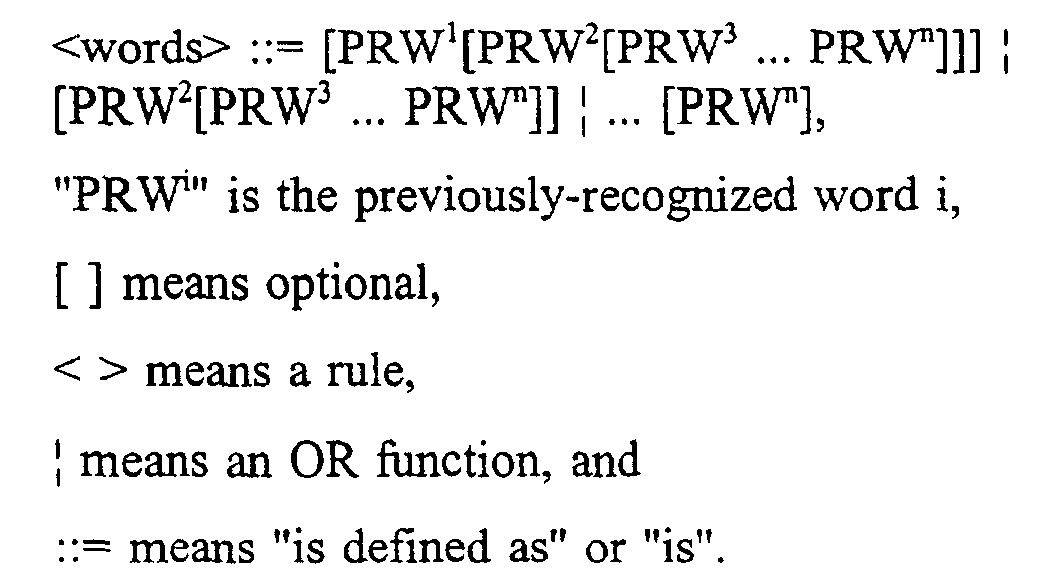
- Referring again to Fig. 2, another
constraint grammar 225 that may be used by thespeech recognition software 160 is a large vocabulary dictation grammar. The large vocabulary dictation grammar identifies words included in theactive vocabulary 230, which is the vocabulary of words known to the software. The large vocabulary dictation grammar also indicates the frequency with which words occur. A language model associated with the large vocabulary dictation grammar may be a unigram model that indicates the frequency with which a word occurs independently of context, or a bigram model that indicates the frequency with which a word occurs in the context of a preceding word. For example, a bigram model may indicate that a noun or adjective is more likely to follow the word "the" than is a verb or preposition. -
Other constraint grammars 225 include an in-line dictation macros grammar for dictation commands, such as "CAP" or "Capitalize" to capitalize a word and "New-Paragraph" to start a new paragraph; the select X Y Z grammar discussed above and used in selecting text; an error correction commands grammar; a dictation editing grammar; an application command and control grammar that may be used to control aparticular application program 155; a global command and control grammar that may be used to control theoperating system 150 and thespeech recognition software 160; a menu and dialog tracking grammar that may be used to manipulate menus; and a keyboard control grammar that permits the use of speech in place of input devices, such as thekeyboard 115 or themouse 110. - The
active vocabulary 230 uses a pronunciation model in which each word is represented by a series of phonemes that comprise the phonetic spelling of the word. Each phoneme may be represented as a triphone that includes three nodes. A triphone is a context-dependent phoneme. For example, the triphone "abc" represents the phoneme "b" in the context of the phonemes "a" and "c", with the phoneme "b" being preceded by the phoneme "a" and followed by the phoneme "c". - One or more vocabulary files may be associated with each user. The vocabulary files contain all of the words, pronunciations and language model information for the user. Dictation and command grammars may be split between vocabulary files to optimize language model information and memory use, and to keep each single vocabulary file under 64,000 words. There also is a set of system vocabularies.
- Separate
acoustic models 235 are provided for each user of the system. Initially speaker-independent acoustic models of male or female speech are adapted to a particular user's speech using an enrollment program. The acoustic models may be further adapted as the system is used. The acoustic models are maintained in a file separate from theactive vocabulary 230. - The
acoustic models 235 represent phonemes. In the case of triphones, theacoustic models 235 represent each triphone node as a mixture of Gaussian probability density functions ("PDFs"). For example, node "i" of a triphone "abc" may be represented as abic:where each wk is a mixture weight,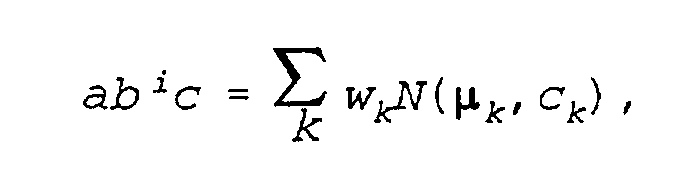 µk is a mean vector for the probability density function ("PDF") Nk , and ck is the covariance matrix for the PDF Nk . Like the frames in the sequence of frames, the vectors µk each include twenty four parameters. The matrices ck are twenty four by twenty four matrices. Each triphone node may be represented as a mixture of up to, for example, sixteen different PDFs.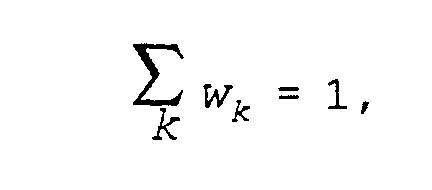
- A large vocabulary dictation grammar may include multiple dictation topics (e.g., "medical" or "legal"), each having its own vocabulary file and its own language model. A dictation topic includes a set of words which represents the
active vocabulary 230. In a typical example, a topic may include approximately 30,000 words that are considered for normal recognition. - A complete dictation vocabulary consists of the
active vocabulary 230 plus abackup vocabulary 245. The backup vocabulary may include files that contain user-specific backup vocabulary words and system-wide backup vocabulary words. - User-specific backup vocabulary words include words which a user has created while using the speech recognition software. These words are stored in vocabulary files for the user and for the dictation topic, and are available as part of the backup dictionary for the dictation topic regardless of user, and to the user regardless of which dictation topic is being used. For example, if a user is using a medical topic and adds the word "ganglion" to the dictation vocabulary, any other user of the medical topic will have immediate access to the word "ganglion". In addition, the word will be written into the user-specific backup vocabulary. Then, if the user says "ganglion" while using a legal topic, the word "ganglion" will be available during correction from the backup dictionary.
- In addition to the user-specific backup vocabulary noted above, there is a system-wide backup vocabulary. The system-wide backup vocabulary contains all the words known to the system, including words which may currently be in an active vocabulary.
- The
recognizer 215 may operate in parallel with apre-filtering procedure 240. Upon initiating processing of an utterance, therecognizer 215 requests from the pre-filtering procedure 240 a list of words that may have been spoken as the first word of the utterance (i.e., words that may correspond to the first and subsequent frames of the utterance). Thepre-filtering procedure 240 performs a coarse comparison of the sequence of frames with theactive vocabulary 230 to identify a subset of the vocabulary for which a more extensive comparison using the recognizer is justified. - The control/
interface module 220 controls operation of the speech recognition software and provides an interface to other software or to the user. The control/interface module receives the list of recognition candidates for each utterance from the recognizer. Recognition candidates may correspond to dictated text, speech recognition commands, or external commands. When the best-scoring recognition candidate corresponds to dictated text, the control/interface module provides the text to an active application, such as a word processor. The control/interface module also may display the best-scoring recognition candidate to the user through a graphical user interface. When the best-scoring recognition candidate is a command, the control/interface module 220 implements the command. For example, the control/interface module may control operation of the speech recognition software in response to speech recognition commands (e.g., "wake up", "make that"), and may forward external commands to the appropriate software. - The control/interface module also controls the active vocabulary, acoustic models, and constraint grammars that are used by the recognizer. For example, when the speech recognition software is being used in conjunction with a particular application (e.g., Microsoft Word), the control/interface module updates the active vocabulary to include command words associated with that application and activates constraint grammars associated with the application.
- Other functions provided by the control/
interface module 220 include a vocabulary customizer and a vocabulary manager. The vocabulary customizer optimizes the language model of a specific topic by scanning user supplied text. The vocabulary manager is a developer tool which is used to browse and manipulate vocabularies, grammars and macros. Each such function of the control/interface module 220 may be implemented as an executable program that is separate from the main speech recognition software. Similarly, the control/interface module 220 also may be implemented as a separate executable program. - The control/
interface module 220 also may provide an enrollment program that uses an enrollment text and a corresponding enrollment grammar to customize the speech recognition software to a specific user. The enrollment program may operate in an interactive mode that guides the user through the enrollment process, or in a non-interactive mode that permits the user to enroll independently of the computer. In the interactive mode, the enrollment program displays the enrollment text to the user and the user reads the displayed text. As the user reads, therecognizer 215 uses the enrollment grammar to match a sequence of utterances by the user to sequential portions of the enrollment text. When therecognizer 215 is unsuccessful, the enrollment program prompts the user to repeat certain passages of the text. The recognizer uses acoustic information from the user's utterances to train or adaptacoustic models 235 corresponding to the matched portions of the enrollment text. - In the non-interactive mode, the user reads the text without prompting from the computer. This offers the considerable advantage that, in addition to reading text displayed by the computer, the user can read from a printed text independent of the computer. Thus, the user could read the enrollment text into a portable recording device and later download the recorded information into the computer for processing by the recognizer. In addition, the user is not required to read every word of the enrollment text, and may skip words or paragraphs as desired. The user also may repeat portions of the text. This adds substantial flexibility to the enrollment process.
- The enrollment program may provide a list of enrollment texts, each of which has a corresponding enrollment grammar, for the user's selection. Alternatively, the user may input an enrollment text from another source. In this case, the enrollment program may generate the enrollment grammar from the input enrollment text, or may employ a previously generated enrollment grammar.
- The control/
interface module 220 also implements error correction and cursor/position manipulation procedures of thesoftware 160. Error correction procedures include a "make that" command and a "spell that" command. Cursor/position manipulation procedures include the "select" command discussed above and variations thereof (e.g, "select [start] through [end]"), "insert before/after" commands, and a "resume with" command. - During error correction, word searches of the backup vocabularies start with the user-specific backup dictionary and then check the system-wide backup dictionary. The backup dictionaries also are searched when there are new words in text that a user has typed.
- When the system makes a recognition error, the user may invoke an appropriate correction command to remedy the error. Figs. 4A-4N illustrate a user interface provided by the control/
interface module 220 in response to a sequence of interspersed text and commands. As shown in Fig. 4A, therecognizer 215 correctly recognizes a first utterance 1300 ("When a justice needs a friend New-Paragraph") and the control/interface module 220 displays the results 1305 ("When a justice needs a friend") of recognizing the utterance in adictation window 1310. Themodule 220 displays text 1305 ("When a justice needs a friend") corresponding to a text portion of the utterance and implements the formatting command ("New-Paragraph") included in the utterance. - The
recognizer 215 incorrectly recognizes a second utterance 1315 ("there are two kinds of legal kibitzers") by incorrectly recognizing the word "kibitzers" as "cancers". The control/interface module 220 displays this incorrect result 1316 ("There are two kinds of legal cancers") in thedictation window 1310. The control/interface module also displays the results of recognizing the current utterance, which, in this case, is the second utterance, in adisplay field 1320 at the bottom of thewindow 410. - As shown in Fig. 4B, the user corrects the incorrect recognition by selecting the word "cancers" using the
mouse 110 and saying "Spell That k i b i". The control/interface module responds to recognition of the "Spell That" command by displaying acorrection dialog box 1325, such as is illustrated in Fig. 4B. Thebox 1325 displays a numbered list ofwords 1326 starting with the indicated letters ("kibi"). Instead of using themouse 110 to select the word "cancer", the user could have verbally selected the word using a "Select" command by saying "Select cancer". Similarly, instead of saying "Spell That k i b i", the user could have typed the letters "k i b i". - The user selects the correct word 1327 ("kibitzers") by saying "Choose 4", where "kibitzers" is the fourth word on the choice list. As shown in Fig. 4C, the control/
interface module 220 responds by replacing the incorrect word ("cancers") with the selectedword 1327 in thedictation window 1310. - Referring again to Fig. 4B, the
correction dialog box 1325 includes a "Train"button 1328. When the user selects this button, the control/interface module responds by prompting the user through a training session to obtain one or more samples from the user of the word or words to be trained. The recognizer uses these samples to adapt acoustic models for the words to the user's speech patterns. - utterance As shown in Fig. 4D, the
recognizer 215 next misrecognizes a third utterance 1329 ("those who pronounce amicus") and the control/interface module 220 responds by inserting the incorrect text 1330 ("those who Brown to meet this") in thedictation window 1310. As shown in Fig. 4E, the user causes the control/interface module 220 to generate thecorrection dialog box 1325 by saying the "Correct That"command 1331. Thecorrection dialog box 1325 includes a list 1332 of recognition candidates for theentire utterance 1329. Though thedialog box 1325 permits only ten recognition candidates to be displayed at a single time, the list 1332 may include more than ten entries. Additional entries may be accessed using ascroll bar 1333. - As shown in Fig. 4F, the user selects the word "Brown" 1335 using the
mouse 110. As noted above, the user could also select the word "Brown" by using the voice command "Select Brown". As shown in Fig. 4G, the user then says "p r o n" 1340 to indicate that the word Brown should be replaced with a word starting with the letters "pron". The user could achieve the same result by typing the letters "pron". The control/interface module 220 responds by producing an updatedlist 1341 of recognition candidates, where each recognition candidate includes a word starting with "pron" in the position previously occupied by the word "Brown". Each of the recognition candidates includes the correctly-recognized words that preceded "Brown" ("those who") and the words that followed "Brown" ("to meet this"). - As shown in Fig. 4H, the user selects the
recognition candidate 1345 that includes the word "pronounce" by using the mouse to select the third entry in the list. The user could achieve the same result by saying "Choose 3". - As shown in Fig. 4I, the user then uses the mouse to select the words "to meet this" 1350. Then, as shown in Fig. 4J, the user types the letters "amicu", and the control/
interface module 220 responds by producing an updatedlist 1351 of recognition candidates that start with the words "those who pronounce" and include a word starting with the letters "amicu". Anentry 1352 of the list includes a phrase "amicus curiae" that starts with the letters "amicu". Since thefirst entry 1353 is the correct entry, the user clicks on an "OK"button 1354 at the bottom of thecorrection dialog box 1325. As shown in Fig. 4K, the control/interface module 220 responds by placing thecorrect version 1355 of the utterance in thedictation window 1310. As discussed above, all of the correction steps for the utterance are performed within the samecorrection dialog box 1325. - As shown in Fig. 4L, the
recognizer 215 next misrecognizes an utterance 1360 ("Each submits a brief as an outsider") and the control/interface module 220 responds by inserting the incorrect text 1361 ("Each submits a brief is an outsider") in thedictation window 1310. Fig. 4L also illustrates another feature of the interface. As an utterance is being recognized, the control/interface module 220 may display apartial recognition candidate 1365 for the utterance. This partial candidate represents the best scoring hypotheses for the utterance at a point in time before the recognizer completes processing of the utterance. Display of the partial candidate is useful for long utterances that may require an extended time for processing. As shown in Fig. 4M, the user again causes the control/interface module 220 to generate thecorrection dialog box 1325 by saying the "Correct That"command 1331. Thecorrection dialog box 1325 includes alist 1370 of recognition candidates for theentire utterance 1331. Since the text of theutterance 1360 appears as thesecond entry 1372 on thelist 1370, the user selects the text by saying "Choose 2". As shown in Fig. 4N, the control/interface module 220 responds by placing thetext 1372 in thedialog box 1310. - Referring to Fig. 5A, the control/
interface module 220 may process recognition results according to aprocedure 1400. Initially, the control/interface module 220 receives recognition results for an utterance from the recognizer 215 (step 1405). If the speech recognition software is not operating in correction mode (i.e., thecorrection dialog box 1325 is not displayed) (step 1405), the control/interface module determines whether the best-scoring recognition candidate includes only text (step 1410). If so, the control/interface module processes the text (step 1415). For example, the control/interface module may insert the text into adictation window 1310. - If the best-scoring recognition candidate includes something other than text (step 1410), the control/interface module determines whether the candidate includes a correction command (step 1420). Correction commands activate the
correction dialog box 1325 and include the "Select", "Spell That", and "Correct That" commands noted above, and an additional correction command, referred to as the "Make That" command. - If the best-scoring recognition candidate does not include a correction command (step 1420), the control/interface module processes any other command included in the best-scoring recognition candidate (step 1425). For example, as shown in Fig. 4A, if the best-scoring recognition candidate includes text and a formatting command such as New-Paragraph, then the control/interface module processes the text portion of the candidate and performs the formatting command.
- If the best-scoring recognition candidate includes a correction command (step 1420), then the control/interface module displays the correction dialog box 1325 (step 1430) and enters the correction mode (step 1435).
- Next, the control/interface module processes the best-scoring recognition candidate as a correction command (step 1440). The control/interface module also processes the best-scoring recognition candidate as a correction command if the software already is operating in the correction mode when the recognition results are received (i.e., the correction dialog box is already displayed).
- In general, the control/interface module responds to correction commands by displaying a choice list in the
correction dialog box 1325. For the "Correct That" command, if no portion of the best-scoring recognition candidate has been selected previously using themouse 110,keyboard 115, or the "Select" command, the choice list includes the recognition candidates provided by therecognizer 215, with the candidates being ordered according to their associated scores. If a portion of the best-scoring recognition candidate has been selected previously, then the choice list includes versions of the original recognition candidate in which the selected portion varies. These versions of the original candidate may be generated by having therecognizer 215 perform a re-recognition of the utterance using a constraint grammar that only permits the selected portion of the original candidate to vary from the original candidate. - Similarly, for the "Spell That" command, if no portion of the original candidate has been selected previously, then the choice list includes only entries that begin with the letters following "Spell That" in the "Spell That" command. If a portion of the original candidate has been selected previously, then the choice list includes versions of the original candidate in which the selected portion starts with the letters provided in the "Spell That" command.
- The "Make That" command includes the words "Make That" followed by one or more replacement words. If no portion of the original candidate has been selected previously, then the choice list includes entries corresponding to recognition of the replacement words, so that the entire original candidate is replaced with the replacement words. Alternatively, the software could identify automatically a portion of the original candidate to be replaced with the replacement words and list recognition candidates that include different versions of that portion. If a portion of the original candidate has been selected previously, then the choice list includes versions of the original candidate in which the selected portion has been replaced with different recognition candidates for the replacement words.
- After processing the best-scoring recognition candidate (step 1440), the control/interface module determines whether the command included in the candidate has completed the correction session (step 1445). If so, the control/interface module exits the correction mode and removes the correction dialog box (step 1450). In either case, the control/interface module then waits for receipt of the next set of recognition candidates (step 1400). The control/interface module also waits for such receipt after processing a text-only candidate (step 1415) or a candidate that includes no correction commands (step 1425).
- As noted above, the user may choose either to speak a correct word or words using the "Make That" command or to verbally spell a correct word or portion of a word using the "Spell That" command. When the user invokes the "Make That" command, the
recognizer 215 performs speech recognition on the utterance that includes the command and returns the results in the form of a list of ordered groups of phonemes (i.e., recognition candidates). For example, the recognition candidate for "Make That Apple" could include the phonemes corresponding to "Make That a pull" while the second recognition candidate could include the phonemes corresponding to "Make That apple". - The control/
interface module 220 may expand on the list of recognition candidates provided by therecognizer 215 by finding "confused pronunciation" matches for the phonemes following "Make That" in each of the recognition candidates. Confused pronunciation is based on the observation that phonemes having similar characteristics are commonly confused with one another. The control/interface module 220 then creates a list of words corresponding to the confused pronunciation results and uses those words to populate the choice list in thecorrection dialog box 1325. - The
software 160 also may be configured so that the "Make That" and "Spell That" commands do not use a correction dialog box. When the software is so configured, the control/interface module replaces an utterance, a selected portion of the utterance, or an automatically determined portion of the utterance with the text portion of the best-scoring result of the "Make That" or "Spell That" commands. The control/interface module may perform the replacement by instructing therecognizer 215 to perform a re-recognition of the utterance using a constraint grammar that requires the results of the re-recognition to include an entry from the list. - When the user invokes the "Spell That" command, the
recognizer 215 recognizes the spelling of the word in the context of a spelling constraint grammar that permits recognition of only letters. The recognition candidates provided by therecognizer 215 are in the form of a list of ordered groups of letters, with each group being a probable recognition result for the word or portion of a word spelled by the user. The control/interface module may then find "confused spelling" matches for the groups of letters in the list of results. The confused spelling match is similar to the confused pronunciation match, and is based on the observation that letters having similar pronunciation are often confused with one another. The results of the confused spelling match are then used in the same manner as the results of the confused pronunciation match to correct previously-misrecognized text. - Generally, the system performs the confused pronunciation or confused spelling matches by searching a dictionary. If the word used to correct the previously misrecognized word is absent from the active vocabulary, then the
recognizer 215 could not have avoided misrecognizing the word during the original recognition. To avoid repetition of the misrecognition, the control/interface module "activates" the word from the backup dictionary by adding the word to theactive vocabulary 230. - Referring to Fig. 6, the control/
interface module 220 implements correction commands according to aprocedure 1440. If the command corresponds to the "Correct That" command (step 1500), then the control/interface module displays a choice list as described above (step 1505). - If the command does not correspond to the "Correct That" command (step 1500), and instead corresponds to the "Select" command or a variation of that command (e.g., "Select [start] through [end]") (step 1510), then the control/interface module finds and highlights the word or words identified by the select command (step 1515). Thus, for the basic "Select" command, the module highlights the word or words following "Select". Similarly, for the "Select [start] through [end]" command, the module highlights the block of text starting with the word corresponding to "[start]" and ending with the word corresponding to "[end]". These words are identified by the
recognizer 215 through implementation of the constraint grammar corresponding to the expanded "Select" command, which may be expressed as:where In general, the command considers all of the previously-recognized words that are displayed on the
display 120. - The illustrated constraint grammar provides for a "Select [word(s)]" command, a "Select [start] Through [end]" command, a "Select From [start] To [end]" command, a "Select From [start] Through [end]" command, a "Select That" command, and a "Select Again" command. Other variations also could be provided.
- The notation (ordered) indicates that words in the first instance of <words> in the command appear in the text before words in the second instance of <words>. Use of {ordered} in the constraint grammar provides considerable processing savings relative to an approach that requires the second instance of <words> to differ depending upon the words included in the first instance. The {ordered} operator may be implemented by permitting both instances of <words> to include any words from the previously-recognized text, and throwing out any hypotheses that include out-of-order results (i.e., results in which the "starting" word actually follows the "ending" word of the block to be selected. Thus, the constraint grammar employs positional information to eliminate nonsensical results.
- The "Select That" command provides for a quick and efficient way to select and highlight the user's previous utterance. In particular, the control/interface module highlights the words corresponding to the previous utterance in response to the "Select That" command.
- The "Select Again" command provides for a quick and efficient way to select a particular instance of a word when a word appears multiple times in a passage. For example, if the word "speech" had occurred three times in the text displayed on the screen, and the system had highlighted the first occurrence (or a passage beginning or ending with the first occurrence), the user could move to the next occurrence by saying "Select Again". User-selectable parameters may be used to designate whether the select commands look for word occurrences located before or after the cursor position.
- In generating hypotheses that correspond to the select command, the
recognizer 215 may be configured to score homophones equally. Thus, if the displayed text included the word "triphones" and the phrase "try phones", the recognizer would use the score of the best scoring of the two elements in generating hypotheses that include each of the two elements. - The constraint grammar for <words> may be updated incrementally as the displayed text changes. For example, as text scrolls off the top of the display and new text is added at the bottom, the removed text may be eliminated from the beginning of the grammar while the new text is added to the end of the grammar.
- The results of the "Select" command also may be achieved by using the
mouse 110 orkeyboard 115 to select a desired portion of the utterance. - If the command does not correspond to the "Correct That" command (step 1500) or the "Select" command (step 1510), the control/interface module determines whether the command corresponds to the "Make That" command (step 1520). The
recognizer 215 identifies the "Make That" command using a constraint grammar similar to the constraint grammar for the "Select" command. In particular, the constraint grammar requires the words "make that" to be followed by one or more words from the recognition vocabulary. This constraint grammar may be expressed as:where and
and If the user has invoked the "Make That" command (step 1520), the control/interface module performs a MAKETHAT correction procedure (step 1525).
- If the command does not correspond to the "Correct That" command (step 1500), the "Select" command (step 1510), or the "Make That" command (step 1520), the control/interface module determines whether the command corresponds to the "Spell That" command (step 1530). The
recognizer 215 identifies the "Spell That" command using the following constraint grammar:where and
and
<letter> is any letter of the alphabet.
If the user has invoked the "Spell That" command (step 1530), the control/interface module performs the SPELLTHAT correction procedure (step 1535). From the dialog box, the user also may invoke the "Spell That" command by typing or speaking a series of letters. - Following performing one of the MAKETHAT (step 1525) or SPELLTHAT (step 1535) correction procedures, the control/interface module performs a procedure identified as FIND&REPLACE (step 1540). This procedure replaces some of the previously-recognized text with text produced by the MAKETHAT or SPELLTHAT correction procedures. Briefly, if a portion of an utterance has been selected using the "Select" command or other means, the control/
interface module 220 instructs therecognizer 215 to perform a re-recognition to replace the selected word or words. If no selection has been made, then the control/interface module either replaces the entire utterance with text produced by the MAKETHAT or SPELLTHAT correction procedures, or re-recognizes speech frames for the previously-recognized words to replace a word or words in the previous recognition results. - If the correction command is the "Choose N" command (step 1545), the control/interface module selects entry "N" from the list displayed in the correction dialog box 1325 (step 1550) and indicates that correction is done (step 1555). If the correction command is "OK" or some other affirmative response (step 1560), then the control/interface module selects the top entry in the correction dialog box 1325 (step 1565) and indicates that correction is done (step 1555).
- Fig. 5B illustrates a procedure used by the control/interface module to perform cursor/position manipulation commands and other commands included in the best-scoring recognition candidate (step 1425). Particular commands illustrated in Fig. 5B include an "Insert Before" command, an "Insert After" command, and a "Resume With" command.
- If the command is an "Insert Before" command (step 1455), the module moves the cursor/action position to a position preceding the text identified in the command (step 1460). Similarly, if the command is an "Insert After" command (step 1465), the module moves the cursor/action position to a position following the text identified in the command (step 1470).
- The "Insert Before/After" commands provide a simple way for the user to move to a desired position in the text. The
recognizer 215 identifies these commands using an "Insert" constraint grammar, which may be expressed as:where
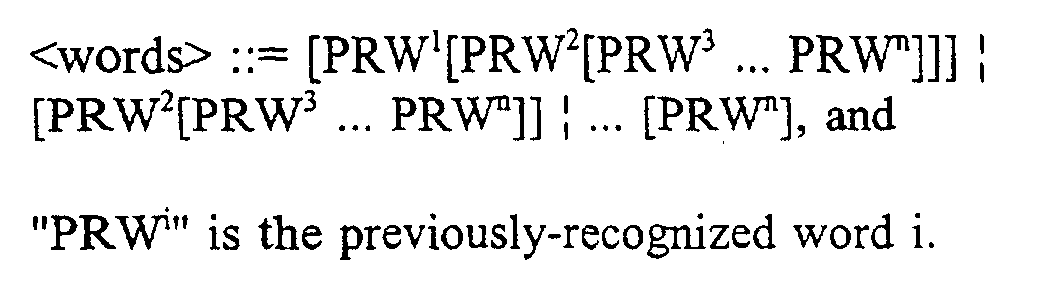
- The "Insert Before That" and "Insert After That" commands provide quick and efficient ways to move to the beginning or end of the user's previous utterance or to a previous selection by the user. When the user has not previously selected text, the control/interface module responds to this command by moving the cursor/action position to a location before or after the previous utterance, as appropriate. Thus, if a user neglected to put a word at a beginning of an utterance, the user could say "Insert Before That" to move to the beginning of the utterance. After speaking the missing word, the user could say "Insert After That" to move back to the end of the utterance.
- When the user has previously selected text, the control interface module responds to the "Insert Before/After That" command by moving the cursor/action position to a location before or after the selection. Thus, the user could select a passage by saying for example, "Select [start] Through [end]", and could then move to the beginning of the passage by saying "Insert Before That".
- If the command is a "Resume With" command (step 1475), the module finds in the text the word or words identified by the command and overlapping the text (step 1480) and replaces any following text with the word or words identified in the command (step 1485). Thus, if the user had said "Today, I saw a giraffe at the zoo" followed by "Resume With saw an elephant at the circus", the module would cause the system to display "Today, I saw an elephant at the circus". In this example, "saw" would be the overlapping word.
- Similarly, if the user had said "Today, I saw a giraffe at the zoo PERIOD" followed by "The giraffe had a long neck PERIOD" followed by "Resume With saw an elephant at the circus", the module would cause the system to display "Today, I saw an elephant at the circus". Thus, most of the first sentence and all of the second sentence of the original dictation would be overwritten by the text in the "Resume With" command. As also shown, the "Resume with" command may be used to overwrite multiple utterances. In some implementations, the user is required to pause before reciting the "Resume With" command. This is not required in other implementations.
- The "Resume With" command does not rely on the presentation of information on the display. For that reason, the command is particularly useful when the user records speech using a portable recording device, such as an analog or digital recorder, and subsequently transfers the recorded speech to the speech recognition system for processing. In that context, the "Resume With" command provides the user with a simple and efficient way of redirecting the dictation and eliminating erroneously-spoken words.
- The
recognizer 215 identifies the "Resume With" command using a "Resume With" constraint grammar, which may be expressed as:where If the command is not an "Insert" command or a "Resume With" command, the module processes the command accordingly (step 1490).
- Other embodiments are within the scope of the following claims. For example, the techniques described here are not limited to any particular hardware or software configuration; they may find applicability in any computing or processing environment that may be used for speech recognition. The techniques may be implemented in hardware or software, or a combination of the two. Preferably, the techniques are implemented in computer programs executing on programmable computers that each include a processor, a storage medium readable by the processor (including volatile and non-volatile memory and/or storage elements), at least one input device, and at least one output device. Program code is applied to data entered using the input device to perform the functions described and to generate output information. The output information is applied to one or more output devices.
- Each program is preferably implemented in a high level procedural or object oriented programming language to communicate with a computer system. However, the programs can be implemented in assembly or machine language, if desired. In any case, the language may be a compiled or interpreted language.
- Each such computer program is preferably stored on a storage medium or device (e.g., CD-ROM, hard disk or magnetic diskette) that is readable by a general or special purpose programmable computer for configuring and operating the computer when the storage medium or device is read by the computer to perform the procedures described in this document. The system may also be considered to be implemented as a computer-readable storage medium, configured with a computer program, where the storage medium so configured causes a computer to operate in a specific and predefined manner.
Claims (14)
- A method (1400) of manipulating an action position in computer-implemented speech recognition, comprising:receiving data representing a spoken command (1420), the command including a command identifier and a designation comprising at least one previously-spoken word;performing speech recognition on the data to identify the command identifier and the designation (1405, 1455, 1465, 1475); and characterised byestablishing an action position at which an action is to be performed based on the command identifier (1460, 1470, 1480), the action position being relative to the at least one previously-spoken word.
- The method of claim 1, wherein the command identifier indicates that the action position is to be before the at least one previously-spoken word, and establishing the action position comprises establishing the action position immediately prior to the at least one previously-spoken word (1460).
- The method of claim 2, wherein the command identifier comprises "insert before".
- The method of claim 1, wherein the command identifier indicates that the action position is to be after the at least one previously-spoken word, and establishing the action position comprises establishing the action position immediately after the at least one previously-spoken word (1460).
- The method of claim 4, wherein the command identifier comprises "insert after" .
- The method of claim 1, wherein the designation comprises a designation term that represents a multi-word utterance.
- The method of claim 1, wherein the designation comprises at least one new word, the method further comprising replacing any words following the at least one previously-spoken word with the at least one new word (1485).
- The method of any of the preceding claims, wherein establishing the action position comprises establishing the action position after the at least one new word (1470).
- The method of claim 7, wherein the command identifier comprises "resume with".
- The method according to any of the preceding claims, wherein receiving data comprises receiving data generated by recording the spoken command using a recording device physically separate from a computer implementing the speech recognition.
- The method of claim 10, wherein the recording device comprises a digital recording device, and receiving data comprises receiving a file from the digital recording device.
- The method of claim 10, or claim 11, wherein receiving data comprises receiving signals generated by playing back the spoken command using the recording device.
- Computer software (160), residing on a computer-readable storage medium (145), comprising instructions for causing a computer (125) to:receive data representing a spoken command (1420), the command including a command identifier and a designation comprising at least one previously-spoken word;perform speech recognition on the data to identify the command identifier and the designation (1405, 1455, 1465, 1475); and characterised in that the system 100 is configured toestablish an action position at which an action is to be performed based on the command identifier (1460, 1470, 1480), the action position being relative to the at least one previously-spoken word.
- A speech recognition system (100), comprising:an input device (105, 110, 115, 120) for receiving speech signals; and a processor (130) configured to:receive data representing a spoken command (1420), the command including a command identifier and a designation comprising at least one previously-spoken word;perform speech recognition on the data to identify the command identifier and the designation (1405, 1455, 1465, 1475); and characterised in that the system 100 is configured toestablish an action position at which an action is to be performed based on the command identifier (1460, 1470, 1480), the action position being relative to the at least one previously-spoken word.
Applications Claiming Priority (2)
| Application Number | Priority Date | Filing Date | Title |
|---|---|---|---|
| US94611 | 1987-09-09 | ||
| US09/094,611 US6601027B1 (en) | 1995-11-13 | 1998-06-15 | Position manipulation in speech recognition |
Publications (2)
| Publication Number | Publication Date |
|---|---|
| EP0965979A1 EP0965979A1 (en) | 1999-12-22 |
| EP0965979B1 true EP0965979B1 (en) | 2004-01-14 |
Family
ID=22246158
Family Applications (1)
| Application Number | Title | Priority Date | Filing Date |
|---|---|---|---|
| EP99304637A Expired - Lifetime EP0965979B1 (en) | 1998-06-15 | 1999-06-15 | Position manipulation in speech recognition |
Country Status (4)
| Country | Link |
|---|---|
| US (1) | US6601027B1 (en) |
| EP (1) | EP0965979B1 (en) |
| JP (1) | JP4444396B2 (en) |
| DE (1) | DE69914131T2 (en) |
Families Citing this family (49)
| Publication number | Priority date | Publication date | Assignee | Title |
|---|---|---|---|---|
| US7689416B1 (en) | 1999-09-29 | 2010-03-30 | Poirier Darrell A | System for transferring personalize matter from one computer to another |
| JP2001100781A (en) * | 1999-09-30 | 2001-04-13 | Sony Corp | Audio processing device, audio processing method, and recording medium |
| MXPA02005466A (en) * | 1999-12-02 | 2002-12-16 | Thomson Licensing Sa | Speech recognition with a complementary language model for typical mistakes in spoken dialogue. |
| US7243069B2 (en) * | 2000-07-28 | 2007-07-10 | International Business Machines Corporation | Speech recognition by automated context creation |
| US6836759B1 (en) | 2000-08-22 | 2004-12-28 | Microsoft Corporation | Method and system of handling the selection of alternates for recognized words |
| DE60128816T2 (en) * | 2000-09-08 | 2008-02-07 | Koninklijke Philips Electronics N.V. | LANGUAGE RECOGNITION PROCEDURE WITH REPLACEMENT COMMAND |
| US7085716B1 (en) * | 2000-10-26 | 2006-08-01 | Nuance Communications, Inc. | Speech recognition using word-in-phrase command |
| DE10119677A1 (en) * | 2001-04-20 | 2002-10-24 | Philips Corp Intellectual Pty | Procedure for determining database entries |
| US20030061053A1 (en) * | 2001-09-27 | 2003-03-27 | Payne Michael J. | Method and apparatus for processing inputs into a computing device |
| US20090106251A1 (en) * | 2001-10-24 | 2009-04-23 | Harris Scott C | Web based communication of information with reconfigurable format |
| US20030130875A1 (en) * | 2002-01-04 | 2003-07-10 | Hawash Maher M. | Real-time prescription renewal transaction across a network |
| US20030130867A1 (en) * | 2002-01-04 | 2003-07-10 | Rohan Coelho | Consent system for accessing health information |
| KR100438838B1 (en) * | 2002-01-29 | 2004-07-05 | 삼성전자주식회사 | A voice command interpreter with dialogue focus tracking function and method thereof |
| JP3967952B2 (en) * | 2002-04-16 | 2007-08-29 | 富士通株式会社 | Grammar update system and method |
| WO2005086908A2 (en) * | 2004-03-09 | 2005-09-22 | Ashwin Rao | System and method for computer recognition and interpretation of arbitrary spoken-characters |
| US7580837B2 (en) | 2004-08-12 | 2009-08-25 | At&T Intellectual Property I, L.P. | System and method for targeted tuning module of a speech recognition system |
| US7925506B2 (en) * | 2004-10-05 | 2011-04-12 | Inago Corporation | Speech recognition accuracy via concept to keyword mapping |
| KR100679042B1 (en) * | 2004-10-27 | 2007-02-06 | 삼성전자주식회사 | Speech recognition method and apparatus, navigation system using same |
| GB0426347D0 (en) * | 2004-12-01 | 2005-01-05 | Ibm | Methods, apparatus and computer programs for automatic speech recognition |
| US7242751B2 (en) | 2004-12-06 | 2007-07-10 | Sbc Knowledge Ventures, L.P. | System and method for speech recognition-enabled automatic call routing |
| US7751551B2 (en) | 2005-01-10 | 2010-07-06 | At&T Intellectual Property I, L.P. | System and method for speech-enabled call routing |
| US7627096B2 (en) * | 2005-01-14 | 2009-12-01 | At&T Intellectual Property I, L.P. | System and method for independently recognizing and selecting actions and objects in a speech recognition system |
| JP4574390B2 (en) * | 2005-02-22 | 2010-11-04 | キヤノン株式会社 | Speech recognition method |
| US7949536B2 (en) * | 2006-08-31 | 2011-05-24 | Microsoft Corporation | Intelligent speech recognition of incomplete phrases |
| US8502876B2 (en) | 2006-09-12 | 2013-08-06 | Storz Endoskop Producktions GmbH | Audio, visual and device data capturing system with real-time speech recognition command and control system |
| US9830912B2 (en) | 2006-11-30 | 2017-11-28 | Ashwin P Rao | Speak and touch auto correction interface |
| US8731925B2 (en) * | 2006-12-22 | 2014-05-20 | Nuance Communications, Inc. | Solution that integrates voice enrollment with other types of recognition operations performed by a speech recognition engine using a layered grammar stack |
| KR20090020265A (en) * | 2007-08-23 | 2009-02-26 | 삼성전자주식회사 | Mobile device and how to write a message |
| US20090234655A1 (en) * | 2008-03-13 | 2009-09-17 | Jason Kwon | Mobile electronic device with active speech recognition |
| US8536976B2 (en) * | 2008-06-11 | 2013-09-17 | Veritrix, Inc. | Single-channel multi-factor authentication |
| US8849672B2 (en) * | 2008-05-22 | 2014-09-30 | Core Wireless Licensing S.A.R.L. | System and method for excerpt creation by designating a text segment using speech |
| US8166297B2 (en) * | 2008-07-02 | 2012-04-24 | Veritrix, Inc. | Systems and methods for controlling access to encrypted data stored on a mobile device |
| US9922640B2 (en) | 2008-10-17 | 2018-03-20 | Ashwin P Rao | System and method for multimodal utterance detection |
| WO2010051342A1 (en) * | 2008-11-03 | 2010-05-06 | Veritrix, Inc. | User authentication for social networks |
| US9197736B2 (en) | 2009-12-31 | 2015-11-24 | Digimarc Corporation | Intuitive computing methods and systems |
| JP5753769B2 (en) * | 2011-11-18 | 2015-07-22 | 株式会社日立製作所 | Voice data retrieval system and program therefor |
| US9336776B2 (en) * | 2013-05-01 | 2016-05-10 | Sap Se | Enhancing speech recognition with domain-specific knowledge to detect topic-related content |
| JP6100101B2 (en) * | 2013-06-04 | 2017-03-22 | アルパイン株式会社 | Candidate selection apparatus and candidate selection method using speech recognition |
| USD747733S1 (en) * | 2013-08-30 | 2016-01-19 | SkyBell Technologies, Inc. | Display screen or portion thereof with a graphical user interface |
| JP6193736B2 (en) * | 2013-11-15 | 2017-09-06 | 日本電信電話株式会社 | Homophone / synonym removal method, compound word removal method, homophone / synonym removal method, device and program thereof |
| US9311639B2 (en) | 2014-02-11 | 2016-04-12 | Digimarc Corporation | Methods, apparatus and arrangements for device to device communication |
| USD762688S1 (en) | 2014-05-16 | 2016-08-02 | SkyBell Technologies, Inc. | Display screen or a portion thereof with a graphical user interface |
| USD759702S1 (en) | 2015-01-15 | 2016-06-21 | SkyBell Technologies, Inc. | Display screen or a portion thereof with a graphical user interface |
| USD760738S1 (en) | 2015-01-15 | 2016-07-05 | SkyBell Technologies, Inc. | Display screen or a portion thereof with a graphical user interface |
| US10134425B1 (en) * | 2015-06-29 | 2018-11-20 | Amazon Technologies, Inc. | Direction-based speech endpointing |
| US10121471B2 (en) * | 2015-06-29 | 2018-11-06 | Amazon Technologies, Inc. | Language model speech endpointing |
| US10832675B2 (en) | 2018-08-24 | 2020-11-10 | Denso International America, Inc. | Speech recognition system with interactive spelling function |
| US10325597B1 (en) | 2018-10-08 | 2019-06-18 | Sorenson Ip Holdings, Llc | Transcription of communications |
| US11875780B2 (en) * | 2021-02-16 | 2024-01-16 | Vocollect, Inc. | Voice recognition performance constellation graph |
Family Cites Families (41)
| Publication number | Priority date | Publication date | Assignee | Title |
|---|---|---|---|---|
| US4355302A (en) | 1980-09-12 | 1982-10-19 | Bell Telephone Laboratories, Incorporated | Spelled word recognizer |
| US4674065A (en) | 1982-04-30 | 1987-06-16 | International Business Machines Corporation | System for detecting and correcting contextual errors in a text processing system |
| US4566065A (en) * | 1983-04-22 | 1986-01-21 | Kalman Toth | Computer aided stenographic system |
| US4726065A (en) * | 1984-01-26 | 1988-02-16 | Horst Froessl | Image manipulation by speech signals |
| US4914704A (en) | 1984-10-30 | 1990-04-03 | International Business Machines Corporation | Text editor for speech input |
| NL8500339A (en) | 1985-02-07 | 1986-09-01 | Philips Nv | ADAPTIVE RESPONSIBLE SYSTEM. |
| US4833712A (en) | 1985-05-29 | 1989-05-23 | International Business Machines Corporation | Automatic generation of simple Markov model stunted baseforms for words in a vocabulary |
| US4783803A (en) | 1985-11-12 | 1988-11-08 | Dragon Systems, Inc. | Speech recognition apparatus and method |
| US4866778A (en) | 1986-08-11 | 1989-09-12 | Dragon Systems, Inc. | Interactive speech recognition apparatus |
| US4829576A (en) | 1986-10-21 | 1989-05-09 | Dragon Systems, Inc. | Voice recognition system |
| US4805219A (en) | 1987-04-03 | 1989-02-14 | Dragon Systems, Inc. | Method for speech recognition |
| US4805218A (en) | 1987-04-03 | 1989-02-14 | Dragon Systems, Inc. | Method for speech analysis and speech recognition |
| US5231670A (en) | 1987-06-01 | 1993-07-27 | Kurzweil Applied Intelligence, Inc. | Voice controlled system and method for generating text from a voice controlled input |
| US4931950A (en) | 1988-07-25 | 1990-06-05 | Electric Power Research Institute | Multimedia interface and method for computer system |
| JPH0293597A (en) | 1988-09-30 | 1990-04-04 | Nippon I B M Kk | Speech recognition device |
| US5027406A (en) * | 1988-12-06 | 1991-06-25 | Dragon Systems, Inc. | Method for interactive speech recognition and training |
| US5127055A (en) * | 1988-12-30 | 1992-06-30 | Kurzweil Applied Intelligence, Inc. | Speech recognition apparatus & method having dynamic reference pattern adaptation |
| US5033087A (en) | 1989-03-14 | 1991-07-16 | International Business Machines Corp. | Method and apparatus for the automatic determination of phonological rules as for a continuous speech recognition system |
| JPH03163623A (en) | 1989-06-23 | 1991-07-15 | Articulate Syst Inc | Voice control computor interface |
| US5036538A (en) | 1989-11-22 | 1991-07-30 | Telephonics Corporation | Multi-station voice recognition and processing system |
| US5202952A (en) | 1990-06-22 | 1993-04-13 | Dragon Systems, Inc. | Large-vocabulary continuous speech prefiltering and processing system |
| US5329609A (en) | 1990-07-31 | 1994-07-12 | Fujitsu Limited | Recognition apparatus with function of displaying plural recognition candidates |
| US5386494A (en) | 1991-12-06 | 1995-01-31 | Apple Computer, Inc. | Method and apparatus for controlling a speech recognition function using a cursor control device |
| JP3414735B2 (en) | 1992-03-06 | 2003-06-09 | ドラゴン システムズ インコーポレイテッド | Speech recognizer for languages with compound words |
| US5398220A (en) | 1992-04-06 | 1995-03-14 | Barker; Bruce J. | Portable dictation recording device having a mechanism for transmitting recorded dictation to a remote device |
| US5428707A (en) | 1992-11-13 | 1995-06-27 | Dragon Systems, Inc. | Apparatus and methods for training speech recognition systems and their users and otherwise improving speech recognition performance |
| EP0607615B1 (en) | 1992-12-28 | 1999-09-15 | Kabushiki Kaisha Toshiba | Speech recognition interface system suitable for window systems and speech mail systems |
| US5384892A (en) | 1992-12-31 | 1995-01-24 | Apple Computer, Inc. | Dynamic language model for speech recognition |
| US5497373A (en) | 1994-03-22 | 1996-03-05 | Ericsson Messaging Systems Inc. | Multi-media interface |
| US5491774A (en) * | 1994-04-19 | 1996-02-13 | Comp General Corporation | Handheld record and playback device with flash memory |
| US5477511A (en) * | 1994-07-13 | 1995-12-19 | Englehardt; C. Duane | Portable documentation system |
| US5765132A (en) | 1995-10-26 | 1998-06-09 | Dragon Systems, Inc. | Building speech models for new words in a multi-word utterance |
| US6064959A (en) * | 1997-03-28 | 2000-05-16 | Dragon Systems, Inc. | Error correction in speech recognition |
| US5799279A (en) * | 1995-11-13 | 1998-08-25 | Dragon Systems, Inc. | Continuous speech recognition of text and commands |
| US5794189A (en) * | 1995-11-13 | 1998-08-11 | Dragon Systems, Inc. | Continuous speech recognition |
| US6167377A (en) * | 1997-03-28 | 2000-12-26 | Dragon Systems, Inc. | Speech recognition language models |
| US6212498B1 (en) * | 1997-03-28 | 2001-04-03 | Dragon Systems, Inc. | Enrollment in speech recognition |
| US5875429A (en) * | 1997-05-20 | 1999-02-23 | Applied Voice Recognition, Inc. | Method and apparatus for editing documents through voice recognition |
| US6138098A (en) * | 1997-06-30 | 2000-10-24 | Lernout & Hauspie Speech Products N.V. | Command parsing and rewrite system |
| US6085159A (en) * | 1998-03-26 | 2000-07-04 | International Business Machines Corporation | Displaying voice commands with multiple variables |
| US6163768A (en) * | 1998-06-15 | 2000-12-19 | Dragon Systems, Inc. | Non-interactive enrollment in speech recognition |
-
1998
- 1998-06-15 US US09/094,611 patent/US6601027B1/en not_active Expired - Lifetime
-
1999
- 1999-06-15 DE DE69914131T patent/DE69914131T2/en not_active Expired - Lifetime
- 1999-06-15 EP EP99304637A patent/EP0965979B1/en not_active Expired - Lifetime
- 1999-06-15 JP JP16830399A patent/JP4444396B2/en not_active Expired - Fee Related
Also Published As
| Publication number | Publication date |
|---|---|
| EP0965979A1 (en) | 1999-12-22 |
| US6601027B1 (en) | 2003-07-29 |
| JP2000035799A (en) | 2000-02-02 |
| DE69914131D1 (en) | 2004-02-19 |
| JP4444396B2 (en) | 2010-03-31 |
| DE69914131T2 (en) | 2004-11-11 |
Similar Documents
| Publication | Publication Date | Title |
|---|---|---|
| EP0965979A1 (en) | Position manipulation in speech recognition | |
| EP0965978B1 (en) | Non-interactive enrollment in speech recognition | |
| EP1346343B1 (en) | Speech recognition using word-in-phrase command | |
| US6912498B2 (en) | Error correction in speech recognition by correcting text around selected area | |
| EP0376501B1 (en) | Speech recognition system | |
| US6212498B1 (en) | Enrollment in speech recognition | |
| US6064959A (en) | Error correction in speech recognition | |
| US5794189A (en) | Continuous speech recognition | |
| US7584102B2 (en) | Language model for use in speech recognition | |
| US5712957A (en) | Locating and correcting erroneously recognized portions of utterances by rescoring based on two n-best lists | |
| US5855000A (en) | Method and apparatus for correcting and repairing machine-transcribed input using independent or cross-modal secondary input | |
| US5787230A (en) | System and method of intelligent Mandarin speech input for Chinese computers | |
| EP0840289B1 (en) | Method and system for selecting alternative words during speech recognition | |
| US7529678B2 (en) | Using a spoken utterance for disambiguation of spelling inputs into a speech recognition system | |
| EP0840288B1 (en) | Method and system for editing phrases during continuous speech recognition | |
| US6345249B1 (en) | Automatic analysis of a speech dictated document | |
| EP1189203B1 (en) | Homophone selection in speech recognition | |
| JP4790956B2 (en) | Spelling mode in speech recognizer | |
| Besler | Improving the continuous speech control of Lotus system using error recognition/error recovery techniques |
Legal Events
| Date | Code | Title | Description |
|---|---|---|---|
| PUAI | Public reference made under article 153(3) epc to a published international application that has entered the european phase |
Free format text: ORIGINAL CODE: 0009012 |
|
| AK | Designated contracting states |
Kind code of ref document: A1 Designated state(s): DE FR GB |
|
| AX | Request for extension of the european patent |
Free format text: AL;LT;LV;MK;RO;SI |
|
| 17P | Request for examination filed |
Effective date: 20000516 |
|
| AKX | Designation fees paid |
Free format text: DE FR GB |
|
| 17Q | First examination report despatched |
Effective date: 20021025 |
|
| GRAH | Despatch of communication of intention to grant a patent |
Free format text: ORIGINAL CODE: EPIDOS IGRA |
|
| RIC1 | Information provided on ipc code assigned before grant |
Ipc: 7G 10L 15/22 B Ipc: 7G 10L 15/26 A |
|
| GRAS | Grant fee paid |
Free format text: ORIGINAL CODE: EPIDOSNIGR3 |
|
| GRAA | (expected) grant |
Free format text: ORIGINAL CODE: 0009210 |
|
| AK | Designated contracting states |
Kind code of ref document: B1 Designated state(s): DE FR GB |
|
| REG | Reference to a national code |
Ref country code: GB Ref legal event code: FG4D |
|
| REF | Corresponds to: |
Ref document number: 69914131 Country of ref document: DE Date of ref document: 20040219 Kind code of ref document: P |
|
| ET | Fr: translation filed | ||
| PLBE | No opposition filed within time limit |
Free format text: ORIGINAL CODE: 0009261 |
|
| STAA | Information on the status of an ep patent application or granted ep patent |
Free format text: STATUS: NO OPPOSITION FILED WITHIN TIME LIMIT |
|
| 26N | No opposition filed |
Effective date: 20041015 |
|
| REG | Reference to a national code |
Ref country code: FR Ref legal event code: PLFP Year of fee payment: 18 |
|
| REG | Reference to a national code |
Ref country code: FR Ref legal event code: PLFP Year of fee payment: 19 |
|
| PGFP | Annual fee paid to national office [announced via postgrant information from national office to epo] |
Ref country code: FR Payment date: 20170630 Year of fee payment: 19 Ref country code: GB Payment date: 20170630 Year of fee payment: 19 |
|
| PGFP | Annual fee paid to national office [announced via postgrant information from national office to epo] |
Ref country code: DE Payment date: 20170831 Year of fee payment: 19 |
|
| REG | Reference to a national code |
Ref country code: DE Ref legal event code: R119 Ref document number: 69914131 Country of ref document: DE |
|
| GBPC | Gb: european patent ceased through non-payment of renewal fee |
Effective date: 20180615 |
|
| PG25 | Lapsed in a contracting state [announced via postgrant information from national office to epo] |
Ref country code: FR Free format text: LAPSE BECAUSE OF NON-PAYMENT OF DUE FEES Effective date: 20180630 Ref country code: GB Free format text: LAPSE BECAUSE OF NON-PAYMENT OF DUE FEES Effective date: 20180615 Ref country code: DE Free format text: LAPSE BECAUSE OF NON-PAYMENT OF DUE FEES Effective date: 20190101 |