EP0784814B1 - Information management device - Google Patents
Information management device Download PDFInfo
- Publication number
- EP0784814B1 EP0784814B1 EP94921746A EP94921746A EP0784814B1 EP 0784814 B1 EP0784814 B1 EP 0784814B1 EP 94921746 A EP94921746 A EP 94921746A EP 94921746 A EP94921746 A EP 94921746A EP 0784814 B1 EP0784814 B1 EP 0784814B1
- Authority
- EP
- European Patent Office
- Prior art keywords
- tag
- item
- user
- tag item
- freehand input
- Prior art date
- Legal status (The legal status is an assumption and is not a legal conclusion. Google has not performed a legal analysis and makes no representation as to the accuracy of the status listed.)
- Expired - Lifetime
Links
Images


Classifications
-
- G—PHYSICS
- G06—COMPUTING OR CALCULATING; COUNTING
- G06F—ELECTRIC DIGITAL DATA PROCESSING
- G06F3/00—Input arrangements for transferring data to be processed into a form capable of being handled by the computer; Output arrangements for transferring data from processing unit to output unit, e.g. interface arrangements
- G06F3/01—Input arrangements or combined input and output arrangements for interaction between user and computer
- G06F3/048—Interaction techniques based on graphical user interfaces [GUI]
- G06F3/0487—Interaction techniques based on graphical user interfaces [GUI] using specific features provided by the input device, e.g. functions controlled by the rotation of a mouse with dual sensing arrangements, or of the nature of the input device, e.g. tap gestures based on pressure sensed by a digitiser
- G06F3/0488—Interaction techniques based on graphical user interfaces [GUI] using specific features provided by the input device, e.g. functions controlled by the rotation of a mouse with dual sensing arrangements, or of the nature of the input device, e.g. tap gestures based on pressure sensed by a digitiser using a touch-screen or digitiser, e.g. input of commands through traced gestures
- G06F3/04883—Interaction techniques based on graphical user interfaces [GUI] using specific features provided by the input device, e.g. functions controlled by the rotation of a mouse with dual sensing arrangements, or of the nature of the input device, e.g. tap gestures based on pressure sensed by a digitiser using a touch-screen or digitiser, e.g. input of commands through traced gestures for inputting data by handwriting, e.g. gesture or text
-
- G—PHYSICS
- G06—COMPUTING OR CALCULATING; COUNTING
- G06F—ELECTRIC DIGITAL DATA PROCESSING
- G06F3/00—Input arrangements for transferring data to be processed into a form capable of being handled by the computer; Output arrangements for transferring data from processing unit to output unit, e.g. interface arrangements
- G06F3/01—Input arrangements or combined input and output arrangements for interaction between user and computer
- G06F3/048—Interaction techniques based on graphical user interfaces [GUI]
- G06F3/0481—Interaction techniques based on graphical user interfaces [GUI] based on specific properties of the displayed interaction object or a metaphor-based environment, e.g. interaction with desktop elements like windows or icons, or assisted by a cursor's changing behaviour or appearance
Definitions
- the present invention relates to a device for storing information electronically and which has a pen-sensitive screen for a user to make freehand input.
- the device may be a handheld device for the storage and manipulation of personal data with a pen/stylus for user input.
- the present invention has the advantage of providing a simple and elegant way of uniting several manipulations using the single artefact of tag items.
- Tag items provide a way of permanently structuring data and can be reused as often as desired.
- the artefact of tag items is particularly useful in the context of a small screen device for storing and manipulation of personal information where convenient data manipulation is particularly important.
- a tag item is selected prior to manipulation of the tagged freehand input and creation of a tag item automatically results in selection of the newly created tag item.
- the device is configured so that only the subsidiary screen area recognises user input relating to tag item manipulations.
- the device may comprise means enabling a user to select a plurality of tag items at any one time. This complicates the user interface of the device but may be useful in certain application, for example in associating more than one address with a message.
- the tag item manipulations typically comprise moving, copying and deleting tag items and the associated freehand input and may further include the creation of a new page with the tagged item as its title.
- Figure 1 shows a pen-based handheld device 10 for stonng and displaying pages of electronic information comprising a display screen 12.
- the user makes input using a pen (not shown).
- the device 10 also comprises buttons 13.14,15 and 16 for copying, moving ('tear' and 'stick' buttons) and deleting items.
- the device 10 also compnses other buttons which are not relevant to the present invention.
- the screen 12 is divided into two parts - a main part 17 and a subsidiary screen area 18.
- the user can make freehand or 'scribble' input using the pen on the surface of the screen 12.
- An example is shown in Figure 2 in which the words 'old' and 'new' have been written by the user. It is possible to tag any such freehand input with tag items, examples of which are referenced 20 and 22.
- the user In order to create a tag item against an item of freehand input, the user simply taps the pen in the area 18 adjacent to the relevant freehand input. For example, tapping the pen in the area 18 adjacent to the word 'old' in Figure 2 causes the tag item 20 to appear.
- a stroke is associated with the nearest tag item whose top point is above or level with the top point of the received stroke. If no such tag item exists then the scribble is associated with the page instead (this simply reflects the fact that the stroke cannot currently be selected using any tag items).
- This algorithm will be called when a new stroke is input by the user.
- the algorithm also needs to be used whenever tag items are moved or created. In this case it is necessary to reevaluate the association of every scribble on the current page.
- the algorithm may be biassed in favour of associating a new stroke with the same tag item as the previous stroke. It may also use information about the bottom and mid-height of the stroke and the tag item. Optimisations for faster computation are also possible.
- a tap with the pen on an existing tag item causes that tag item to be selected. Selection of a tag item is indicated by a colour change as shown for the tag item 22 in Figure 2. Only one tag item can be selected at any one time. The next step is for the user to indicate what manipulation it is desired to make on the selected tag item and associated freehand input. This is done using the buttons 13,14,15 and 16 of the device 10.
- a double tap by the pen on a tag item causes the freehand input associated with the tapped tag item to become the title of a new page.
- the title of the new page is tagged with a reverse arrow which, when tapped reverts the display to the original page.
- the operation is recursive in that it is possible to create tagged freehand input in the sub-page and to double tap on the tag to create a further sub-page with the latest freehand input as its title.
- the new sub-page title will have a reverse arrow in the subsidiary screen area to allow the user to move upwardly in the hierarchy of sub-pages.
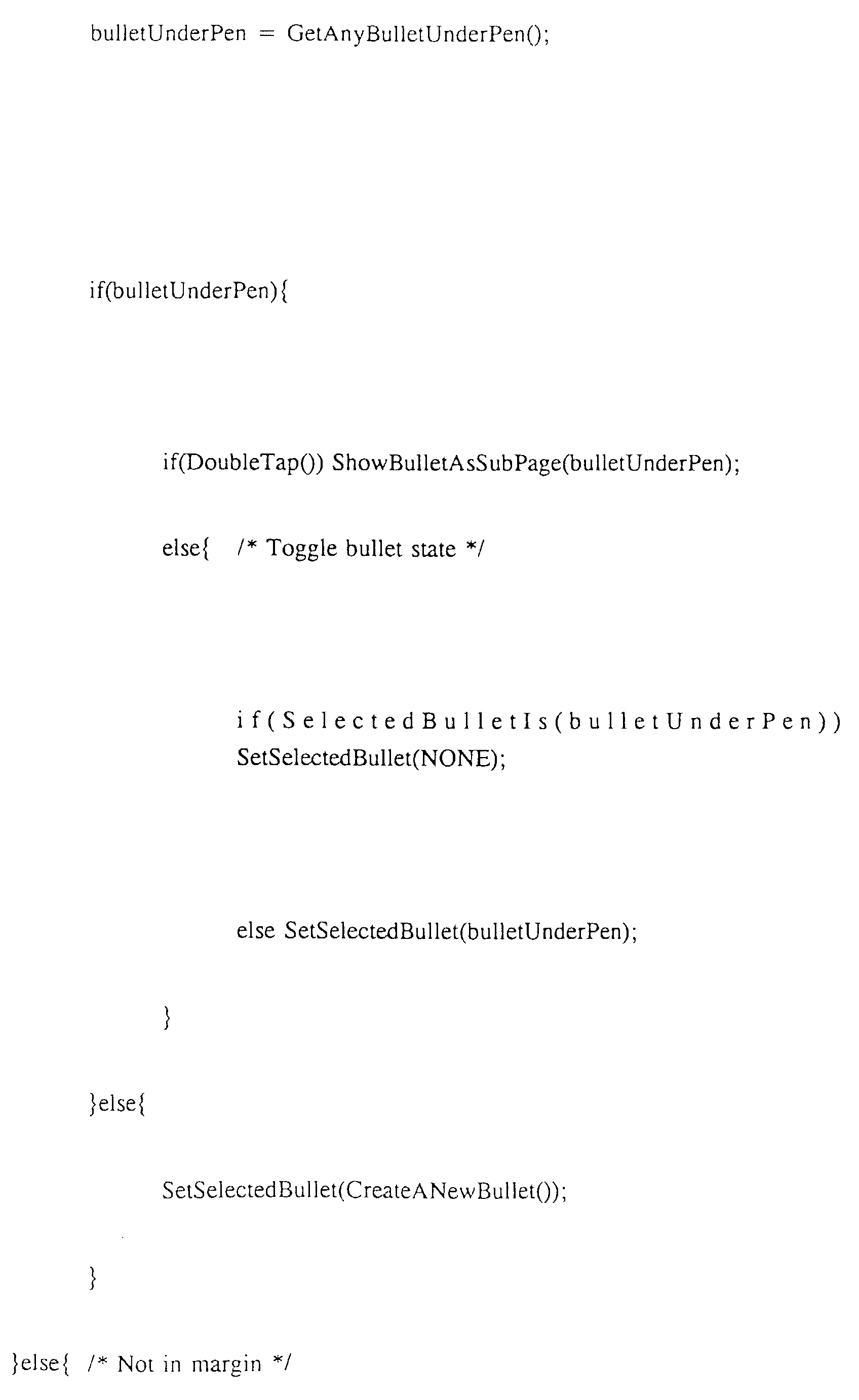
- a pseudo-code implementation of this embodiment of the present invention is as follows.
- the operations described below show how tag items (called 'bullets') may be selected or deselected and the operations that are affected by there being a selected tag item.
- the invention provides a simple and user-friendly way of manipulating freehand input.
- the range of manipulations unified by tag items may vary according to the particular device embodying the present invention. An example would be that selection of a tag item associated with a telephone number would cause the number to be rung when a 'send' or 'phone' button is pressed.
- tag items can be varied according to requirements and may be made customisable by the user. Different types of tag item could be used for different types of data eg. a sub-page which has further data at a lower level could be tagged with a differently presented tag item from sub-pages without such further data.
- the subsidiary area 18 shown as a left hand margin in Figure 2 could made larger or smaller and could appear on any edge of the displayed page.
- the device 10 may be configured so that if tag items are moved within the area 18, automatic rearrangement of the tag items occurs to avoid one tag item overlapping with another or freehand input associated with one tag item overlapping with freehand input associated with another tag item. This can be achieved by causing the original tag item to move down the screen a predetermined distance to provide enough space for the other tag item and associated input.
- Another possible feature would be to allow more than one tag item to be selected at any one time.
- An example of when this feature could be useful is when the tag items are associated with addresses and it is desired to send a message to more than one addressee. Since the selection of more than one tag item could lead to ambiguity with respect to some manipulations eg move, this feature would probably best be one which the user could invoke as required.
- Tag items may be able to be created in ways other than by a tap of the pen in the area 18.
- a tag item may be created whenever the user performs a pen stroke which is entirely contained in the area 18.
- the tag item would be positioned according to the position of a predetermined part of the stroke eg the beginning or the end of the stroke.
- the present invention provides a particularly effective way of marking and manipulating data stored on small-screen devices.
Landscapes
- Engineering & Computer Science (AREA)
- General Engineering & Computer Science (AREA)
- Theoretical Computer Science (AREA)
- Human Computer Interaction (AREA)
- Physics & Mathematics (AREA)
- General Physics & Mathematics (AREA)
- User Interface Of Digital Computer (AREA)
- Position Input By Displaying (AREA)
Description




Claims (6)
- A device for storing information electronically comprising:means enabling a user to make freehand input;means for displaying the freehand input in a main screen area (17);means for allowing the user to tag an item of freehand input so that a tag item (20, 22) is subsequently displayed adjacent the said freehand input in a subsidiary screen area (18) associated with the main screen area (17); andmeans to enable subsequent manipulation of the tagged freehand input by means of the tag item (20, 22).
- A device according to claim 1 adapted for selection of a tag item (20, 22) by a user prior to manipulation of the tagged freehand input.
- A device according to claim 2 wherein creation of a tag item automatically results in selection of the newly created tag item.
- A device according to any preceding claim which is configured so that only the subsidiary screen area recognises user input relating to tag manipulation.
- A device according to claim 2 comprising means enabling a user to select a plurality of tag items at any one time.
- A device according to any preceding claim wherein tag item manipulations comprise moving, copying and deleting.
Applications Claiming Priority (1)
| Application Number | Priority Date | Filing Date | Title |
|---|---|---|---|
| PCT/GB1994/001628 WO1996003687A1 (en) | 1994-07-28 | 1994-07-28 | Information management device |
Publications (2)
| Publication Number | Publication Date |
|---|---|
| EP0784814A1 EP0784814A1 (en) | 1997-07-23 |
| EP0784814B1 true EP0784814B1 (en) | 1998-11-04 |
Family
ID=10749469
Family Applications (1)
| Application Number | Title | Priority Date | Filing Date |
|---|---|---|---|
| EP94921746A Expired - Lifetime EP0784814B1 (en) | 1994-07-28 | 1994-07-28 | Information management device |
Country Status (4)
| Country | Link |
|---|---|
| US (1) | US5864339A (en) |
| EP (1) | EP0784814B1 (en) |
| DE (1) | DE69414423T2 (en) |
| WO (1) | WO1996003687A1 (en) |
Families Citing this family (5)
| Publication number | Priority date | Publication date | Assignee | Title |
|---|---|---|---|---|
| US6160555A (en) * | 1997-11-17 | 2000-12-12 | Hewlett Packard Company | Method for providing a cue in a computer system |
| US7831913B2 (en) * | 2005-07-29 | 2010-11-09 | Microsoft Corporation | Selection-based item tagging |
| EP2370879B1 (en) | 2008-12-05 | 2013-07-03 | Fisher Controls International Llc | User interface for a portable communicator for use in a process control environment |
| JP6329013B2 (en) * | 2014-06-19 | 2018-05-23 | シャープ株式会社 | Information processing apparatus, information processing program, and information processing method |
| USD784408S1 (en) * | 2015-07-02 | 2017-04-18 | Abb Technology Oy | Display screen or portion thereof with icon |
Family Cites Families (3)
| Publication number | Priority date | Publication date | Assignee | Title |
|---|---|---|---|---|
| USRE34476E (en) * | 1990-05-14 | 1993-12-14 | Norwood Donald D | Hybrid information management system for handwriting and text |
| US5404439A (en) * | 1992-04-15 | 1995-04-04 | Xerox Corporation | Time-space object containment for graphical user interface |
| US5572651A (en) * | 1993-10-15 | 1996-11-05 | Xerox Corporation | Table-based user interface for retrieving and manipulating indices between data structures |
-
1994
- 1994-07-28 WO PCT/GB1994/001628 patent/WO1996003687A1/en not_active Ceased
- 1994-07-28 DE DE69414423T patent/DE69414423T2/en not_active Expired - Lifetime
- 1994-07-28 EP EP94921746A patent/EP0784814B1/en not_active Expired - Lifetime
- 1994-07-28 US US08/750,728 patent/US5864339A/en not_active Expired - Lifetime
Also Published As
| Publication number | Publication date |
|---|---|
| DE69414423D1 (en) | 1998-12-10 |
| EP0784814A1 (en) | 1997-07-23 |
| DE69414423T2 (en) | 1999-04-01 |
| WO1996003687A1 (en) | 1996-02-08 |
| US5864339A (en) | 1999-01-26 |
Similar Documents
| Publication | Publication Date | Title |
|---|---|---|
| USRE42268E1 (en) | Method and apparatus for organizing addressing elements | |
| US10088975B2 (en) | User interface | |
| US7503016B2 (en) | Configuration mechanism for organization of addressing elements | |
| US5917493A (en) | Method and apparatus for randomly generating information for subsequent correlating | |
| US6282315B1 (en) | System for entering handwritten data into computer generated forms | |
| US5276794A (en) | Pop-up keyboard system for entering handwritten data into computer generated forms | |
| US7735008B2 (en) | Adding and removing white space from a document | |
| US5682439A (en) | Boxed input correction system and method for pen based computer systems | |
| US6941507B2 (en) | Insertion point bungee space tool | |
| US6683600B1 (en) | Adaptive input pen mode selection | |
| CA2270641C (en) | User interface for entering and editing data in data entry fields | |
| US20050091604A1 (en) | Systems and methods that track a user-identified point of focus | |
| CN1542634B (en) | Information terminal device | |
| US20130050141A1 (en) | Input device and method for terminal equipment having a touch module | |
| US20080040687A1 (en) | Computing Device with User Interface for Navigating a Contacts List | |
| US20090249203A1 (en) | User interface device, computer program, and its recording medium | |
| RU2421777C2 (en) | Improved pocket computer and associated method | |
| US6032163A (en) | Method and apparatus for reformatting paragraphs on a computer screen | |
| CN103221913A (en) | Information display method and device for mobile terminal | |
| JPH10105324A (en) | Intuitive gestuer system graphical user interface | |
| JP2003303047A (en) | Image input and display system, usage of user interface as well as product including computer usable medium | |
| US7571384B1 (en) | Method and system for handwriting recognition with scrolling input history and in-place editing | |
| EP0784814B1 (en) | Information management device | |
| CA2001895C (en) | Apparatus for document annotation and manipulation with a window source | |
| JPH09297738A (en) | Portable information terminal device, screen transition method, and data management method |
Legal Events
| Date | Code | Title | Description |
|---|---|---|---|
| PUAI | Public reference made under article 153(3) epc to a published international application that has entered the european phase |
Free format text: ORIGINAL CODE: 0009012 |
|
| 17P | Request for examination filed |
Effective date: 19961125 |
|
| AK | Designated contracting states |
Kind code of ref document: A1 Designated state(s): DE FR GB |
|
| GRAG | Despatch of communication of intention to grant |
Free format text: ORIGINAL CODE: EPIDOS AGRA |
|
| 17Q | First examination report despatched |
Effective date: 19971126 |
|
| GRAG | Despatch of communication of intention to grant |
Free format text: ORIGINAL CODE: EPIDOS AGRA |
|
| GRAH | Despatch of communication of intention to grant a patent |
Free format text: ORIGINAL CODE: EPIDOS IGRA |
|
| GRAH | Despatch of communication of intention to grant a patent |
Free format text: ORIGINAL CODE: EPIDOS IGRA |
|
| GRAA | (expected) grant |
Free format text: ORIGINAL CODE: 0009210 |
|
| AK | Designated contracting states |
Kind code of ref document: B1 Designated state(s): DE FR GB |
|
| REF | Corresponds to: |
Ref document number: 69414423 Country of ref document: DE Date of ref document: 19981210 |
|
| ET | Fr: translation filed | ||
| PLBE | No opposition filed within time limit |
Free format text: ORIGINAL CODE: 0009261 |
|
| STAA | Information on the status of an ep patent application or granted ep patent |
Free format text: STATUS: NO OPPOSITION FILED WITHIN TIME LIMIT |
|
| 26N | No opposition filed | ||
| REG | Reference to a national code |
Ref country code: GB Ref legal event code: 732E |
|
| REG | Reference to a national code |
Ref country code: GB Ref legal event code: IF02 |
|
| REG | Reference to a national code |
Ref country code: FR Ref legal event code: TP |
|
| REG | Reference to a national code |
Ref country code: GB Ref legal event code: 732E Free format text: REGISTERED BETWEEN 20120329 AND 20120404 |
|
| PGFP | Annual fee paid to national office [announced via postgrant information from national office to epo] |
Ref country code: FR Payment date: 20120731 Year of fee payment: 19 |
|
| PGFP | Annual fee paid to national office [announced via postgrant information from national office to epo] |
Ref country code: GB Payment date: 20130626 Year of fee payment: 20 |
|
| PGFP | Annual fee paid to national office [announced via postgrant information from national office to epo] |
Ref country code: DE Payment date: 20130621 Year of fee payment: 20 |
|
| REG | Reference to a national code |
Ref country code: FR Ref legal event code: ST Effective date: 20140331 |
|
| PG25 | Lapsed in a contracting state [announced via postgrant information from national office to epo] |
Ref country code: FR Free format text: LAPSE BECAUSE OF NON-PAYMENT OF DUE FEES Effective date: 20130731 |
|
| REG | Reference to a national code |
Ref country code: DE Ref legal event code: R071 Ref document number: 69414423 Country of ref document: DE |
|
| REG | Reference to a national code |
Ref country code: GB Ref legal event code: PE20 Expiry date: 20140727 |
|
| PG25 | Lapsed in a contracting state [announced via postgrant information from national office to epo] |
Ref country code: DE Free format text: LAPSE BECAUSE OF EXPIRATION OF PROTECTION Effective date: 20140729 |
|
| PG25 | Lapsed in a contracting state [announced via postgrant information from national office to epo] |
Ref country code: GB Free format text: LAPSE BECAUSE OF EXPIRATION OF PROTECTION Effective date: 20140727 |